judith_sw
Finding my way
-
Joined
-
Last visited
-
So, it may be fixed … well not properly but I’ve got it to work, thanks to @DSL and @sussamb’s suggestions in particular. No newer cables work, even the MFI ones, and the only genuine Apple ones I have are USB-C. However … I tried a couple of old ones and they both work! One is Amazon Basics and the other is unbranded (may or may not be a genuine one, can’t tell, but it’s old and yellowing). Thank you all for your help. I might get a USB-A to C adapter to see if the genuine Apple ones work too. Really odd but now I have a happy husband who can use CarPlay again! Out of interest, if I replaced the current USB-A port with the newer dual USB-C one, would we likely have the same issue with cables? I’m sure the local Skoda garage or indie could do this.
-
I can pick some up from Screwfix later, just in case, but I’m thinking the whole port might need replacing now 😞
-
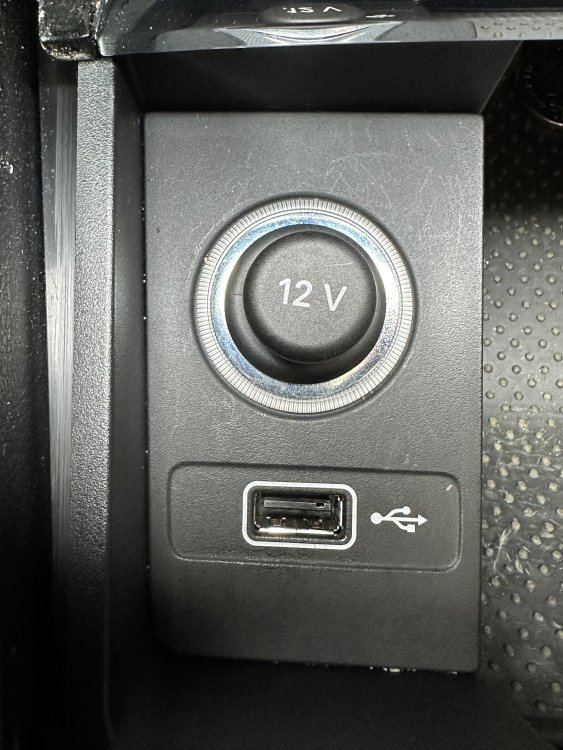
Thanks both - I’ve cleaned it as best I can, including some compressed air, but no change unfortunately. Charges but no data connection. Skoda wanted about £150 to replace. Not sure if it’s a diy job or any coding required - photo attached of the port in question!
-
Thank you, I’ll double check this as soon as my husband gets home (- his car, daily driver, including two mucky dogs, so there is a chance of debris)!
-
At best, CarPlay was a bit unreliable in the car (2019 DSG), but a couple of weeks ago it completely stopped working, along with a bit of a burning smell. It turned out that the AdBlue module had gone and needed replacing. Asked Skoda to check the USB as part of the diagnostics, but they said it was working. I can charge the phone fine via the USB slot but there is no data connection at all to the MMI now. The cable is new, data transfer one and MFI certified (and works in my other car). Does anyone have any thoughts on what might need to be done? If it’s just a new USB slot, then that’s easy enough, but don’t want to replace it unnecessarily if it might be something else.
-
Looking for a windscreen protector for this cold weather that will fit a Karoq. Recommendations if you’ve found one that’s a good fit and good quality, please! Thank you 😊
-
I’ll need to change the tyres on our Karoq 2.0l TDi SEL 4x4 in the next month or two, probably all four. It came with Bridgestone Turanza T001s (225 50 R18) which have been fine. I’d consider getting these again but am interested in any recommendations for others. Probably summer tyres but would consider All Season too for where we live. Thank you