




smudge1
Finding my way
-
Joined
-
Last visited
-
Thanks for the extra information Xman and RoddersUK . As it happens I didn't get a chance to view as it was sold before I could get there. Lucky escape perhaps 🙂 But as always , learnt a few things from this thread and hopefully it'll benefit others as well . My search continues 🙂
-
Thanks for your replies guys. Having studied the MOT history a little further I find that this advisory is only on the last MOT of Nov 23 and not on any previous ones . So its had a year and 10K to rust but fingers crossed -surface rust. In answer to your questions :- 1. It is a small dealer but not a main dealer . 2. 2.0 TDI Elegance 83K on the clock 3. " Multilink suspension or torsion beam? " that's a question that I don't have an answer 😞 , but it has an engine number code of CHFC which a EBAY search brings up a picture as attached I assume a " £1000 " repair cost was for the ,more complex Vrs type ? Fully appreciate you cant say too much without seeing it. I just wondered if as I've an inspection scope , if there were any weak spots to look at . Now , it could be I'm over thinking 🙂 it so I just need to get there and make a judgment . Cheers
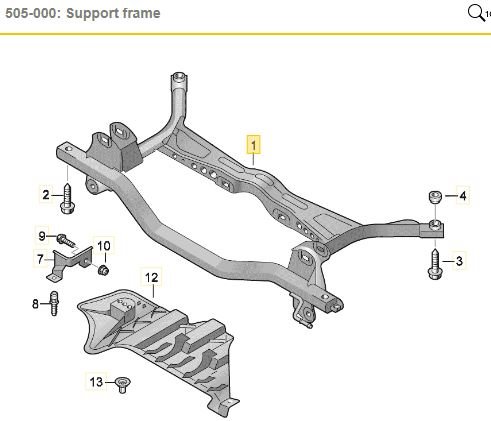
-
Hi . I'm just about to look over a Octavia for sale ( I'm upgrading from a MK1 ) which has the advisory of " Rear Sub-frame is corroded but structural rigidity is not significantly reduced (6.1.1 (c) (i))" . I wondered if anyone had advice on what to look for or any particular areas to inspect ? Any photos would be appreciated . I'm also assuming that if I get it wrong , it will be an expensive repair . I'm hoping its just surface rust that can be treated with something like ACF-50. Extra info 80K miles and also history of " Offside Rear Tyre worn close to legal limit/worn on edge 205/55/16 91V (5.2.3 (e))" Could that also be related to rear tracking ? Many thanks in advance.