




Niamh
Members
-
Joined
-
Last visited
Everything posted by Niamh
-
I Don't think athermic is the same as heated though
-
Yep, but the dealer installed the camera there with the lens just looking through the clear area. We can probably just squeeze it in, but if we have more flexibility as to location then so much the better
-
What is one looking for??
-
I know what they are, the question is is one installed
-
Does the vRS IV have one? I suspect not but does anyone have a definitve answer. Neet the fit a libere-t tag.
-
But there's the point, how far does 1 kWH take you? Zap map gives Real-world electricity use 16.2 kWh/100km Which is 3.8 miles per kWH But the comparison is not with some other vehicle but the iV itself running on petrol
-
Ah but is the pricing cheaper or more expensive than petrol?
-
Dragon Charging are now a flat 65p per kWH
-
Irrelevant as we've had the car for a year now and usually charge at home, but with the world opening up we're going to be holidaying more.
-
I'm trying to get a conversion between cost per kWH and per litre. My rough calculations say the multply the cost per kWH by 2.34 and if petrol is more expensive per litre then charging is cheaper. Anyone else tried to work out the ratio?
-
Great so about 5A which will be fine for the gite I'm sure someone will know how to just set reduced current on its own.
-
Right Do you know what the reduced charging current is? What do I do to set reduced charging but no off peak or departure time? The app is not clear.
-
There's a radio button in the app.
-
If I set reguced current charging in the scheduler does that only apply to the sceduled charged when it is activated, or all charging? We're staying in a friend's gite later this year and he says best to limit the charging current to 7A if we can. Also what's the difference between a "departure time" and setting "Off peak"?
-
Don't do much more than talk to each other such as radioing home with an ETA. Never hear many CQs on 2M calling when we're away on holiday, but tend to listen on the off chance MW0 NRE & 2W0KLZ
-
Myself & my husband are licenced amateur radio operators and have a transceiver in the car. When we bought the car we asked the dealership to bring out a 20A switched live for the rig, which they agreed to do. It transpires that in fact they connected up a permanent live saying there wasn't a way to hook up to a switched live! This is a right pain as if we are away we can end up with a flat 12V battery if we forget to manually switch off the radio. Anyone know if there is any way to fine a switched live we can tap into? The radio power lead carries its own fuse.
-
The same problems as ours?
-
Ours starts with a letter
-
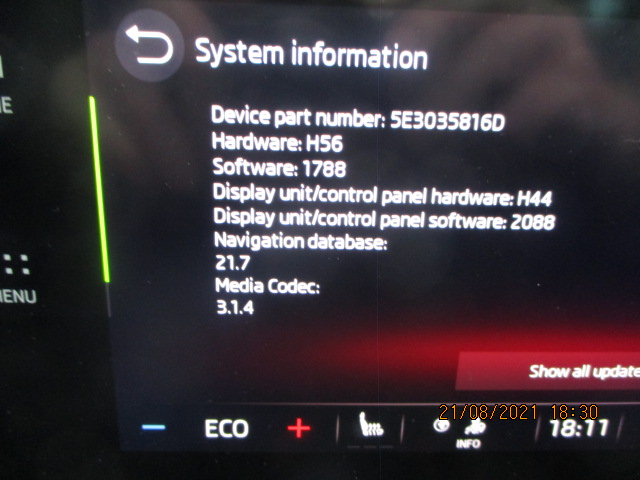
How do I get the version number?
-
Frequently soon after starting a message Changing Vehicle Settings "OK" "Cancel" pops up and if one doesn't cancel things like how music is played change and we start at the beginning of Abba's Greatest Hits again. How do we stop the car changing setting of it's own accord?
-
Think we're doing something wrong, but not sure what. We're going on a trip next month and staying in 4 places so obviously want to add them to the SatNav but... Set the first destination, send it to the car and then add it to favourites. Great Set the next destination, send it to the car and then add it to favourites. And the first destination is deleted from favourites so only the second is there. There must be a way to stop a destination being deleted when another is added, but how?

