



Skip to content

Best bulb upgrade?

Featured Replies

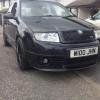
Hi guys, I noticed today that one of my sidelight bulbs was out,My 2005 VRS has zenons fitted and was thinking of upgrading the side light and full beam bulbs, was thinking of something with a blue tinge, any suggestions? Also when looking in to the headlights is there a bulb nearest to the wing, it looksd like it, if so mine aren't working also.

  • Author

Hi guys, I noticed today that one of my sidelight bulbs was out,My 2005 VRS has zenons fitted and was thinking of upgrading the side light and full beam bulbs, was thinking of something with a blue tinge, any suggestions? Also when looking in to the headlights is there a bulb nearest to the wing, it looksd like it, if so mine aren't working also.

Ok I am officially a ****, of course the one nearest the wing is the indicator. Duhh!!

You need to define what "best" means to you. It certainly wouldn't include being "blue" in my case. I changed my side lights to LEDs but after two failures swapped back to ordinary bulbs. I had two sent to me free with other bulbs - they look blue when off but give out a very white light without a hint of blue when on - so I've used those.

Best solution:

Heat resistant LED sidelights

these For full beam, H7 6000k

Then these for dipped beam to match the colour of your full beams:

D2s 6000k bulbs

This will give you a crisp bright white setup with a cheeky blue tint when the light refracts. Colour temperatures will be consistent with all bulbs, and Hella bright when your whippin through A roads.

Create an account or sign in to comment

Recently Browsing 0

  • No registered users viewing this page.

Important Information

Welcome to BRISKODA. Please note the following important links Terms of Use. We have a comprehensive Privacy Policy. We have placed cookies on your device to help make this website better. You can adjust your cookie settings, otherwise we'll assume you're okay to continue.

Account

Navigation

Configure browser push notifications

Chrome (Android)
  1. Tap the lock icon next to the address bar.
  2. Tap Permissions → Notifications.
  3. Adjust your preference.
Chrome (Desktop)
  1. Click the padlock icon in the address bar.
  2. Select Site settings.
  3. Find Notifications and adjust your preference.
