




Skip to content

mucden

Members
  • Joined

  • Last visited

Everything posted by mucden

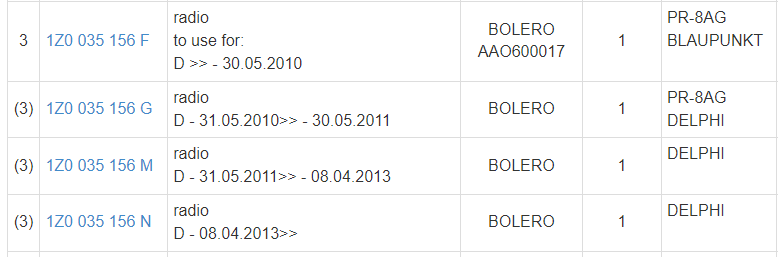
  1. Hi! I've upgraded from factory Swing to Bolero and unfortunately if I enter to the Tone menu the HU reboots: My car is from 02.2012, the Bolero is 08.11.2010, so 1Z0 035 156 G (SW0029 HW015). According to ETKA my car should have 1Z0 035 156 M by date, so I've checked the behavior on table with only Pos, Neg and Acc wires. The behavior is the same 😞 According to Google there might be a newer sw, namely 0030, I also found the flash file (1Z0035156G_DE2_0030.sgo), but I don't have ODIS, neither VCP to update it. The Version info from the hidden submenu is also missing. These are the fact. Has anybody encountered this behavior? What could be the fix?
  2. No, the answer is it depends. According to the database after 22.11.2010 single mass flywheel was intended to built in (into manual, 5 speed, front wheel, w/o StastStop), but there might be deviations, so "before parts order, physical inspection of old part necessary".

  3. In Hungary the Isofix anchor for the front passanger seat was optional or was standard in the "Family" trim level. It is also possible to retrofit the anchors, in 2019 I've looked it up. The anchor (1K0 881 545) was still available to buy from official workshops BUT the necessary seat covering for child seat mounting (because it's different as the standard) is not available any more: https://skoda.7zap.com/en/cz/octavia/oct/2012-663/8/881-881001/#29
  4. I have activated the rear lights as DRL in my own car. I have used VCP (Vag Can Pro) and VAGHelper.

Important Information

Welcome to BRISKODA. Please note the following important links Terms of Use. We have a comprehensive Privacy Policy. We have placed cookies on your device to help make this website better. You can adjust your cookie settings, otherwise we'll assume you're okay to continue.

Account

Navigation

Configure browser push notifications

Chrome (Android)
  1. Tap the lock icon next to the address bar.
  2. Tap Permissions → Notifications.
  3. Adjust your preference.
Chrome (Desktop)
  1. Click the padlock icon in the address bar.
  2. Select Site settings.
  3. Find Notifications and adjust your preference.
