RSZWEI
Finding my way
-
Joined
-
Last visited
Everything posted by RSZWEI
-
Ive just changed the oil in my 2014 Octavia vRS early (time and mileage). But because the light isn't on I don't know how to reset the service interval? ie holding down the trip reset.
-
Ill juts update this. The issue with my car was a failed windscreen water pump motor. Replaced it but removing the wheel and unscrewing half of the wheel arch liner screws.
-
Thanks for the reply. Fuse 42: Control unit for central locking rear door - left, right, headlight cleaning system, windscreen wipers The central locking works fine so it must be one of the out options.
-
A bit of an update. I tried the rear wiper washer/squirter. No fluid. So neither the front or rear screens are getting fluid as well as the headlights.
-
Thanks for the advice. Ill have a look. Do you know which pump the main pump is? The one closest to the wheel arch or the one that is more inboard ?
-
Ive read quite a few topic on headlight & windscreen washers not working but very rarely the fix hasn't been updated. I live in New Zealand so its nothing to do with lines being frozen and there doesn't seem to be a dedicated fuse to replace? I found this thread and see that there are 2 pumps: Can one pump fail so neither of them work? There is no squirter motor noise when pulling back on the stork. Any ideas would be grateful.
-
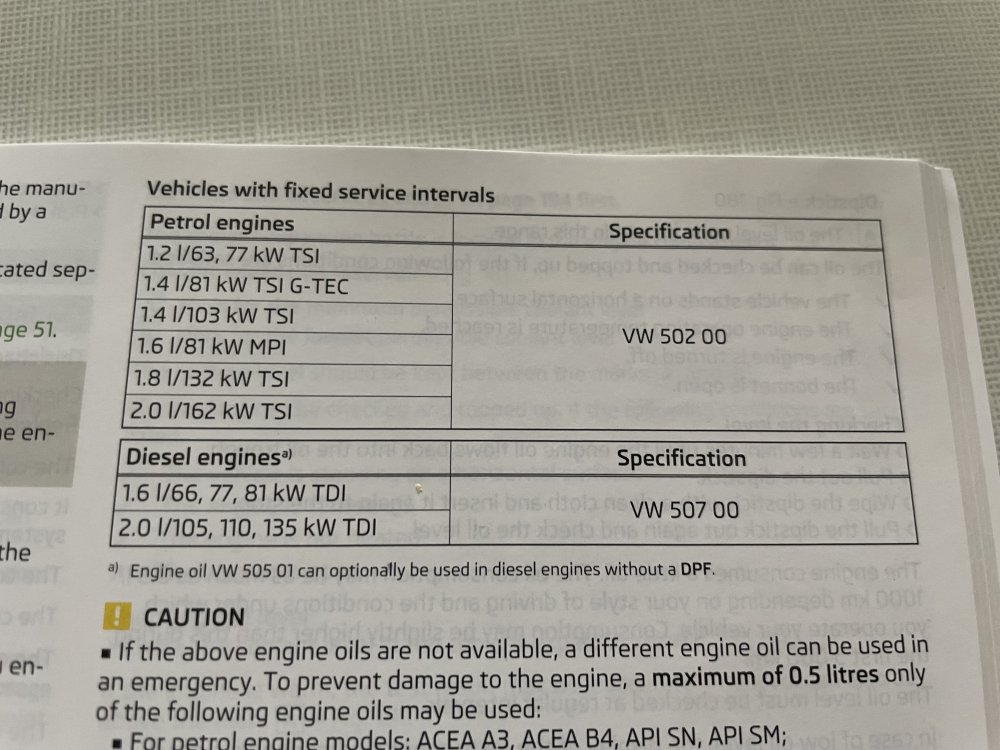
I should have had a closer look in the handbook:
-
Thanks guys.
-
Sorry if this has been asked a thousand times, but do I really have to use Long life oil? The car will annually doing 6,500kms so I plan to service it every 12 months. Should normal Castrol Edge 10w30 be ok? Or should I really use Castrol Edge 10w30 LL?