




eoinwhite
Finding my way
-
Joined
-
Last visited
Everything posted by eoinwhite
-
I can see lots of piggyback leads for sale but I can't find them with that flat tip connector. Mind sharing? Or if anyone has another solution to securely connect the new output to the correct slot in fuse 40 location.
-
On my Octavia MY2016 I can enter Irish Eircodes the same way you can enter UK postcodes. On my Superb MY2019 I can't enter Irish Eircodes ... but I can enter UK postcodes. Anyone else have the same issue and managed to fix it?
-
Cheers will take another look tomorrow.
-
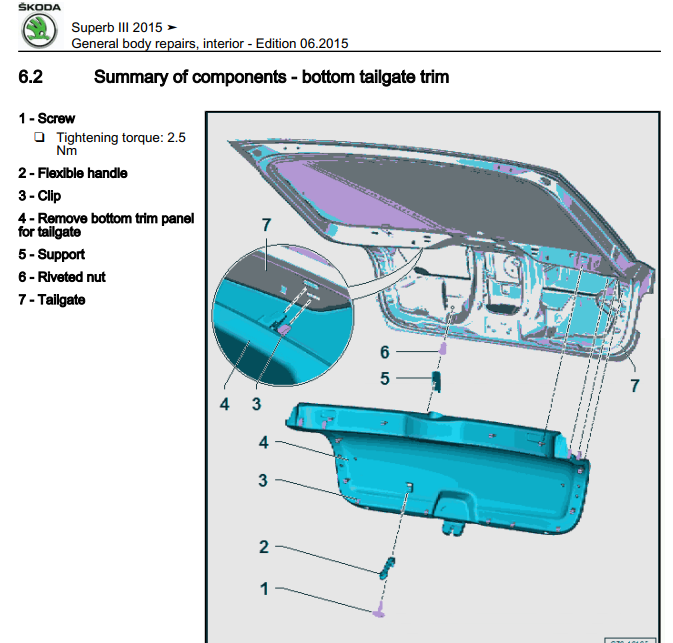
I finally had some time to fit the reverse camera to my MY19 Superb. I tested the camera at the glovebox before removing the boot trim and it all worked. However when I removed the boot trim I could see no way of popping out the existing boot handle to fit the camera. (When I did the Octavia there was plenty of room). There's a component in the way of access ... looks like an actuator for the power-boot lift. Anyone have this and managed to find a way around it? I was tempted to try and pop out the handle from the outside but I didn't want to risk damaging the cable attached to the handle.
.thumb.jpg.7dda594976a2ed318720ec626b741d48.jpg)
-
Would be interested in learning how to do this for my MY19 SE-L Exec
-
I had something similar lately. Seems like the car pings if I drive away with the internal rear light on. Sometimes I had it on for the rear passenger when it was dark. Its never pinged when the light is off.
-
I fitted a reverse camera to my Octavia but I can't find any detail on how to remove the boot trim on the superb with a power tailgate ... it doesn't appear to have the plastic rivets that the Octavia does and I'm worried about damaging the power button if I just start pulling. I have a workshop manual but it doesn't mention the power button ... I'd rather not break anything ... anyone ever removed the trim with the power button?
.jpg.8d0824dff1e2e4c403535050afc364fd.jpg)