bryetian
Finding my way
-
Joined
-
Last visited
Everything posted by bryetian
-
It was.
-
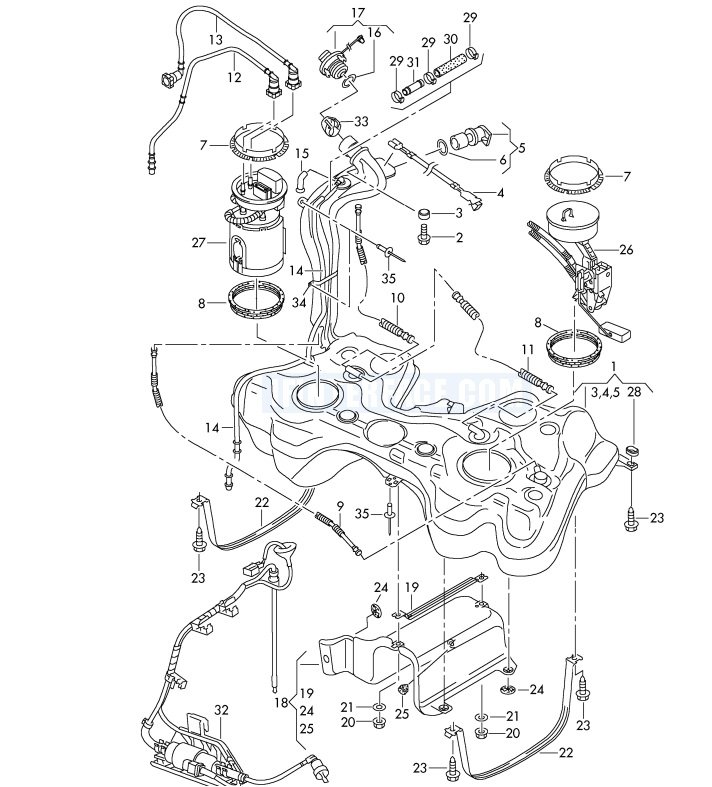
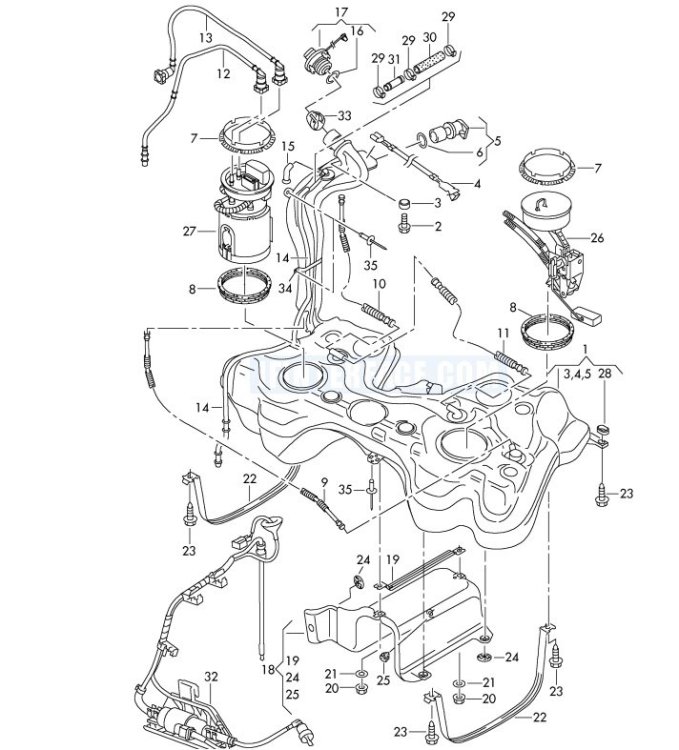
I've had a better look and there's nothing like a diagram: Item 26 - This is the fuel delivery unit and sender for the fuel gauge in the LH side of the tank. Item 27 - This is the fuel delivery unit and sender unit for the fuel gauge in the RH side of the tank Item 32 - This is the pump for a diesel heater if fitted. The level sensors must both have an input into the fuel gauge, perhaps averaging the left and right readings. I would surmise that item 26 is not a transfer pump but a recirculation pump. It is driven by fuel delivered to it by the pump in the RH side of the tank and after, passing through the venturi, this fuel "exhausts" into the LH side of the tank. Meanwhile the venturi sucks fuel from the LH side and delivers it to the RH side of the tank. Hence there is continuous movement of fuel between left and right sides of the tank.
-
Fuel flow from the LH side of the tank to the RH side is accomplished by a venturi effect system using fuel flow from the pump in the RH side of the tank. Without checking somewhere I can't remember if it is supply or return flow that is used as the driving flow. Hence the in-tank pump for 4x4 versions differs from the pumps for 2WD cars. I don't think there is a level sensor in the LH side of the tank and fuel transfer to the RH side is likely the reason for the slow drop of the fuel gauge from full in 4x4 cars.
-
Thanks. I did eventually work that out during my investigations.
-
I don't believe that the missing fuse was the problem. I've never used the lighter sockets in the 6 years I've owned the car and never noticed the missing fuse before. I plug the CTEK charger into the boot socket and that comes off a different fuse. Ross Tech Wiki http://wiki.ross-tech.com/wiki/index.php/00927 for fault code 00927 (terminal 30) says that possible causes are "electrical path issues". It also notes that possible symptoms include exterior lights inoperative. I did check the lights which were all working hence my working on both fuses boxes as the possible weak link in the electrical path - accepting that no wires were broken. I think the cause was a bad contact on a fuse, not sure which one, and cleaning the contacts restored the electrical path. Either way, the door locks and windows are working again and I have lots of fault codes to delete - sometime. I may even try to get the tear drop function to work on the front wipers.
-
Fixed it. I went through the dashboard end fuse box again. Removed every fuse, cleaned the 'legs' and replaced each one several times to clean the fuse panel contacts. Fuse 30 for the lighter sockets was missing so I replaced that one. And that was job done. All the doors lock and all the windows work. Seriously, it wasn't the door wiring!
-
Since I couldn't find anything else I have looked at the driver's door wiring and can't find any sign of broken wire(s) . I've checked all the large under bonnet fuses and checked that the single relay works.
-
My 2015 Yeti 2.0 TDI SE Business has developed its first real issue since I bought it in 2018. I discovered late yesterday that the doors weren't locking via the key fob, nor will they lock by using the key in the drivers door. The boot and the fuel flap DO lock and unlock as normal, the boot on the second press of the fob button, as set up. Additionally none of the windows work from either the fob, the drivers door buttons or the button on the other three doors. The battery is about 18 months old, and is well charged. The car is always attached to a CTEK charger when not in use. I've check fuse 23 for the central locking but that was OK. I removed and refitted it just to make sure the terminal were clean. I checked all the fuses in the under bonnet fuse panel but not the relays. All the fuses were OK. I've done a scan with VCDS and got this: 01-Engine -- Status: OK 0000 02-Auto Trans -- Status: Malfunction 0010 No comms with front distance sensor. One isn't fitted so ignore. 03-ABS Brakes -- Status: OK 0000 04-Steering Angle -- Status: OK 0000 08-Auto HVAC -- Status: Malfunction 0010 13701488 + 13701504 + 13701520 + 13701536 All say: function restricted due to missing messages. I don't think the HVAC has been working properly for a while so query connected to door locking. 09-Cent. Elect. -- Status: Malfunction 0010 01331 + 01332 + 01333 + 01334 No comms with all four door modules. 00927 terminal 30 (Right) open circuit intermittent 10-Park/Steer Assist -- Status: OK 0000 15-Airbags -- Status: OK 0000 16-Steering wheel -- Status: OK 0000 17-Instruments -- Status: Malfunction 0010 13639168 Function restricted due to missing messages 19-CAN Gateway -- Status: Malfunction 0010 01771 + 01331 + 01332 + 01333 + 01334 No comms to Headlight Range module and all four door modules 22-AWD -- Status: OK 0000 25-Immobilizer -- Status: OK 0000 42-Door Elect, Driver -- Status: Cannot be reached 1100 44-Steering Assist -- Status: OK 0000 46-Central Conv. -- Status: OK 0000 52-Door Elect, Pass. -- Status: Cannot be reached 1100 55-Headlight Range -- Status: Cannot be reached 1100 5F-Information Electr. -- Status: Malfunction 0010 Ignore this as I've removed the antenna 61-Battery Regul. -- Status: OK 0000 62-Door, Rear Left -- Status: Cannot be reached 1100 72-Door, Rear Right -- Status: Cannot be reached 1100 Since mine is a facelift model there should not be a problem with the wires between the driver's door and the A pillar; and the faults suggest something common to all four doors. Terminal 30 (Right) sounds worthy of investigation but I don't know what or where that is. I don't understand the "missing messages" faults either. Could the common thing be a relay? Any help, appreciated.