kubokozak
Finding my way
-
Joined
-
Last visited
-
look. if you have parking assistant, then look for parking assistant one. I think its grey one. the description will definitely say which one it is I believe grey one (£25) is for parking assistant and blue one(£15) is cheaper simpler version without parking assistant.
-
i think it is same issue I had there are two types of sensor - grey and blue simply said. for the cars equipped with parking assistant you need to get the one which support this. the difference there is about £10 more.
-
the other diagnostic shows error P194500 Coolant fan control (FC) control module 1, Fan activation. Short circuit. the fan comes on sometimes when i swich engine off. any idea what could it be?
-
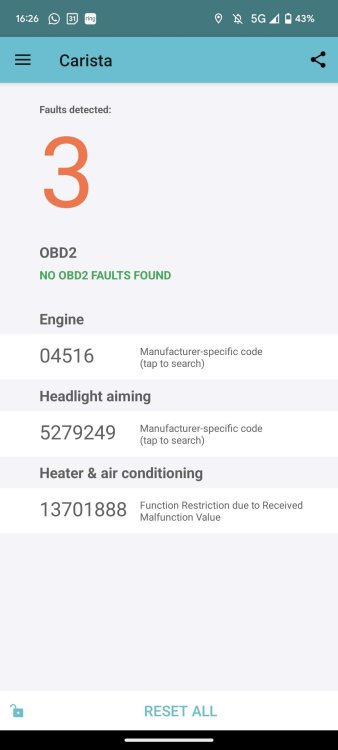
Hello. I realised recently the AC fan on the radiator has coming on to full speed and switches off and repeats few times then goes off completely. The fan itself seems to work well but something else isn't. On my Carista app diagnostics I get suddenly 3 errors - the AC one is 13701888 which doesn't give me anything when I look on google. Also there are two other error codes presumably related to same issue as they appeared from nowhere in same time engine error - 04516 and lights 5279249. The engine goes well, no limbo or smoke. in terms of lights the error disappears for a week when I reset but came back. I wonder if there is some water/damp issue or something what could case this, or is it relay or sensor issue for the AC fan? I didn't drive through big puddles but suddenly have these 3 issues. Could you please advise where to start as I know this can get very expensive very quick by changing AC parts. Please see attached. Thank you!