



Skip to content

Kosbe

Finding my way
  • Joined

  • Last visited

  1. What is fair price? I obtained mine from http://www.kopacek.com/ but it used to be a lot cheaper then. You can ask from your dealer also. Taping is one solution also. It could be cheaper.
  2. It is possible but won't be easy. I was lazy and broke the grille frame when changed mine.
  3. The most difficult step is the old grill trim removal. Removal is fairly easy even bumper in place if it is ok to break the old grill trim. Some people has removed it without any damage though. Installing the new one is very easy. Just push it in place. Avoid touching headlights during removal. Some LED headlights have poor plastic and could potentially crack and then moisture gets in.
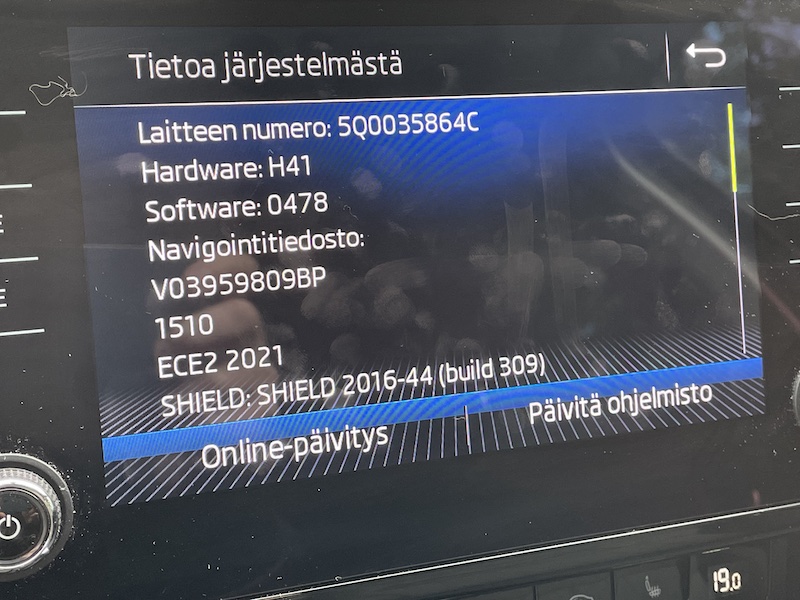
  4. There seems to be updated firmware for this headunit?
  5. OBDeleven had stored the fault codes: From control unit 13 Adaptive cruise control: U112300 Database error value received U112200 Databus implausible message From control unit 01 Engine: U112300 Databus error value received P056800 Cruise control set signal
  6. Yes they replaced both. Since then no faults have occurred but no cold days either.
  7. I had the same problem on cold days. Service replaced the left levers.
  8. I did the firmware 0475 to 0478 update today without any issues. I have also Skoda Care Connect services activated. Update process didn't took an hour with a fast SD card. At the end of the update process head unit asked to connect to tester for head unit version check. I pressed cancel there.
  9. Hello! I'd like to have a new version to my MIB2.5 unit. Dealer said no newer FW available but I don't believe them because I had seen here newer ones. There are some annoying rebooting and CarPlay bugs in this version. Could you @pab567 provide me a link?

Important Information

Welcome to BRISKODA. Please note the following important links Terms of Use. We have a comprehensive Privacy Policy. We have placed cookies on your device to help make this website better. You can adjust your cookie settings, otherwise we'll assume you're okay to continue.

Account

Navigation

Configure browser push notifications

Chrome (Android)
  1. Tap the lock icon next to the address bar.
  2. Tap Permissions → Notifications.
  3. Adjust your preference.
Chrome (Desktop)
  1. Click the padlock icon in the address bar.
  2. Select Site settings.
  3. Find Notifications and adjust your preference.