Skip to content

DeltaOscar

Finding my way
  • Joined

  • Last visited

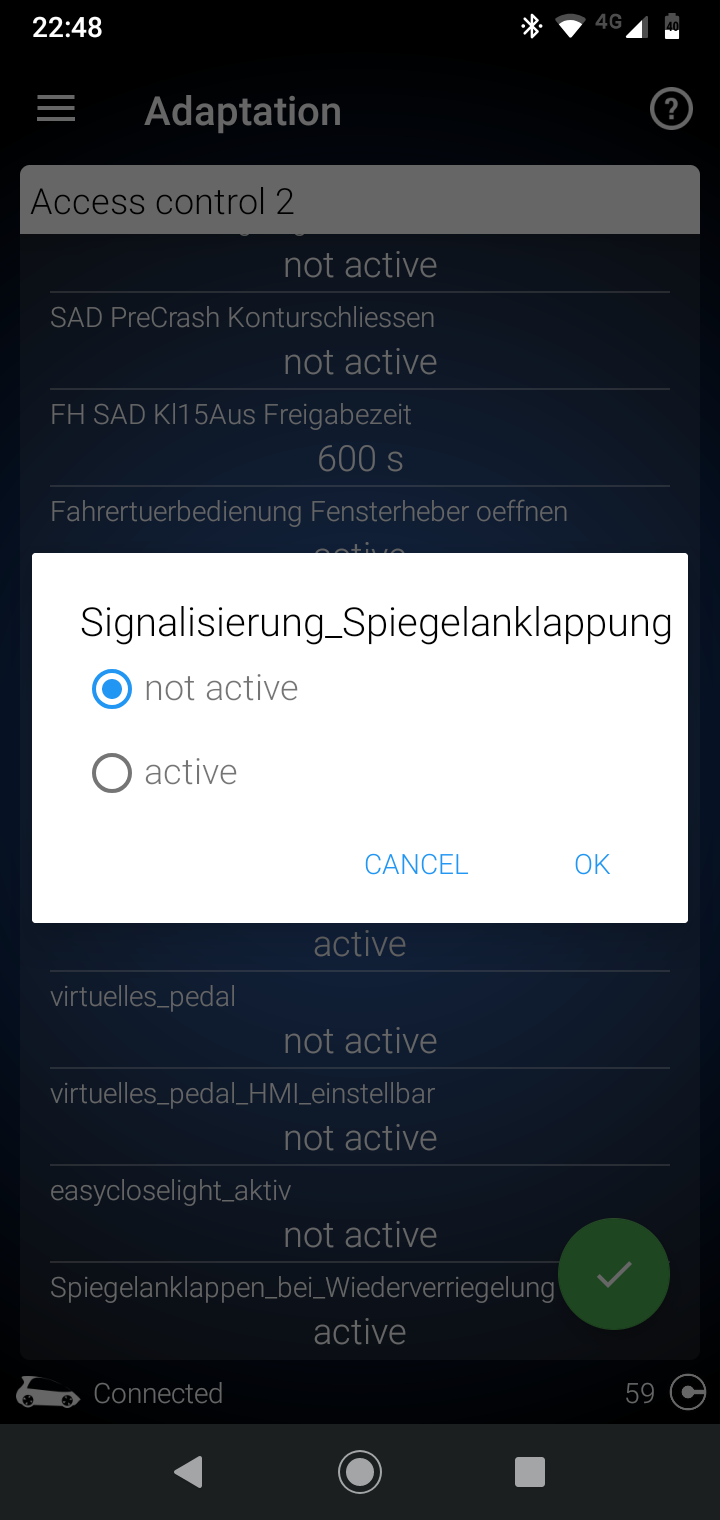
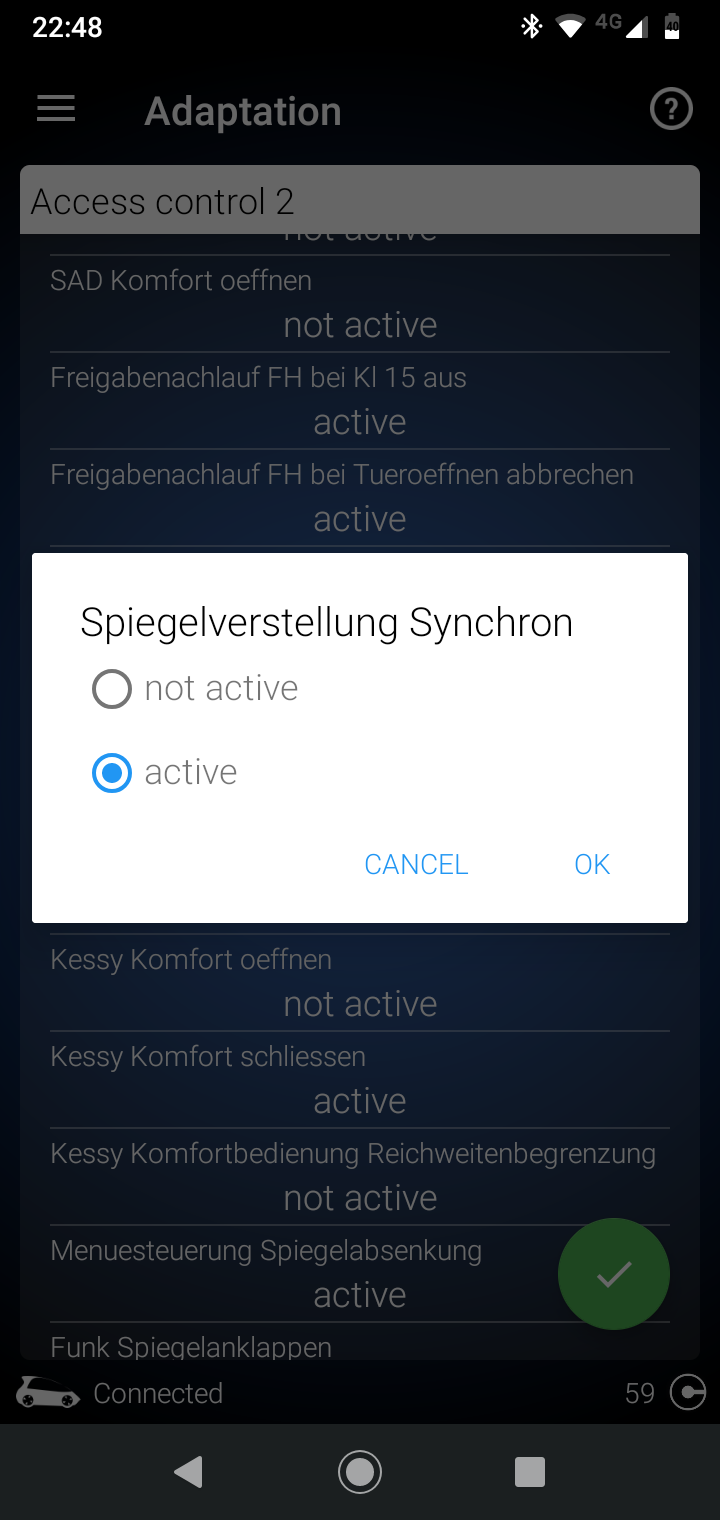
  1. So it looks like you just have to change spiegelverstellung Synchron: to not active I reckon.
  2. That didn't work for me either. I changed 2 adaptions in access control 2 to not active and it worked on my pre FL 2017 Vrs. See if that works for you.
  3. No, only other fault is in unit 5f. Something about grounding of left speaker.
  4. Hi. Just wondering if anyone here has any idea what this fault means or what part of the climate control could be the problem? I've always taught from the start that my climate control isn't agressive (for want of a better word) enough when adjusting to a set temperature. And so I end up setting temperature at 16° for most of the summer. The wording of this fault would appear to back this up I think. Anyone any ideas? 08 Air Conditioning System description: Climatronic Trouble codes: P171900 - Function restriction by engine control module Intermittent Date: 2020-09-12 07:03:00 Mileage: 42240 km Priority: 6 Malfunction frequency counter: 15 Unlearning counter: 119 Dynamic environmental data: 02868D27C1F3
  5. I bought Matte black vinyl wrap and just put that over it in the end. Looks a lot better I think.
  6. I do but the point of auto headlights is that it does that itself so would be handy to have it coded.
  7. Thanks for the suggestion but I have coded Scandinavian DRLs already. While this turns on my rear lights, I still want my front headlights to turn on earlier to make me more visible from the front at dawn and dusk.
  8. Hi. I want to try to code the headlights on my VRS to turn on a small bit earlier. I know there is an option to do this in the car settings which I have set to the earliest option but would like to get them to come on a bit earlier again. I find I have to turn them on myself manually sometimes as I feel it's too dark to just have DRLs on. This is the menu of OBD 11 which I think is where I can code the sensitivity of lights. Did a bit of Google translating but does anyone know which one I should lower the lumens in to make them turn on earlier? Thanks.
  9. No problem. Not even sure what I changed but seems to work alright. Can't make sense of why VAG moved away from this setup with newer cars.
  10. I used your guide and sashagrace's guide from the first page. Must be slightly different for pre-fl but thanks anyway. I changed the following 2 adaptions in access control 2 to not active and it worked on my pre FL 2017 Vrs. Chuffed that I got it working to only unfold when ignition turned on.
  11. Did anyone find a way to code it like this in the end? I also think it makes much more sense to have mirrors fold when locked and unfold when ignition turned on.
  12. Could be a good solution for the winter. I am going to be getting something to put my winter tyres on and steel wheels would be best. Had taught you couldn't get 17" steel wheels for Skodas though.
  13. Sounds good. So it's the 8J0711051E that I should order? Audi quoted me 60€ for the other part number ending in 046E.
  14. Ya, I heard about that glossifier stuff alright. Not sure if I can apply it on top of it now to make it gloss. I'm happy enough with it as is anyway. Might buy a badge like ads230 if this starts to peel or something. Plasti-dipped the grille on my last car and it still looked fine a year later when sold so seems to last well enough.
  15. I think your badge Ads230 looks the best on white anyway. I'lll keep an eye out for a discount on superskoda.

Important Information

Welcome to BRISKODA. Please note the following important links Terms of Use. We have a comprehensive Privacy Policy. We have placed cookies on your device to help make this website better. You can adjust your cookie settings, otherwise we'll assume you're okay to continue.

Account

Navigation

Configure browser push notifications

Chrome (Android)
  1. Tap the lock icon next to the address bar.
  2. Tap Permissions → Notifications.
  3. Adjust your preference.
Chrome (Desktop)
  1. Click the padlock icon in the address bar.
  2. Select Site settings.
  3. Find Notifications and adjust your preference.