




tuttiweb1
Finding my way
-
Joined
-
Last visited
-
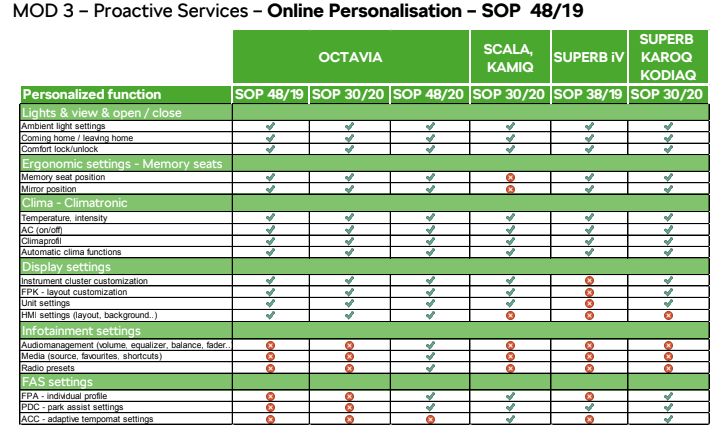
I've now heard back from Skoda UK, but with bad news, as expected. They have explained that there has/had been a "misprint" in the documentation and website when providing information for customers on Kodiaqs. Despite what all the documentation said (says), most of the Key Personalisation relating to the Infotainment does not work on the newer models, evidenced by the attached, which they kindly provided me. I'm not sure how they can claim it as a misprint when my poor dealership invested at least 40 workshop hours trying to get these features working on our MY21, MIB3, Columbus vehicle. For us, one of the massive benefits of the Personalisation was that we could use our specific keys and return to the car with the Infotainment layout being as we left it, radio settings and all. Alas, there's little hope of that now.
-
Did you try sending a journey from the Skoda Connect app to your vehicle? Success?
-
Same happened to me over the weekend. Only other thing that happened was an update to Skoda Connect App on phone. I wonder if the update addresses sending routes via cloud? If so, what else is on the horizon to start working, I wonder?
-
Identical equipment setup on Kodiaq = no fast charging (USB A port). Identical equipment setup on Kodiaq, but swapping to known-good PD (Fast Charging) USB C cable instead of USB A = no fast charging.
-
I'm happy to bow down to your superior knowledge with this. I can't help but feel Skoda could have at least provided fast charging on the wireless charging pad if it wasn't possible to get it via 12V or USB C sockets.
-
Spot on. This is exactly what I'm trying to confirm. I'm surprised at this since, as I mentioned in my OP, my ancient Volvo did and I wonder why Skoda chose not to in the Kodiaq.
-
The dealership have said "... this technical information is not available in the public domain."
-
I am now in talks with Skoda UK about the Key Personalisation not working anywhere near as it should on Columbus MIB3 (usually MY21 vehicles) Infotainment units. I shall share my learning here, although they've already declared it will be a long process.
-
I asked the question since I installed a wireless charger in my old (2004) Volvo, functioning directly from a standard USB A socket, provided by a device which plugs directly into the 12V socket. I'm sure you've all seen one of these before. It worked a charm (nearly 2 years), providing sufficient power to Fast Charge mine and my wife's phones. It was also beneficial in that if you had the screen on, with Google Maps for navigation and Bluetooth to send audio to the head unit, normal charging speeds were unable to maintain good charge on a long journey. Fast charging retained the battery at 100%. All hands-free, of course. None of the Kodiaq 12V sockets provide this result when I plug in the same equipment. Simple, plain, normal speed charging. My original question was very deliberate, since the standard of USB C was intended to provide increased support for Fast Charging and Power Delivery (as well as increased data transfer bandwidth). The Kodiaq doesn't have this either. Simple, plain, normal speed charging.
-
Has anyone with the new USB C ports managed to get their phone fast charging? We have two phones with this capability (working with charging blocks and cable cominations we have), but neither will fast charge in the Kodiaq. Where can I get the technical details orf the power output of the USB ports of our vehicle? I guess I'm asking if the USB C ports support Power Delivery for anyone?
-
Hi all, We ordered Key Personalisation as an optional extra on our Kodiaq, which we took delivery of back in November 2020. Since then, I've ben having extensive, ongoing discussions with my dealership, ending a couple of days ago with them telling me that Skoda UK (internal technical support) have definitively advised them that most of the features stated as part of the options won't work with the MIB3 & Columbus combination, which we have. I have seen the paperwork where the dealership were advised of this and it clearly staes that it does not extend even as far as radio pre-programming. Confirmed as working (after setting up the Skoda Connect profiles and logging into the infotainment unit with the credentials): Name - When opening the car with our individual keys, the Columbus greets us by name on the screen Units - The vehicle remembers our unit preferences (miles/kilometres) Climate control - The vehicle remembers the individual temperature settings we used Nothing else seems to work. No Infotaiment modular page setup (homeage choices like nav/radio/vehicle data/road signs etc...). No Radio/audio settings. No mirror memory. No driving mode memory...nowt. All settings relating to these features are loaded as 'last-used' for all drivers. Despite repeated requests, I can't get a definitive list of what should work with which vehicles. All documentation is vague, saying that the features will vary according to the vehicle model and trim purchased, but no matrix of what comes with what. We don't have electric seats, but this was never a prerequisite for the Key Personalisation to work. We did receive three keys when we took delivery of the vehicle.
-
Good to see the screenies to see how it should work. I can confirm I'm in the same place as Billywizzo...different menus on screen for MIB3, which doesn't work.
-
This is very detailed. Thank you. In an aim to establish so, does yours have USB C ports and an eSIM on board? Unfortunately, I don't think you have MIB3, since your menus are different to what appears on mine (and Billywizzo's) Infotainment. To be completely honest, I'm finding it very difficult to find a definitive source of information which explains the difference between Amundsen and Columbus systems, let alone MIB2, MIB2.5 and MIB3 software...and so are my Dealership!
-
Thanks for trying... Exactly the same here. Tried sending again (multiple times) and searching the Smartlink and Nav optioned. Nothing getting to the car. I tried on both ESIM and tethering data connection to see if the car would retrieve the route. Fingers crossed someone else has it working.
-
Thank you. Yes, the dealer has activated it. I just checked and the unlock/lock of the vehicle works from the app perfectly.