




matriw
New here
-
Joined
-
Last visited
-
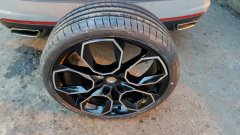 Hi! Which Asymmetrics are they? 2? 6? Is this the normal one or MO/AO type? Do you have any closer photos of the rim protector - especially on car and on the bottom when the tyre touches the road? BR, Robert
 -
It works! :))
-
Just received the e-mail that the problem is fixed. Gonna check it in an hour. I’ll Let You know
-
Skoda just replied me that: 1. they didn’t yet fix the problem („server site”) 2. they will extend my license by 6 months 3. they don’t have a potential fix date 🤡
-
Hi, does anyone have a problem like mine? I will describe it shortly. Of course the Skoda connect stopped working for me (somewhere in 2021Q2), but only now I got time to fight with it. I deleted the assignment on the web as well as in the car. I added it once again. I tried to enter the code twice but it didn’t work, so I did the deletion and adding one more time. The code was rejected once, but the second attempt brought me to the screen where “system is checking the configuration (bla bla) it may take few minutes (bla bla)…guess what - system is checking it since last month. I tried to do factory reset, restart…even I left it without the fuse for a night, but still it’s the first screen I see after I (link my WLAN and) press Skoda Connect on the screen of my car It simply means that I can delete the car on the web and ask for new code, but I no longer have an option to enter it in the car…
