




ikerinagy
Finding my way
-
Joined
-
Last visited
-
I have a 2010 Octavia FL. I have all 10 wires coming from the headlight switch to the BCU and have rain sensors and light sensors for the mirror, so in theory I have everything for auto headlight right? I swapped the switch to a genuine one with auto feature, and when I set it to "Auto", the headlight just stays on. It's a pretty sunny day and it just stays on. Every other setting works correctly, but the "Auto". Do I need coding? If so then where do I need to go in VCDS? Thanks!
-
Hi! My 2010 O2FL's windscreen washer started to act strange. If i pull the stcok as usuall, it only sprays for about 2 seconds, and then stops. From then if I pull it again it won't work (the pump is silent also). I need to restart the engine in order to make it work, but it only works for 2 secs again. Any ideas? Thanks.
-
Thanks! under MFSW support I mean, that I can change the tracks from it. And one more thing came in my mind. I mostly use spotify, will AVRCP work with spotify streaming also? Will it display the track name, artist etc?
-
Hi! I have a 2010 O2FL with bolero head unit. I'm planning to change the BT module to 7P6 035 730 F so I can have AVRCP functions and I have some quesitons about this one. Will it work at all? Can I change the name of the BT module? (I'm planning to buy it used) Does it need coding? Will it have component protection? does it have MFSW support? Thanks!
-
Well...i'm always using bt-audio and spotify, only missing the avrcp function, so I guess, that's not a reason for me to update
-
If so, what are the benefits, and where can I find the firmware?
-
So I want to upgrade my 2010 O2 FL with bolero so it has AVRCP. I found 2 solutions one is fiscon and the other is dension. What I understood is that fiscon connects to the MFD as well, but are there any other differences? What do you recommend among these two? Fiscon is a bit more expensive, is it worth the price? Thanks!
-
part nr.: 1Z0 035 156 F Software: BAP: 01.04.01 TP 2.0: 03.04.00 I checkd the fiscon option...not sure if that's better or not than an OEM bt module...basically it almost costs the same
-
Okay thanks, so basically what I found that the ONLY module that supports AVRCP is indeed 7P6 035 730 F....are there any other options I can get the function without changing the head unit?
-
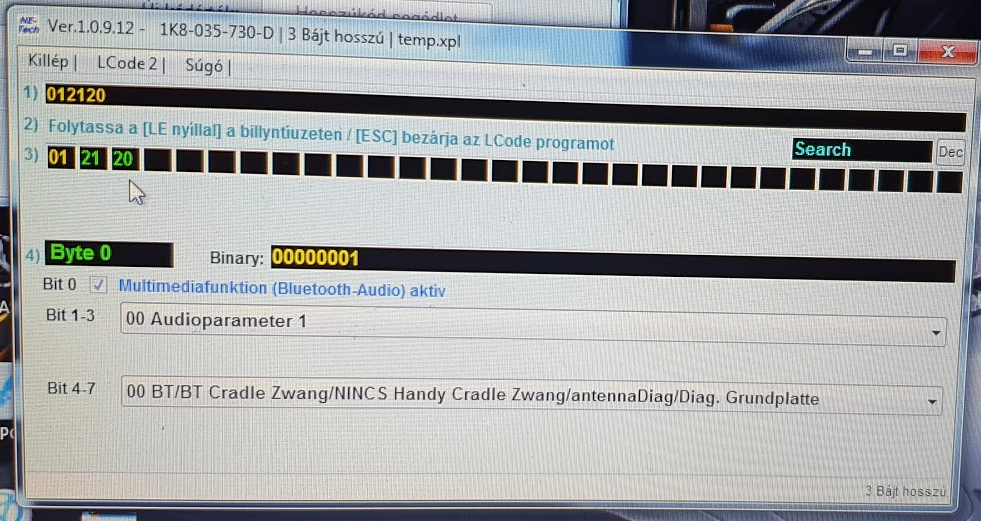
The music streams just fine...I want to control the music, which I can't...The module I bought seems odd, it has only 3 bytes, that's why I thought it has component protection. As I said, I bought it used.
-
The original module is 7P6-035-730-C on which I cannot controll my music. I personally do not have VCDS, but I know some guys who does and can help me. The only problem now is the compontent protection, on which I have to wait. The real question is, A2DP means that I can controll musicM or how can I sort out those modules from the ross-tech sheet?
-
So I have an O2 FL from 2010, on which I swapped the BT module so I can controll the music from the Bolero and the Steering wheel. According to http://wiki.ross-tech.com/wiki/index.php/Telephone_Retrofitting My original BT module is full of "???" so no info there....However I bought a used 1K8-035-730-D which the site sais has A2DP. Is it enough for me to control my music I stream over bluetooth? Unfortunately the module has component protection on it, so I have to wait until I find someone to get rid of it, so I cannot test it until then. Thanks!
-
Oh I didn't meant that...Just normal bt streaming from my phone. The car has the navigation unit. Not sure about the part number.or anything so this is completely hypotethical
-
Hi! I'm about to buy a 2010/12 Octavia and just wondering if spotify would work flawlessly. Like skip, reverse, play/pause etc. any experiences? Thanks!
