
PoloPaul
Members
-
Joined
-
Last visited
-
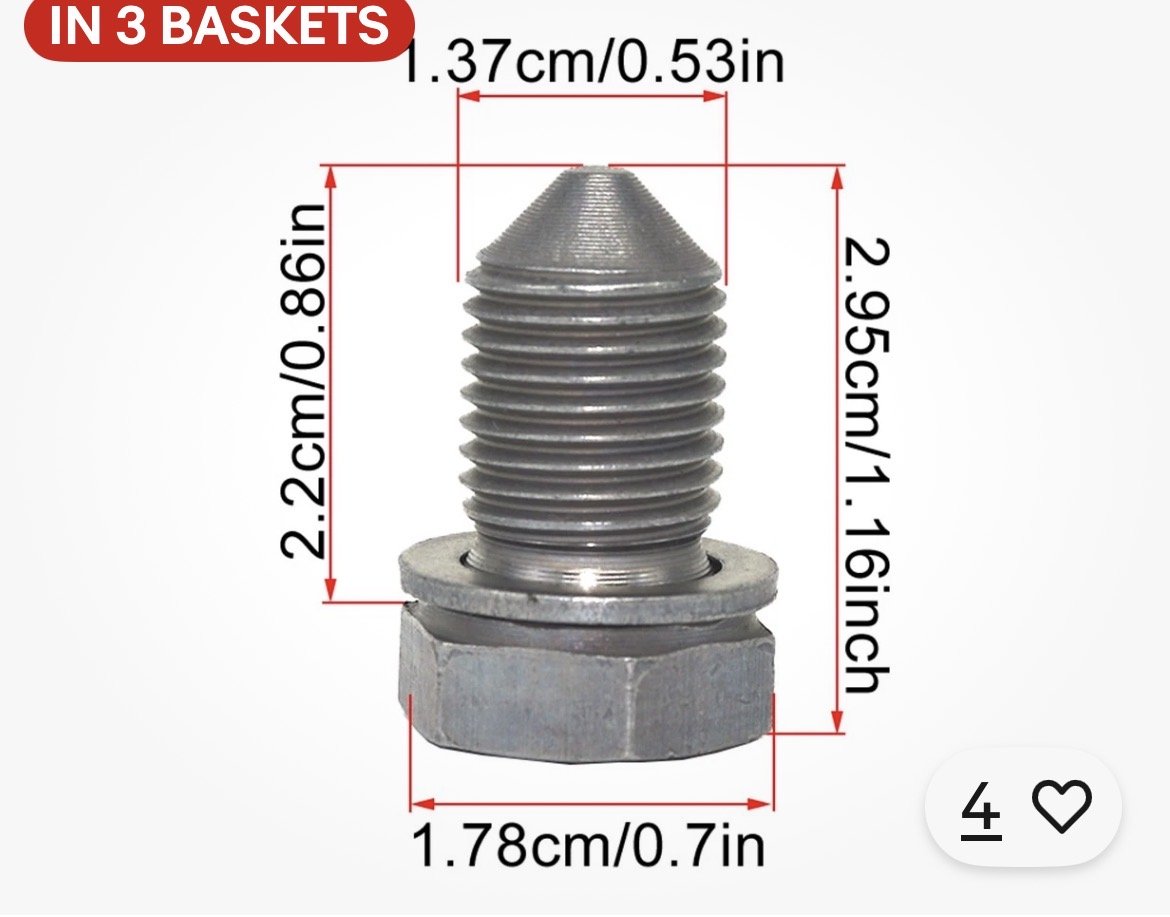
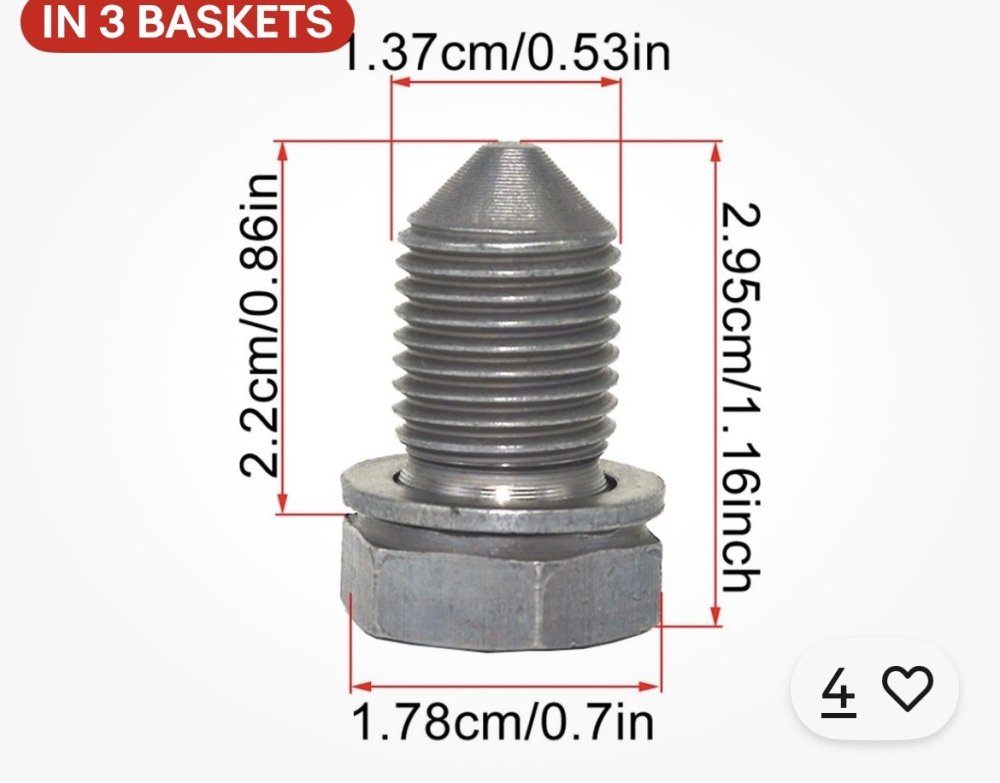
Doing my first Oil change on this car. Presuming the filter is76mm 14 flute. Is clearance sufficient to use a 3 Claw tool or 14 flute 76mm Cup tool. Also sump bolt purchased is 29.5 mm total length. Is this the correct part - M14x1.5 Engine Oil Sump Drain Plug N90813201? See photo below. Thank you PoloPaul
-
My Central Locking will not open the tailgate on my Octavia 4 Combi. I have accessed the internal manual opening latch through a very small hole on the internal side. Once opened I have sprayed in PTFE spray (maximum lubrication/minimal dust attraction). This has restored the remote locking function. Today’s heavy rain has brought the issue on again. I really need to get at the actuator mechanism to lubricate/prevent moisture ingress. I can not find a way of getting at the part. To go further than spraying broadly into a small hole in front of the mechanism I want to get to it properly. Does anyone knowhow to get at this part on the tailgate?
-
I have always suspected that this issue is caused by data transfer.
-
At the end of Year 2 my Online Communications Unit (the component that links to the Skoda network) was replaced. That improved matters greatly following two years of frustration with constant infotainment restarts. I suspect that the issue with the globe-symbol greying-out - with the red X beside it - is due to Skoda network non-connectivity. I base this upon finding that in ‘known’ telecommunications black-spots where cell-phone signals are unavailable eg in remote countryside areas that the Red X alongside the Globe occurs. Upon driving to an area with cellphone coverage the infotainment reconnects. SW 1941 ironed out several problems but without the new OCU I suspect I would have continued to experience what I believe to be network connectivity issues.
-
I’ve had a couple of ‘Pop Pops’ recently’- after a year’s respite - but no reboots…..so far. My wife bought a new Polo in June. The infotainment in her new model is fine.
-
I took the same path in September 2020. I traded in my Passat for an Octavia IV Combi. Mechanically the car is sound and I enjoy driving it. The infotainment System gave continual trouble for the first 3 years. Following the installation of a replacement Coms Unit and especially following software update SW 1491 - all is now good. My experience of Skoda Support over that period was ‘mixed’. It may come down to the quality of your local Service Agent. If you are happy with the deal offered it is advisable to check the service records to see which electronic components have been swapped out and also to check that the installed software is SW 1491 or higher.
-
Best done by your Service Partner’s in my opinion. Seems you may be out of your 3 yr Warranty Period. Skoda will probably do it for you free of charge as it ought to have been done before your warranty expired. I don’t think SW1941 can be installed ‘over the air’ as it is likely to be a very large update.
-
You are still under 3 year warranty. You can call Skoda UK and request that they intervene to direct your Service Partner to do the SW1491 upgrade.
-
Latest software that provides a fix for all those issues is SW1941.
-
Mine was upgraded from something like 1803 to 1941 back in September 2023. I have a strong feeling that SW1941 had to be done by a Dealer Service Department. However since SW1491 last year I now receive smaller OTA updates regularly.
-
3 years ago dealer service guy told me to have have only a single phone registered at any one time time to avoid problems. I was disappointed as this disadvantages a second etc user’s account. But I’ve stuck with it as it was one of the few issues I could control among the several I couldn’t back then. Don’t know if it is now unnecessary following SW1941.
-
Among the array of functions that are suitable to be updated OTA (Over The Air) via the Comms Unit the map-updates would appear to be among the most suitable. The methodology for SD Card or USB(C) pen-drive updates seems simple enough. However after three years of tolerating a dysfunctional Infotainment System, until stabilised recently by SW194, I am loath to tinker myself. I believe Skoda Garages will update maps, at an additional charge, beyond the 3 year warranty. But in fact Apple Maps and particularly Google-Maps, available through connected phones, are far superior to Skoda Navigation.
-
More feedback of that sort would indeed be helpful.
-
Yes, I had a series of updates recently. I was always driving at the time so the update couldn’t begin. Think the communication unit (eSiIM) has to negotiate with the Skoda/VAG servers and that takes a few minutes of driving or leaving ignition on. On my next few journeys the same, an update and number next to ‘info’ appeared. Eventually the numbers stopped appearing/ reappearing and I”ve had nothing further. A notification to indicate that all updates were now installed would be helpful but that doesn’t happen.
-
Yes on both counts. When the number in the ‘info’ window disappears then its done. Can take a couple of cycles to complete.