Cole190119
Finding my way
-
Joined
-
Last visited
-
Hi guys, Hope you're all well Again, back with the HTP Classic 06 Mk1. When pressing the clutch down, car seems to make a weird noise. Haven't got a video of it unfortunately due to phone not being able to pick it up, however the best way I could describe it is like a wooden floorboard creaking. It doesn't do it when pressing it down fast, only slowly. Any ideas? Also, when pressing breaks, again there's another noise which is hard to describe. It's not squeaking it sounds more like when you've got the handbrake on and then get your bite and the car makes that noise, similar to that if you understand what I mean. Any help would be fantastic Many thanks,
-
Hi, Thanks for the quick reply I'll mess around with some adaptors // look at some guides on how to wire it up. If push comes to shove then I'll just leave the airbag out (obvs prefer them to be working n functional but hey ho) Literally any steering wheel with volume controls on the side would be grand. I'm not after like a proper racer after-market steering wheel, just one that looks a bit more modern than the standard mk1 wheel, and obvs has steering wheel controls Many thanks,
-
Hi all, Hope you're well. I'm looking for a replacement steering wheel for my HTP Classic. Same steering wheel as standard mk1 I believe. I'm currently looking for a wheel that has volume control on the wheel itself (so dials buttons etc), however, need some clarification on sizes etc. I was looking at this skoda wheel from the Mk3, however, not too sure if it will fit. https://www.ebay.co.uk/itm/STEERING-WHEEL-SKODA-FABIA-MK3-NJ-2014-On-SE-TSI-WARRANTY-11624744/143938195671?_trkparms=aid%3D111001%26algo%3DREC.SEED%26ao%3D1%26asc%3D20160908105057%26meid%3D25713e7113a24285b67a2a243e094432%26pid%3D100675%26rk%3D1%26rkt%3D15%26mehot%3Dnone%26sd%3D143938195671%26itm%3D143938195671%26pmt%3D0%26noa%3D1%26pg%3D2380057%26brand%3D%3Fkoda&_trksid=p2380057.c100675.m4236&_trkparms=pageci%3Af16d1340-8ca2-11eb-864e-6ecb5ea95990|parentrq%3A645fcada1780a7b0e083943effeb5548|iid%3A1 Any suggestions on steering wheels would be grand And any boss kit links would also be great Many thanks,
-
Again, thank you so much for the quick reply! With regards to the black harness from my car, any idea what the one missing pin is for? Many thanks
-
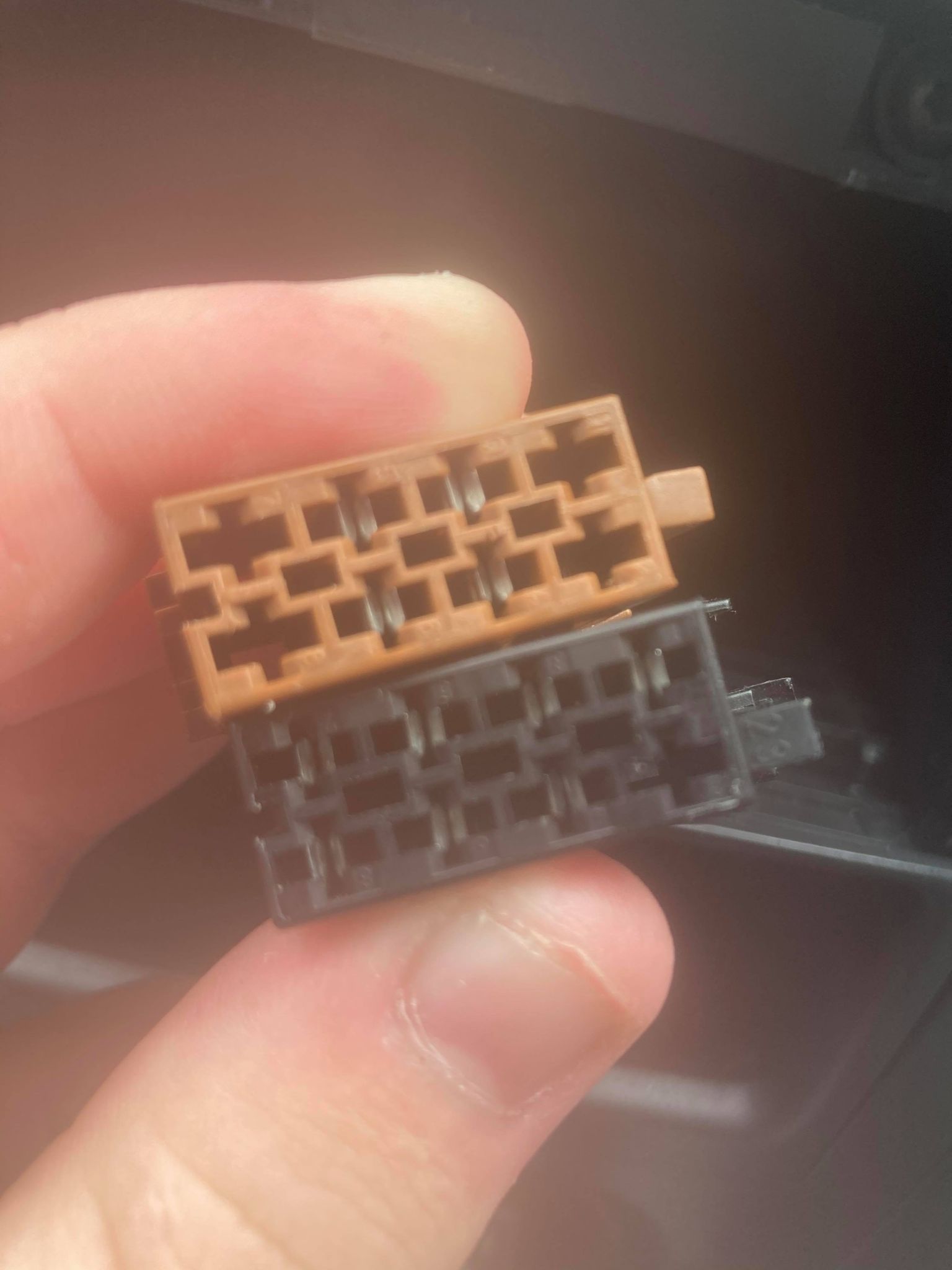
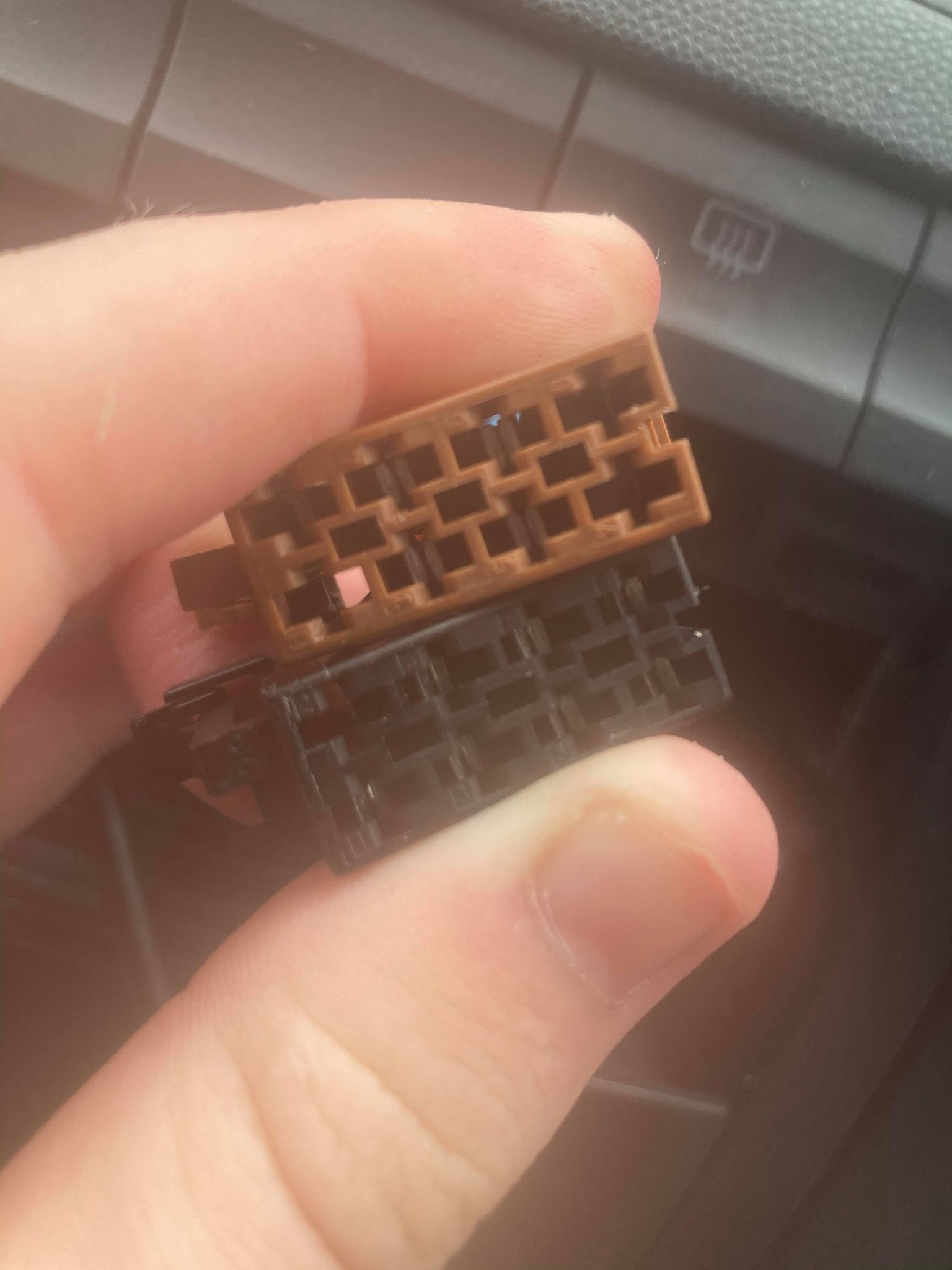
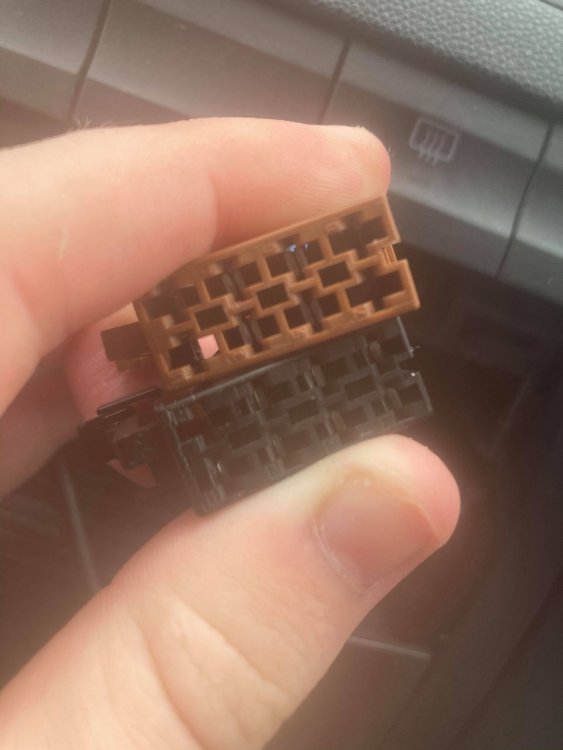
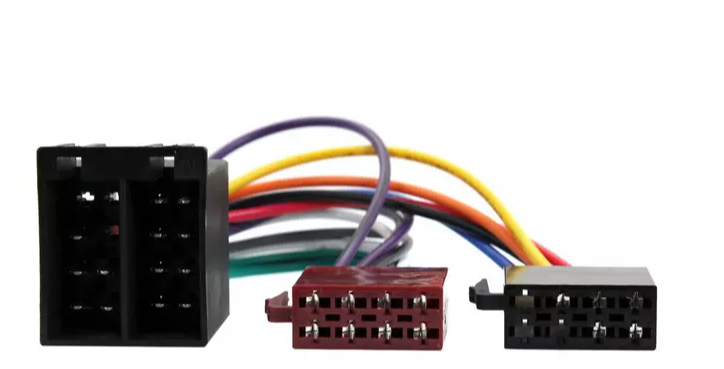
Hi, Thanks for the quick response! So even with the ISO connections being weirdly placed (so 2x2 in the middle on the brown one, and then 4 across and 3 across on the black one) it wont make a difference with the functionality of the radio? That's an image from the unboxing with the harness from the radio itself I found, and as you can see that one has a row of 8, and then a row of 2 and three (with 3 missing) You reckon that wouldn't effect the functionality of the radio? Or any problems it might have? Many thanks,
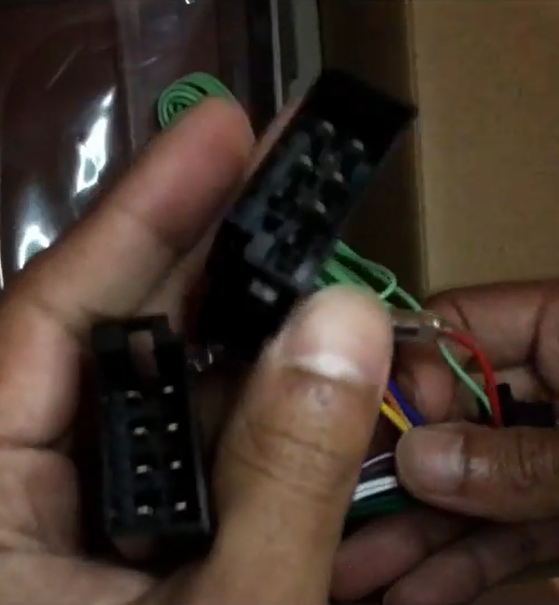
-
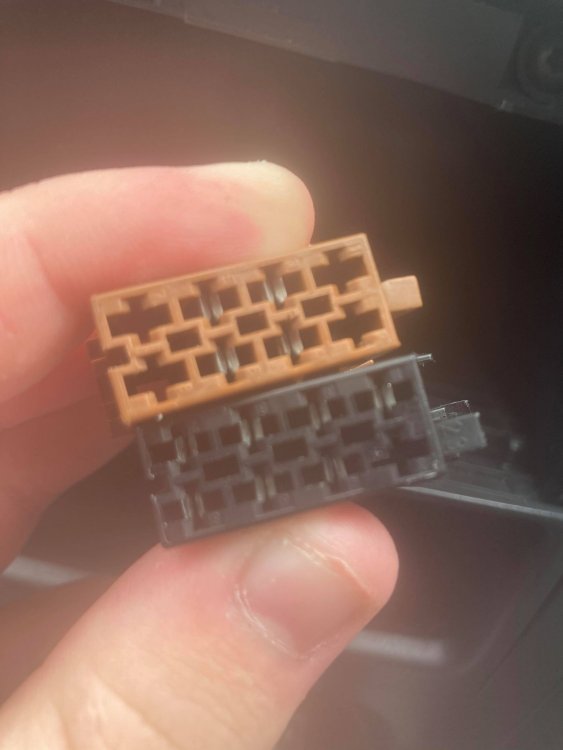
Hi guys, Hope you're all well. So its soon the day when I'm going to replace the radio on my car for a double din radio unit. My only concern is that the stock harness on the car looks like the images below . They seem strange, as taking a look at universal adaptors for the mk1, it seem like the metal pieces inside are normally supposed to be like this: Can anyone assist? Will the fact that the whole for the pins are in the wrong place, be too much of a big deal? will it stop the radio from working entirely etc. The radio I'm getting is the XAV-XA1000 Many thanks,
-
Also @Gt4thomas, if you take a look at this video: it shows that it already has some sort of adaptor in the box with it, would that not do you reckon?
-
Yeee nothing to worry about. It's my first installation of a double din radio, into any car so just a tad bit worried. I went for the XAV-AX1000 instead due to it having a tiny bit smaller depth, (best being a tad bit smaller than a bit bigger than needed) @alff if you're still active on the boards, did you have to buy any harness adaptors or ariel adaptors? I've seen from your post above that you literally just needed the large plastic surround and that was it with the AX1000, just wanna make sure so when I get it, can get it all done at once. Or if anyone else can answer the question that'd be grand Taa,
-
Hi, Thank you for the reply Yeah I was wondering about the cage, seen the universal double din cage on halfords and thought might need it, but will have to see when radio actually comes. When you're on about the two adaptors, found this on Halfords: https://www.halfords.com/technology/car-audio/stereo-fittings/universal-iso-harness-adaptor---ct20uv02-581824.html?cm_mmc=Google+PLA-_-Technology>Car+Audio>Stereo+Fitting+Accessories-_-Technology>Car+Audio>Stereo+Fitting+Accessories-_-581824&istCompanyId=b8708c57-7a02-4cf6-b2c0-dc36b54a327e&istFeedId=62b447cf-331e-4fec-a47a-9985ff72d404&istItemId=wirxtprpm&istBid=tzwt&_$ja=tsid:94971|cid:868555897|agid:49387676812|tid:aud-297219197929:pla-331764450417|crid:203456299599|nw:g|rnd:855742266473371216|dvc:c|adp:|mt:|loc:1006963&gclid=CjwKCAjw9MuCBhBUEiwAbDZ-7gxoiB_mB3GxZGYHocxGvGes06b9XIrEHG3GRWF-5cn3tZRothcJtxoCXK4QAvD_BwE https://www.halfords.com/technology/car-audio/stereo-fittings/fakra-male-aerial-adaptor---ct27aa14-582152.html?cm_mmc=Google+PLA-_-Technology>Car+Audio>Stereo+Fitting+Accessories-_-Technology>Car+Audio>Stereo+Fitting+Accessories-_-582152&istCompanyId=b8708c57-7a02-4cf6-b2c0-dc36b54a327e&istFeedId=62b447cf-331e-4fec-a47a-9985ff72d404&istItemId=wirxtprtw&istBid=tzwt&_$ja=tsid:94971|cid:868555897|agid:49387676812|tid:aud-297219197929:pla-331764450417|crid:203456299599|nw:g|rnd:12566848060210793609|dvc:c|adp:|mt:|loc:1006963&gclid=CjwKCAjw9MuCBhBUEiwAbDZ-7nkD6QqERpEWZUDEeJXmcpfNwpWZVf6kPYyiPAuOmUia0sgIF3wwgRoC6E8QAvD_BwE The top one looks like the one I need. Not sure about the ariel adaptor however. It's the first double din // touchscreen head unit that I've put into a car so just wanna get it right first time I put it in. Do you reckon that the top link will just be the standard adaptor that I will need? Many thanks,
-
Hi, Hope you're well. Soon I was planning on picking up the XAV-AX100 rather than the XAV-AX1000, The size of the XAV-AX100 is 178×100×161.5mm, compared to the XAV-AX1000 which is 178x100x141mm, do you reckon that the extra 20.5mm will make it not fit? Just making sure before I actually buy Many thanks,
-
Hi guys, Hope you're doing well. In my Fabia HTP Classic, I'm replacing the radio next month with a proper head unit, the Sony XAV-AX100. Just to clarify on a few things if you wouldn't mind answering them Firstly, what additional things would I have to buy for the installation to be successful? The car came with an aftermarket radio which was single dim, so will I need to get another whole metal bracket etc? I found this on Ebay which looks like everything I need but just want to make sure: https://www.ebay.co.uk/itm/Skoda-Fabia-2003-2007-MK1-Car-Stereo-Double-Din-Fascia-Panel-Cage-Fitting-Kit/202179100757?hash=item2f12d04055:g:mBoAAOSw-uhaU3SD Secondly, will I have to re-enter the radio code? I have it in the book so it's not an issue, but not sure if I still will need to. Any tips on the installation itself, or any experiences you guys have had with installing a double dim head unit, before I install it, would be grand to hear Many thanks,
-
Hi all, Hope you're all well. I currently own a Fabia HTP Classic 1.2 litre, with 27k mileage on the clock. I've had some experience with some other cars before, to own a Fiesta etc and did a few mods on it before falling in love with the HTP Classic. Was wondering if anybody else has attempted any of these below, and if so, where to find the best parts for them. 1) Is it possible to put an Omex on the 3 cylinder? I understand the coils are seperate on the engine so not to sure if it would work. 2) Decat. I've been looking everywhere for a decat for the car or a car similar but can't seem to find anything 3) Head unit. Looking to replace the radio with an apple play head unit. Any ideas of which ones would fit in the HTP beast? Any help would be grand Many thanks,