
Skodaman62
Members
-
Joined
-
Last visited
Everything posted by Skodaman62
-
Hi @Jakester I contacted these people waiting for response Lightrofit - Audi & VW Retrofit Specialist | Facebook
-
While looking at their site as its in Hertfordshire and I am south wales found a company more local, waiting for a price.
-
Cheers ApertureS I will take a look
-
Was it an easy fit and did it need coding to work or plug and play please.
-
I asked for a quote from Richter automotive. was nearly £900. Needless to say I did not take them up on it.
-
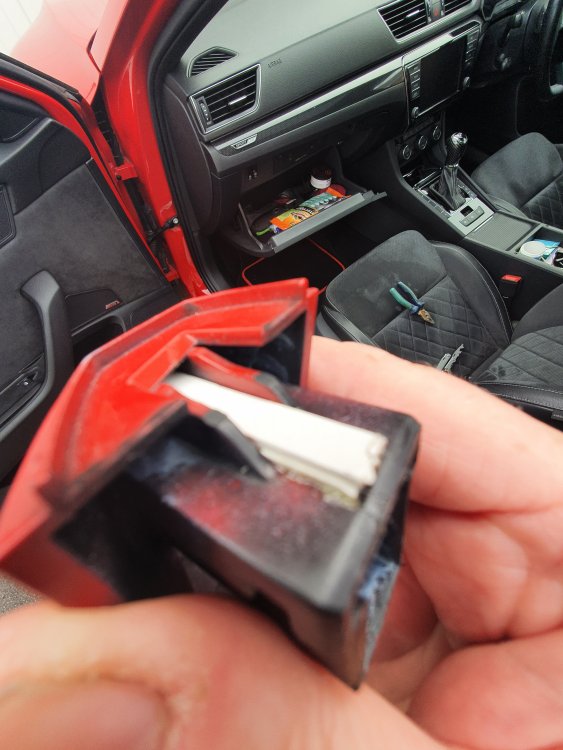
So this is what I did to mine, glued in a strip of plastic to the backplate. This moves the handle slightly forward allowing the hook to grip again. Been 6 months with No issues and helped a few people who did the same on a facebook forum.
-
Fuse checked number 8 I believe is correct, although doubting myself so checked them All and fine. Got no vcds codes as do not own one.
-
HI Sasha - I know youre a Guru when it comes to coding and hoped you could advise. My factory Ambients suddenly all stopped working a few weeks ago. All the coloured LED's in dash and doorsx4, footwells are ok and so are door handle lighting. could it have lost coding and would OBD11 cover long coding of ambients.
-
I will try this, thinking of buying obd11 pro so can look at long coding.
-
Not fixed as yet, either looking for a kind person near me with vcds or ordering myself
-
-
-
Looking at OBD11 there are 2 options, Pro or ultimate, what extra do I get if I opt for Ultimate, bearing in mind all I can see is a phone holder for £80 extra
-
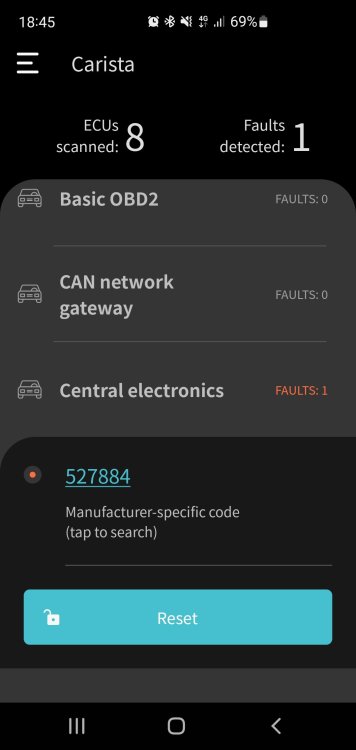
SO did some digging on this code 527884 and turns out it's a Hex code for RGB colour Red which is the colour the ambients were when they suddenly went out. Still no fix but welcome any help from the group. Its not setting issue, thier turned on, tried other users with no luck, its only the inserted ambients as the footwells and door handles are still lit.
-
So far only have a carista code of 527884 which is no help. Is it possible that it lost coding completely and that's why its off no matter what I do. Headlamp switch tried but still nothing.
-
Mine stopped working all around a few weeks back. Trying to work through possibilities but so many to try. Done fuse checks, settings, profiles etc. Last to try this week is replacement headlight switch, after that forget about it as if it's the BCM not worth the cost. Can you take a picture of these plugs and will look at that. Went off suddenly while night driving.
-
issue is ambient lighting strips in door and along dash just stopped working
-
Can anyone help translate a carista code to what the fault may be as cant find any info on here on Google. Code is in central electronics 527884. Many thanks
-
So disconnected battery for 45 mins, still no coloured ambients. Fuses ok in car. Footwells still lit though. Not worried about this feature missing unless someone has another suggestion.
-
Could be if your in Eco mode, know mates BMW stops seats heating up.
-
Esseesse200 I haven't had a chance yet. Will disconnect battery for a while this weekend to see if it resets. However not that worried at moment as its only the Ambient lights in door and dash effected. Footwells are all ok.
-
Following on from my ambient lights not working if i disconnect battery could it potentially reset the BCM which could be the cause of fault.
-
All strips on dash & doors, footwell light ok and interior handle lights ok.
-
Settings are on and profile is still set as mine
-
So fuse 8 control the ambient lighting amongst other things but those others still work. Ambient lights Was working fine then suddenly went off while driving tonight, dash and door cards. Checked carista but nothing.