plutus
Finding my way
-
Joined
-
Last visited
-
-
I currently own a 2018 1.5tsi superb (pre-FL) that I'd like to change..so I tested a 2024 iV FL Sportline with 19'' rims (now I have 17''). I was really disappointed by: - tyre noise! After 20' I had a headache! Should a 18'' version (that I cannot test) be better in this regard? - engine (the 1.4 of the phev system) was quite loud too in the first minutes, than it was better. I was again surprised since my current 1.5 is very quiet Beside these two points, car was nice and better than my current Superb... but noise was a true no-no
-
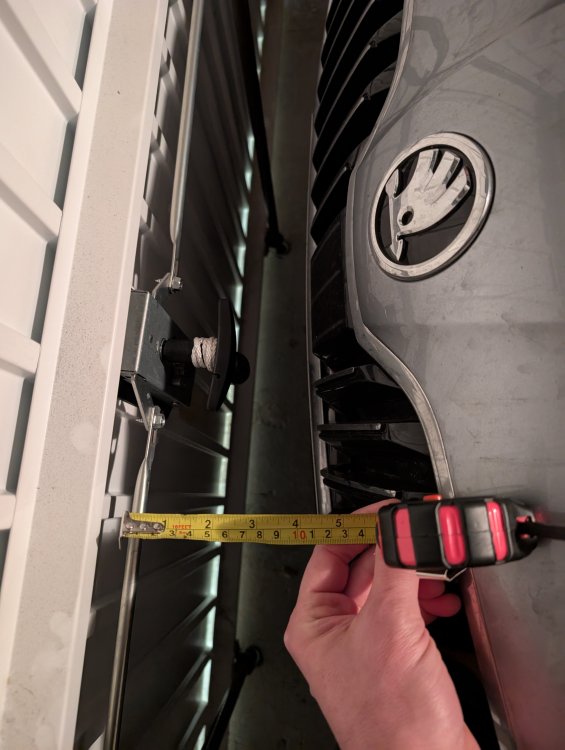
Consider I already own a superb... Anyway, today I was able to test an arteon phev - same length of the superb but the charging door should be longer on the arteon. I plugged the cable and slightly closed the lid. It works..
-
That's a tough call..
-
thanks - I'll close the box and measure the remaining distance between my Superb and the door in "real conditions"
-
I also add that the model I've identified is a Sportline with 19'' rims. Should I be worried about comfort? No DCC as far as I know
-
howdy I currently own a 2018 Superb 1.5TSI - I'm considering upgrading to a 2023 or 2024 Superb iV. Got a few questions... - are there any known issues with the iV? - my car is parked in a box...5m in length. I've noticed the plug is on the front part of the bar. How many cm the plug adds to the car? will I be &ble to close the box door? Thanks! PS any thoughts is welcome indeed!
-
you mean using the custom mode (setting each option separately)? Anyway, if that's normal I don't understand the underlying logic
-
Hi, My Superb mk3 my2019 is equipped with drive mode selector (no active suspensions, just "eco-normal-sport"), essentially modifying the responsiveness of the DSG. I prefer the E mode since it seems to me more efficient in terms of fuel economy (car often coasts in neutral). The problem is that after restarting the car, E mode is still active...but the DSG is in "D" mode (while all the other settings are in E mode). Indeed, if I switch again the E mode button, also the DSG goes in E mode... Is this a bug or is it perfectly normal the DSG "restarts" in D mode instead of E ? Thanks
-
So here I am after a bit more than 2 months and 3000km. I bought a pre-owned superb combi, 1.5 tsi dsg, style trim (xenon, leather, vented&heated seats, blind spot monitor, acc,...). The car is comfy, well suited for long journeys, the engine is sober (6.5l/100km so far) and quite responsive. I was afraid about the size of the car but thanks to the rear camera and the parking sensors it's easy to manœuvre and to park in the garage (5m x 2.4m). The car is long but the length is essentially "behind", making the car not that different to my previous Golf mk6. Lot of space of course, no problems so far beside a minor malfunction of the blind spot monitor which will likely be solved by the dealer. BTW I also discovered that the car servicing is every 2 years (or 30000km) and not every year as I expected.
-
It's mentioned in the manual of the car
-
Indeed. I'd definitely give a try with my wife
-
Have you ever tried using a couple of cardboard boxes?
-
Hi This morning I wanted to test these two safety features. I placed a big cardboard box and... Bump, the car didn't brake I have a my2019 superb, equipped with rear camera, front/rear park radars and blind spot monitor (+manœuvre assist) Do the manœuvre assist and front assist work with fixed objects? Or is my car not working? Or is my testing method? I wanted to try with my wife but for some reasons she didn't want to
-
It got worse... Today I couldn't activate the bsm at all. Anyway, the car was bought from a dealer, there's a warranty.. Hope it'll work