Yaffle
Finding my way
-
Joined
-
Last visited
Everything posted by Yaffle
-
I am sure I am missing something here, but the manual does not explain how to do this. How do I add a favourite location to the built-in sat-nav. I've been able to add home and work via settings, but it would be nice to add others such as relative's houses, or client premises. I seem to recall being able to add the current position as a favourite, but I am stoned if I can see how to do it now. Help!
-
It's 'good enough' as an estimate for comfort break planning before leaving. At the moment my biggest gripe with it is that you can't (at least at my last check) download maps, it has to stream them. Where I live there's zero data signal, so I have to drive with a line on a blank map. Likewise as I get closer to home it drops the map, and has no concept of traffic, turns or similar. Naturally as I know where I am that's no great shakes, but I can see it being an issue if one were in unknown territory. Oh, and no matter how much I tell it not to use toll roads it seems to want me to go on the M6 Toll and won't warn me when it calculates the route, so I don't know until I suddenly realise what it's done, then it won't reroute without using the M6 Toll. That's probably user error though. You can use it free for a week (month?) so I suggest you start using it for your first long trip, and if you like it, pay the sub. TBH it's not worth the sub for me as nearly all my driving is home-work-home, so I use the web version to work out a good spot for lunch en-route, and charge while we're eating. You can also use Tronity if you wish rather than an OBD, it pulls data from there via the MySkoda data feed. An OBD is better, as it gives proper real-time data (and plenty more data beside, such as battery temperature - useful to know for charging).
-
-
I stumbled across this today, it seems to be a wireless way to access the car's data about a few things. While there's a free week or two with it, I was wondering if anyone else had given it a go, and if anyone had any thoughts on the security implications of allowing a third party app access to the car.
-
thank you. I'll see what it shows next time I'm in the car.
-
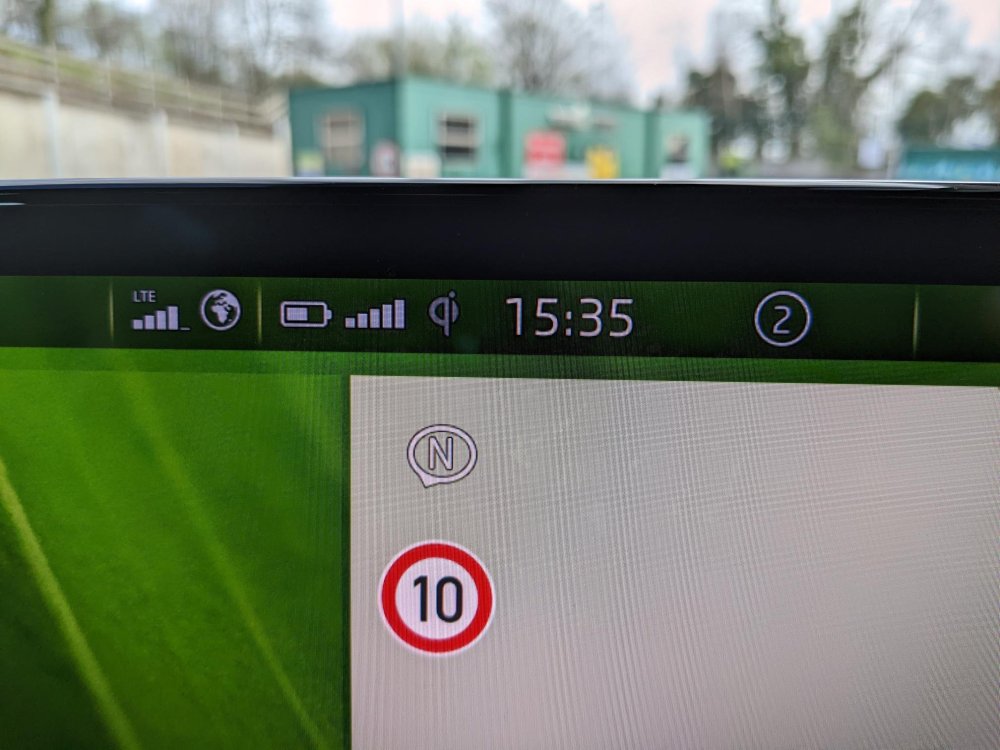
This has been puzzling me for a while. At the top of the infotainment screen, just to the right of the time is a number in a circle. Sometimes it's 0, sometimes 1 and as in the image sometimes 2. I can't find it in the manual - does anyone here know what it means? I thought it may be number of bluetooth devices, but no, as if I don't have my phone there's no difference. I thought it may be wifi networks detected, but no as when I get to work there are 17(!) I thought it might be phone networks detected, but it shows as 2 when parked in the garage and there are none. I thought it might be text messages or e-mails unread, but when the pic was taken both were cleared. Any ideas? Y
-
Don't have an iPhone, but a Pixel 6. This works fine, just keep it face-up, will charge through a case quite happily, not had to place it forward. Yes, it charges my phone not merely keep battery level even if using Android Auto. Never done a full charge, and never timed the charge so can't help on that. I have no evidence the phone box in any way improves reception, this is the UK so reception is naturally quite hopeless in rural locations.
-
80x Sportline iV (195kwh) Owned since mid January. Quartz grey Heat pump Sunroof tow bar prep Parking pack plus Drive Sport pack Assisted Drive Pack Convenience Pack 😁
-
Our Sportline 80x ordered on 26 August is apparently being built as I type. Dealer won't commit (which I understand) to a delivery date, but at least we know things are still being put together. (for the curious - options are heat pump, parking pack +, drive sport pack, assisted drive pack, metallic paint (grey), sunroof, tow bar, convenience pack. Dealer agreed to wire in dashcam wires from the fusebox, then replace trim etc foc as we've had so many cars from them, which was nice).
-
Enjoy - it's quite different in many ways from an ICE. It may be worthwhile considering the expensive heat pump, which while somewhat invisible should help on battery life in both senses - trip to trip and entire lifespan as it helps control the battery temperatures under charging and discharging.
-
From the android store reviews: ŠKODA AUTO a.s.30 August 2021 Hello Mr. XXX, the services for Enyaq iV are gradually being developed on a completely new platform. That is why the main charging and air conditioning services were developed first. Unfortunately, at the moment we cannot guarantee the availability of additional services for vehicles that have already been produced. Your MyŠKODA App Team https://play.google.com/store/apps/details?id=cz.skodaauto.connect&hl=en_GB&gl=US&showAllReviews=true
-
-
Thanks - that's really helpful to know.
-
You, sir are scholar and a gentleman. Thank you.
-
Thanks for the really great review. I'm still at the trying to spec phase, so this was really helpful. My Superb has a really clever thing in the boot - some velcro plastic things you can stick to the floor to hold in place things like boxes etc and stop them sliding around. I wish I knew what they were called! I can't seem to work out if those are standard, or if I need to get some 'pack' to put them in the Enyaq. The sales person wasn't too sure either as the demo vehicles had the luggage pack (and the two plastic things). Skoda's descriptions don't mention them. So - did it come with those two things? That's my fairly short question. Thanks in advance.