Patrober
Finding my way
-
Joined
-
Last visited
Everything posted by Patrober
-
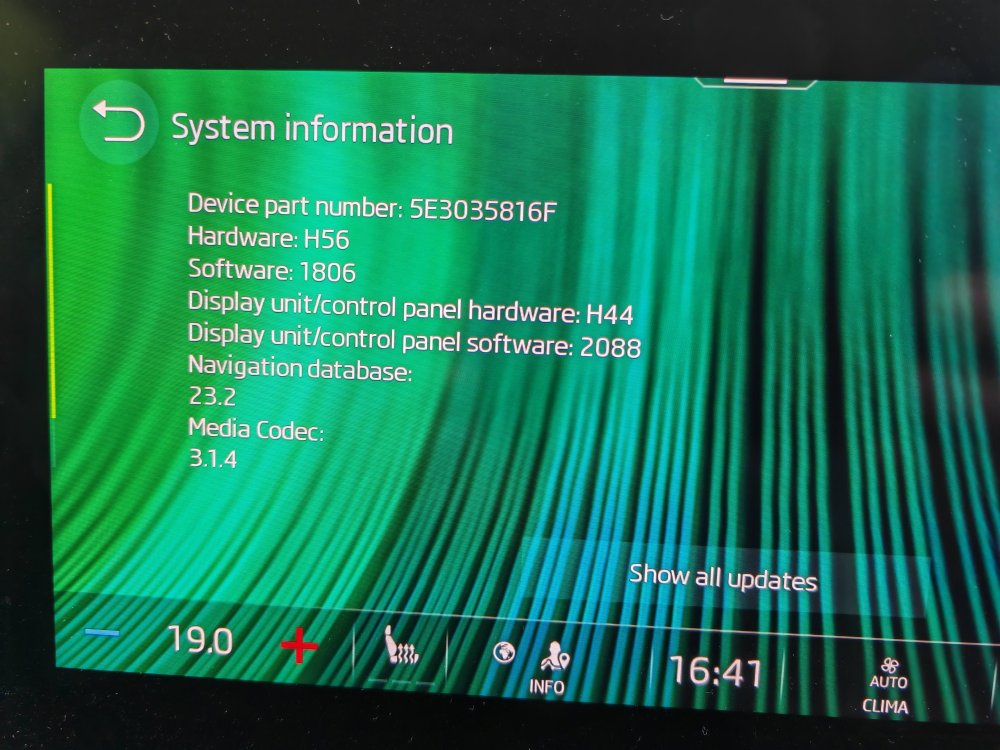
I wasn't sure which one of the numbers listed in the screen was the relevant one. Why isn't it upgraded OTA? is it just too large?
-
This is maybe the third time it's happened to me. First time it never cleared till I got it reflashed at the dealer, second time it cleared after 2 or 3 days. See above for the version. I'm not sure which one is the relevant one.
-
Will do. Wasn't going to get a service till December when the MOT is due. Hopefully it'll survive till then.
-
Not sure. This is what i have installed-
-
I've actually fixed it! The one thing i didnt try that was suggested was to disconnect the battery overnight. Well didnt do it overnight, but for about an hour. That seems to have fixed the loading settings problem. I did get quite panicked when I switched it on and a long list of fault/warnings came up about all the various safety sub systems. Switched on and off a couple of times, and drove for 10 minutes seems to have cleared these warnings thankfully!
-
For several days now, my Octavia infotainment system has been stuck on “loading settings”. I have tried lots of suggested solutions from others in this group that have had the same issue but no avail. I have tried- Reboot the system by pressing the power key for >10 seconds. Done this with the engine on and off – no effect. Pulled the infotainment fuse (#30) for a few minutes. No effect. Pulled the infotainment fuse and the SOS fuse (#19) for several hours. No effect. Pressed the SOS button then cancelled it, then reboot the system (as above). No effect. Tried various combinations of #3 and #4 at the same time. No effect. I contacted my local Skoda garage to get this looked at again (as it has happened before- they just did a system reflash and that seemed to fix it) but cannot get an appointment for over a month! I will be going on a long journey in 2 weeks’ time and need the GPS and radio to work by then. I desperately need a solution before i head off. Like is there a way to do a factory reset without going through the menu system (as that is obviously inaccessible)?
-
Did a search for AVRCP music apps and found that a few supported it - downloaded one and it was the same issue as with my other apps. Cant browse the music files on the phone, but can play them - dependant on what the app was setup to play. eg if its setup to play an album, itll play that, and you can skip etc tracks in it. Or if its play all, it'll play all. But cant browse for artist or album. And in the media tab it shows an empty folder. Ive had to resort to old school memory stick of my music and that works fine.
-
I tried your suggestion, but on my app, it only shows the Navigate option. Hmm..
-
Yeah, the closest Ive got it working is if i have a music app active on the phone, then its music selection (say an album) will be playable (play, pause, next track) through the system. But if you look at the bluetooth folder its still empty. And you are restricted to playing that one album unless you change it on the phone! I feel I need a music app on the phone that makes all my music visible to the car. I guess the issue is that with bluetooth, it defaults to a certain mode - in my case it has the phone as the media player, and the car as the speakers. What I want is the car to be the player, and the phone to be a dumb media storage device like a memory stick.
-
I have the MySkoda app and it shows all the car info as required. Its linked to my planner and shows upcoming events and displays the location correctly on the phone. But when i go to the car, its not in the map app that I can see. Do i need to do something to get the destination info to the car, or is it hidden away in a menu item somewhere? I naively thought if it displayed the even on the phone app, it would be on the car nav page to select too?
-
But not streaming. The music is stored on the phone. There surely must be a way to make the collection visible to the car. Seems odd otherwise.
-
I have both calls and media enabled in bluetooth.
-
My phone has a dodgy connector and looses connection so not really an ideal option for me I still think I should be able to see the media on the phone like a usb stick.
-
Thought it didn't work over Bluetooth and you had to use it wired?
-
Just got an octavia estate, and my android phone connects via Bluetooth fine. But when i go to look at the media folder over Bluetooth in the console, it just shows an empty folder. The folder name is the name of a music app i use on the phone (Hifi Cast). If i delete that app, it went to another (Spotify) and so on and so on. The folder is always empty. Any ideas on how to get at my music on the phone?