




Superbfan140
New here
-
Joined
-
Last visited
Everything posted by Superbfan140
-
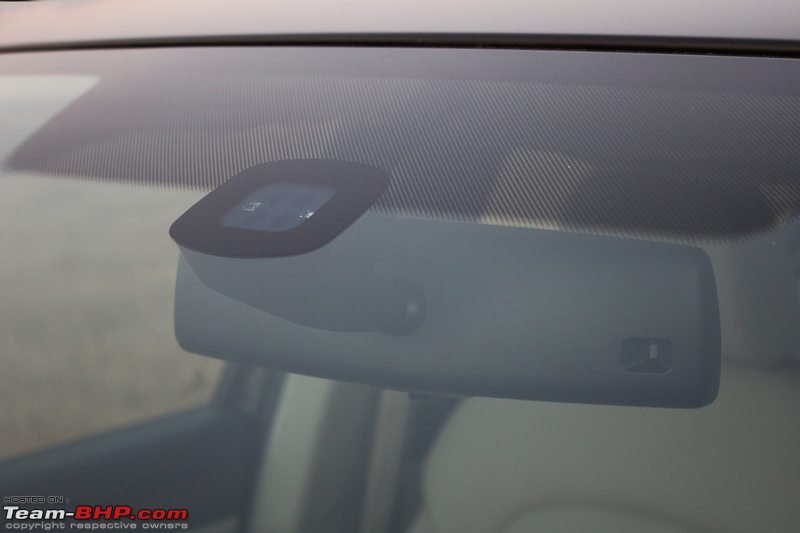
Yeah I tought that white thing on the left next to the rain sensor was the high beam camera and the right side the light sensor
-
Yeah you are probably right and I think so too,the only thing that bothered me was that the Touran with the same sensor has auto high beams and Skoda being a more luxurious car doesn't have one.Thanks for your help guys
-
I dont have it i need to see my mechanic
-
Nowhere on the internet have I found usefull information about this and I didn't see anyone who has auto high beams on a mk 2 superb, I mean it is an old car sort of but there is nowhere where you can find that info. I can only send pics of the sensor and things inside the car.
-
So maybe I have that 20 camera? I can try with vcds to activate it but I still don't know if I need to have a Maxidot display.
-
On auto it just turns them on when i tap the lever but on my 2012 Touran it turns on the auto high beams. The weird thing is that both cars have the same sensor.
-
Hey guys I have a Skoda Superb 2011 with a normal underwindshield sensor but my rain sensor and auto high beams are not working. Is there a way to turn them on or are they not installed at all? Here is the pic of the sensor what it looks like...
-
Hi guys, I need your help because my skoda superb 2011 has the same sensor module as my Touran 2012 but the rain sensor and automatic high beams are not working. They work fine on the Touran so is there a way to turn them on on the skoda via a laptop or something?