ISKIDA
Finding my way
-
Joined
-
Last visited
-
-
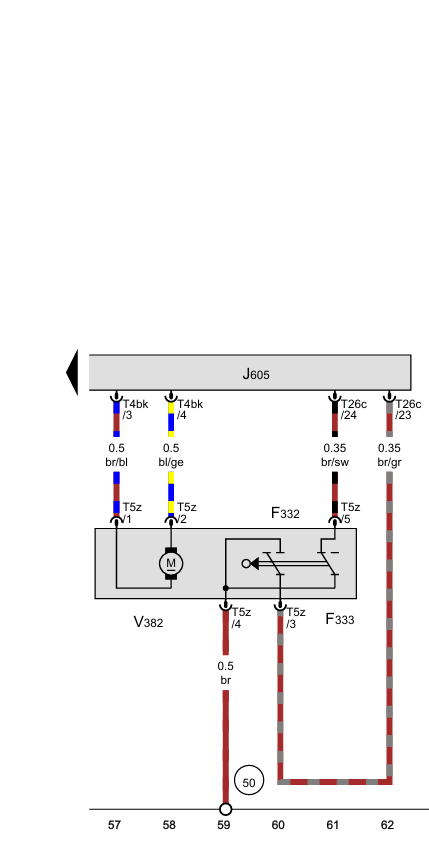
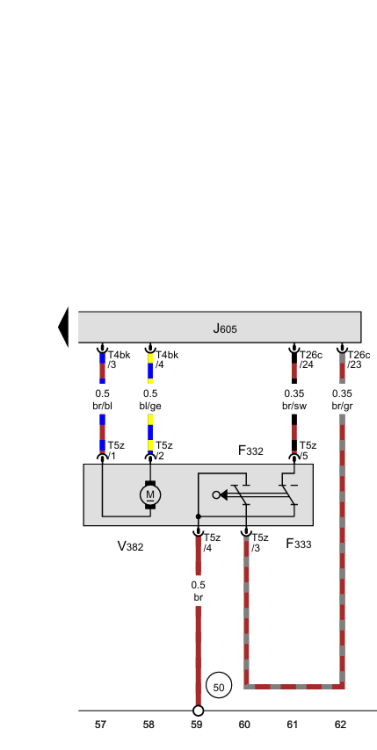
Pins 1 and 2 on the boot lock mechanism to pull the hasp inwards. Other than the annoyance of the warning beep each time I open the boot, and of course the lack of auto open from the key fob (which of course never work because it stopped after 30cm), the jobs done.
-
No, not yet but I have at least found out at the fault code is "Hall Effect sensor". Now this is inside the strut, and I replaced the strut so I am feeling strongly it is a fault in the electrics: probably a dry joint on a circuit board. Does anyone know which boards are in the left hand rear panel? thanks Andrew
-
My tailgate on 2015 octavia scout had been playing up, in what sounds like the same way. It often only opens by about 30cm before stopping. It's the same if I use the remote, the dash button or the tailgate button. Works about half the time. First I replaced the struts (which I think is suggested above). No change. Now I have replaced the latch on the sill. No change, but I can now see a related fact: when it opens correctly the powered "close it tight" latch moves immediately as the hatch starts to open. When it fails, this "close it tight" latch opens after a delay or not at all. see the videos for one good (https://youtu.be/8ARv9X4-zNk) and bad scenario https://youtu.be/OcXeAglfhNk. So I'm now thinking that it's either a computer, or sensor or relay problem. I can hear a relay in the left test panel, but have not yet pulled the panel off to investigate. Any thoughts or similar experience and solution?
-
Assistance wanted...... My tailgate on 2015 octavia scout had been playing up. It often only opens by about 30cm before stopping. It's the same if I use the remote, the dash button or the tailgate button. Works about half the time. First I replaced the struts. No change. Now I have replaced the latch. No change, but I can now see a related fact: when it opens correctly the powered "close it tight" latch moves immediately as the hatch starts to open. When it fails, this "close it tight" latch opens after a delay or not at all. see the videos for one good (https://youtu.be/8ARv9X4-zNk) and bad scenario https://youtu.be/OcXeAglfhNk. So I'm now thinking that it's either a computer, or sensor or relay problem. I can hear a relay in the left test panel, but have not yet pulled the panel off to investigate. Any thoughts or similar experience and solution?
-
My tailgate on 2015 octavia scout had been playing up. It often only opens by about 30cm before stopping. It's the same if I use the remote, the dash button or the tailgate button. Works about half the time. First I replaced the struts. No change. Now I have replaced the latch. No change, but I can now see a related fact: when it opens correctly the powered "close it tight" latch moves immediately as the hatch starts to open. When it fails, this "close it tight" latch opens after a delay or not at all. see the videos for one good (https://youtu.be/8ARv9X4-zNk) and bad scenario https://youtu.be/OcXeAglfhNk. So I'm now thinking that it's either a computer, or sensor or relay problem. I can hear a relay in the left test panel, but have not yet pulled the panel off to investigate. Any thoughts or similar experience and solution?