KaroqyBalboa
Finding my way
-
Joined
-
Last visited
Everything posted by KaroqyBalboa
-
Found the asian model 2021 in sketchup format. Not sure it's 3d printable as is. Sketchup is only a surface model.
-
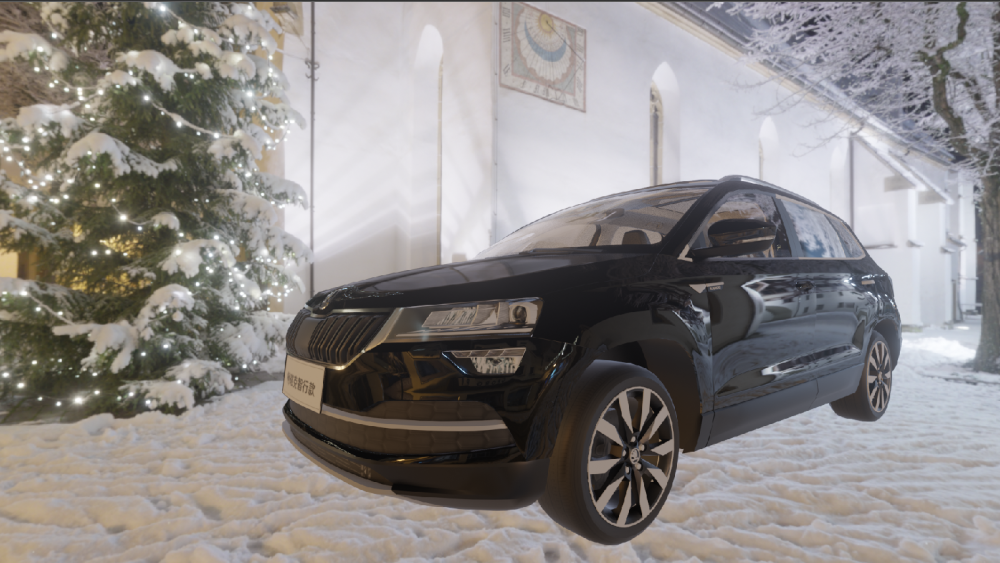
Shows exactly this ^^ in the "Engineering" Menu Software update/versions shows empty screen. I'll get the wife to take a picture as it "comes up all the time"
-
Saw a brief update notification as I drove off today, but my passenger cancelled before I could read beyond the word update. Then the missus says, "oh that comes up all the time, I just press OK and it goes away" Didn't come up again, so no idea what this was for. Went to the System Information and pressed Update System, but there was nothing to update there either. Is this installing in background? What's the latest version I should look for? H/W H22 S/W 0302 Nav 22.8
-
I have a samsung S21 and it charges in fast charge usb in 12v cigar lighter socket, but it stopped after a while, it did work in the regular usb slot but charge didn't increase, just stayed the same because of android auto. It worked again another time. I am wondering if it is because I had AC and lights on at the time. Even tho I have USBC to USBC cable, I never actually tried charging the phone from it, thought it'd be too slow
-
Lol, that's why 99% of my post was talking about alternatives to built in Nav... I used to run the maps directly off SD in previous car. 🙊
-
As well as Android auto which gives limited version of google maps, waze, here we go and more (here we go works great offline). You can also screen mirror you android so the nav screen shows whatever will run on your phone, but I guess that doesn't integrate with the car nav and the directions on the LCD behind the steering wheel. Voice guidance would output on the car speakers tho... You are lucky to have an SD slot, mine only has 2 usbc and no method to update maps from that yet. In my old Jetta I used to run the maps off SD card so could always "obtain" updates.
-
lol, google maps, waze, here we go maps, some others and the built in nav all available , but the wife still couldn't find the place she was looking for. The "plan a trip" function and send to car never works and when it does sometimes, it overwrites the previous sent location only the visited locations show up in a hub and spoke diagram when the built in nav starts up and the place names are all the same, cos the just show the town name googlemaps is better in that it "remembers" all the places I looked up on the phone waze and "here I go" don't always show up on the android auto, particularly when looking for them to use... don't like the tiny screen with massive borders on the android auto nav apps and there is very little config that can be done, they seem to be cut down function versions of the app on the phone... Going for a driving holiday later in the week so going to be giving them all a good test.
-
Lol, not at all aftermarket. this is how the rear camera option is on MY21 Karoq SE L. It sucks but that's how it is... You think the "sticker" is on the lens or on the touch screen?
-
I have driven several cars with rear camera, mostly rentals in USA and they all had 1 thing in common, the green red grid moved (bent around) according to wheel turning angle. In the Karoq, the same green and red grid is there but doesn't move, instead off to the side there is an orange guide showing the wheel path. Why is it separated like this? seems less useful. Can this be changed somehow?
-
What is that under I couldn't find the wipers service mode in the handbook, looking in the index under wipers.
-
Gave the Karoq first proper wash and had to google how to put the wipers into "service mode" so I could lift them and clean properly. But is there a general service mode for the KESSY? The doors kept locking and unlocking as a passed or touched each opening so the mirrors kept extending and tucking in... LOL, literally just thought as I typed this, why did I keep the keybob in my pocket.
-
Interested to see how these fit. I assume you can only use one at a time because the sockets are so close together. Does anyone happen to know how much height clearance there actually is to close the slidey cover? My phone takes usbc too ,so looking for a cable with right angle usbC on both ends. Was kind of hoping for phonebox wireless charge. Will see how only of my QI charges fits, but will need USB micro adapter.
-
Amundsen here and S21, but the google assistant voice reading out the wotsapp messages doesn't seem to finish a full sentence any more. The android-auto app on the phone can connect via bluetooth, wifi or usb cable and mine seems to use wifi happily. I think it clashes with built in nav and voice assist. had a few times now when just talking while driving and the infotainment voice assistant pipes up when we say the work "OK"... Also took a while to get it to stop playing the same podcast everytime google started
-
got my head around what is connecting to where and which hotspot is which... As Michael Barrymore used to say.... what's a hotspot not...?? :D
-
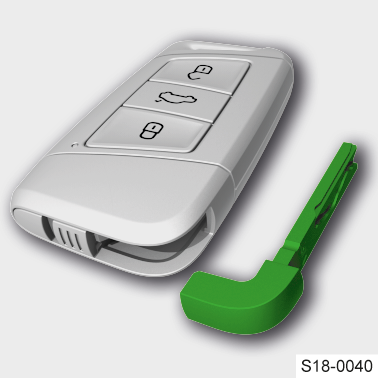
Got it, thanks! Is there a similar way to start the car? Or does this also unlock the start stop button function?
-
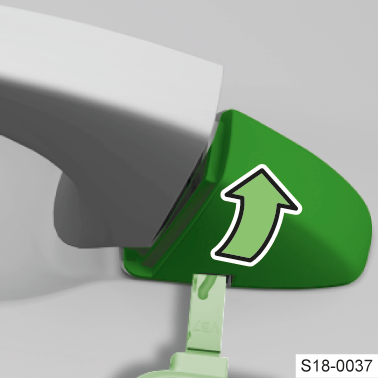
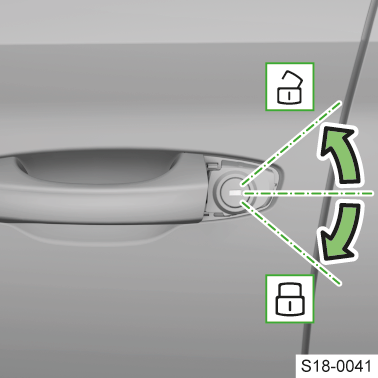
Yes, found this in the manual now, but can't get it to work. Is it supposed to be an obvious catch? or is this method just using the key bit to pry from within?
-
The manual mentions the keybit in the fob, but makes no mention of where it is used... Is there a secret keyhole some place for emergency access??
-
Is there something I need to allow on my phone or the car to allow other users who connect to the car hotspot to get internet? Other users can connect, but comes up as no internet or authorisation required. The authentication doesn't work (maybe cos of no internet??) Just wondered if I missed something? Karoq SEL 2021 with Amundsen Infotainment Cheers