VasilDD
New here
-
Joined
-
Last visited
-
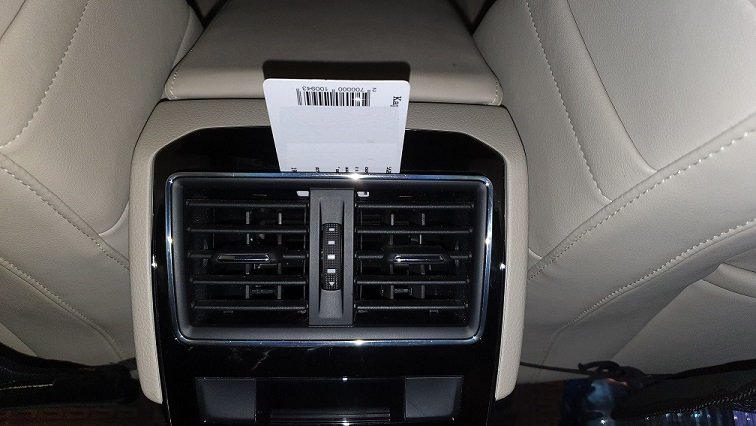
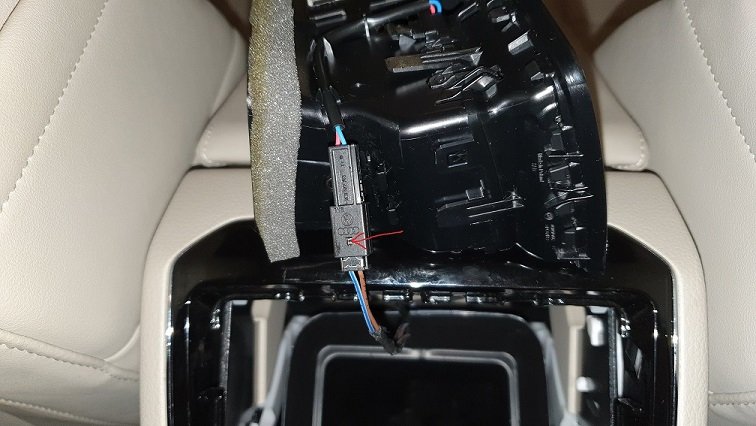
Superb MK3 is still on the road and kids are still doing what they can I've run into the same trouble these days and fix it myself, thanks to all contributors here (the local dealer didn't prove very useful on the matter). As I've found particularly useful the pictures posted by moamer91 in this topic https://www.briskoda.net/forums/topic/460883-rear-air-vent-collapsed/ I want to contribute myself with the following couple of images: To remove the outlet grid part, as described by others, all you need is a plastic card. Insert it gently as shown on the picture, push a little in and move the card aside. The grid part will slightly pop out with a click and you can take the whole thing out. To detach the cable connector you need to push the metal bud on it, with a small screwdriver (as mentioned by MartiniB), towards the brown and blue/white cables and then help further with your fingers. It's a tight link. If there are parts fallen down in the vent pipe a vacuum cleaner may come handy. I hope this will help someone. Thank you all who posted here and in the aforementioned tread, who saved my day (and money). Wish you all the best!