mjfend26
Finding my way
-
Joined
-
Last visited
Everything posted by mjfend26
-
And the boom has gone completely?
-
Hi Ry, what was it you changed exactly ? Is it the pieces on the side of the boot opening?
-
Did it work lol?
-
What's the plan lol?
-
Guys, sorted it. Ended up coding it with vcds, luckily I have access to it for free.
-
Hi, apologies if this is in the wrong place, I've just bought a maxton diffuser and wondering what sort of money the stock original diffuser sells for as I can't find any on ebay for sale.
-
Hi, wondering if someone can give me some insight into a res delete on the 2.0 tsi vrs, does it drone like the mk7 gti?
-
Thanks dude!
-
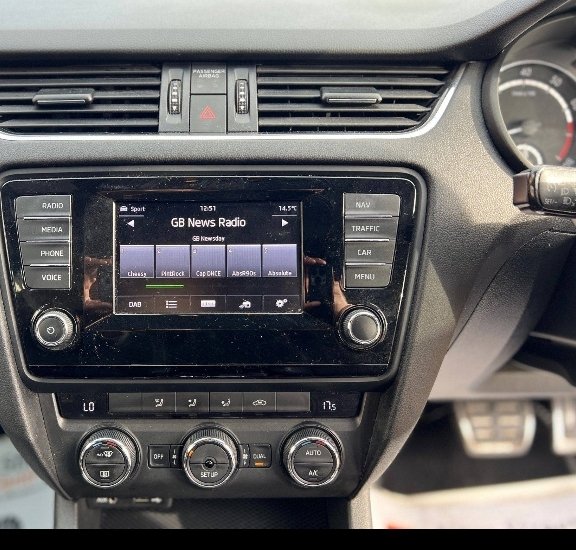
Seems to be a habit the past few days. another question, how do i get the radio station logos to show on dab? Mine say the name etc, but just have a blank square, on my previous car, it would for example show radio 1, with the radio 1 logo..
-
Sold! What drop?
-
Nice, think ima go for the h&r! Makes sense as I know they were dealer approved back ok the mk2.
-
Hi, has anyone got h&r lowering springs on their mk3 vrs? If so, has ride quality been affected?
-
Has anyone ever fixed this?
-
I've tried two lots man, both error free, and ones from a seller I know are error free. It's littered here with having to code, but I'll try another set incase.
-
They are, halfords ones, suitable for 12v and no error, but these vrs need everything coded.
-
The ones I've bought are error free, but still throwing it
-
All mk3 vrs have separate DRL and sidelights. The weird lines inside the headlight are the sidelights.
-
Hi, I'm looking to change my sidelights in my mk3 vrs to led. Is there a way to change the settings in carista to allow led?, I've done my number plate lights, and that's worked OK, but can't seem to find the selection for the sidelights.
-
While I'm on a roll and asking questions.. I have the canton system, when I go into sound settings, my surround sound option is grayed out ,why is this? Also, I have nav, but it doesn't allow me to go onto it, it asks me for a sd card, where can I get these other than main stealer?
-
Going to give this a go tomorrow, I have some underlay and those rubber strips to hand actually 😅
-
Update, not the spare wheel, as I don't have one 😅 They can stay in there, either annoying me by speaking or spending my money😅 Windows, honestly not tried, due to the crazy wet weather we've had in the UK the past week, but I'll give this a go and report back!
-
Could make sense, but it's more of a deep sound, similar to the sound it makes in the cabin when a door is slammed in the car, that sort of thump sound
-
Hi people, recently picked up my mk3 vrs, I've noticed a very deep, almost bassy type banging from the rear inside the cabin, almost like my boot isn't shut properly. Has anyone had similar?
-
Hi people! Wondering if I can scratch some heads on a little question. I've recently purchased a 2014 octavia vrs, 2.0tsi DSG, it's a pretty decent specced car, but seems to have a basic headunit (AFAIK), I've not yet picked the car up. But am wondering whether or not I can upgrade this to a larger screen?, if so, what's required etc? I once retro fitted pro nav into a bmw M135i that I owned, and that was a headache. Hoping there's a plug and play unit to upgrade the screen 🙏. Secondly, it has the 2014 steering wheel, but I'd like to upgrade that to the flat bottom (purely for cosmetics), is this also doable? Thank you all, and thanks for any response in advance. Mike.