




Andreas_Fabia_Driver
Finding my way
-
Joined
-
Last visited
-
No i did not find the values for these missing chip capacitors. I searched on AliExpress and found a complete new PCB for abour 3 EUR. jingyuqin 3 Button Flip Remote Car Key Fob For VW PASSAT Polo Skoda Seat Polo/Golf/Beetle 1J0959753 DA/AH 1K0959753G 434Mhz ID48 - AliExpress 34
-
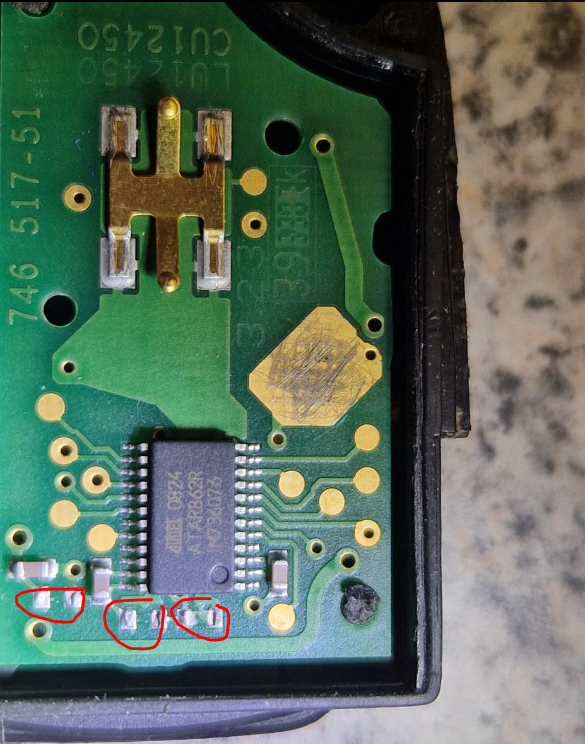
Hi, I am sure, as to bee seen on the attached picture 3 components has "cracked" and are lost from their position. Cheramic capacitors may be sensitive and can easily be damaged without any dramatic force. The job to solder 3 capacitors are very easy, but i need to know new the values. Reading the datasheet for the ATMEL IC gives a hint, but not exact values. Do anyone have the schematics and/or BOM for this PCB? @J.R. Where are the RFID capsule located?
-
Hi, I have a problem with the key to my Skoda Fabia. It stopped working, and when I opened it, I discovered that some components on the circuit board were damaged. Does anyone know the component values that should be placed in the positions marked on the picture, or know where to find an electrical schematic for the key? The circuit board is marked with: LU12450 CU12540 746 517-51 Thankyou in advance
-
Thanx for answering.. It is so strange.. I did not have any fuse inserted at position 31 before, and ha have never got any errorcode for it.. Now last weeks, the errorcode for lambdasond heating element appear, together with glitching door open/close connector. When i read the wirediagram, (thanx for that @Breezy_Pete) it really make sense that there should be a fuse at position 31, otherwise pre-heating will not be possible. The car is equiped with 4 wire type lambdasond.. so why should it not be in use?.. The diagnose system from the car should have given errorcode long time ago as the fuse were not there.. Now when i place a fuse at pos 31... i don´t get the errorcode.. but indicated fuelconsumption rises.. If i remove the fuse, i get errorcode for heating element.. and indicated fuelconsumption goes down.. Reading out from VCDS, there are voltage detected in range from lambda. I have also measured it separate.. but maybe i My car seem to have its own life and logic.. maybe it was built on a monday.. 🙂
-
Another quite strange thing is that when i put in fuse 31, indicated fuelconsumption rises. Anyone have similair experience? Can the Lambda sond be faulty without showing an errorcode?
-
Have checked the doorlock now. Opend it and checked all solderings. All looks fine. Door still glitching.. uhh..
-
Thanx.. Then i defenetley need to check the lock again 🙂 But still.. about lambdasonds.. may both of them break at the same time? Tha car has done about 100000 km..
-
Great!.. thanx for your support! I have seen youtube videos, and also read about the small mini-switch in the lock unit, so i unmounted the switch, cleaned it.. did a simple measurement and it seem work. I have run VCDS check, and i do not have any errorcodes more than lambdasond and AC compressor shortcircuit to + pole. The door indicator glich intermitent, so the car think the door opens and close a lot of time.. When driving for a while, alarm sounds as the car think door is open while driving.. If you close the door.. everything seem to be fine.. but maybe after a minute... or longer.. the car think the door is open again.. for a short while.. Noone even touch the car.. when it happens 🙂
-
Initially, i did initially release both lambda sonds, testing that its alive by heating it up with gasol burner. Both seem to give up to 1v. I also checked the resistance.. and as far i as i remeber i gat a resistance.. (not open circuit... or short circuit).. But i did not find the cable up to Engine ECU. For that reason i beleived it might go via J519 and then to Engine ECU.. I will check the cable to lambdasond to Engine ECU once again.. Its so wiered, as my passenger door keep glitching open/close + my dayligt/half light that use to be on when light selector are in position "0" are also glitching.. light works just fine on half light position + Issues with lambdasonds heating element. As all errors came at same time.. can it be J519 that handle signals/voltage for all these errors?
-
So, then when i get a fault code on both lambdasonds.. it must be the lambdasond itself or the ECU in the engine bay that has an error? As i understand the errorcode says its the lambda pre heating element voltage that are not correct.. I tried to ringout the cables from lambdasond to the ECU enginebay earlier.. but i did not find any cabel connected.. However, the car can read values from the Lambda.. so maybe i should try to ring it out oce again.. to confirm its really connected..
-
Are all 4 wires from lambda connected to ECU in the engine bay, or does the J519 control the heat circuit, and ECU bay the actual lambda voltage?
-
Yes, i can clear the errorcode, but it come back just in a minute. I have just tested once.. drinving a couple of km.. then wen i shut of the car, remove the fuse, and start it again.. fuelconsumption is normal again. I beleive i have never had a fuse there before.. but now when i get errorcodes on the preheater for lambda i think its strange that there are no fuse at that position..
-
When i place a 10A fuse on 31, The indicated fuelconsumption rises dramaticly. Errorcode for lambdasonds still remains.
-
Hi, I do have the same problem with my pasenger door. The door close/open status glitches randomly. I will also test to release the window module and see if it still glithces.. I beleive it will and i wonder if it might be the J519 voltage module that need to be replaced. Does anyone know whats needed to replace J519 with another used one? I guess that some sort of coding is needed. I have both VCDS HEX V2 and Delphis E 150 diagnose module, but have never coded any module before. If i fail coding the new one, can i always replace old J519 module or do i need to recode the old one to be accepted by car? /Andreas
-
Hi Can anyone with this file share it, please?

