




Zmywarka
Finding my way
-
Joined
-
Last visited
Everything posted by Zmywarka
-
-
-
HI GUYS! I got a issue with my skoda Superb mk3 2017. I have problem with my rear fog light LED. It's not working at all. There is no issues on dashboard or warning, lights switch is new I changed . I will be really appreciate if you can send me some schematic of cables or coding to VCDS or anything what can help . I was try nearly all buy new lam still same issue, there is also no error on VCDS. Really don't know what to do now. PLEASE HELP!
-
Hi Guys I got a question how to remove headlight switch if the knob is ripped off?
-
Problem nearly sorted. Lamp. Is working i checked on other superb same as mine. The problem I got its not working on my car. All lights working apart of fog light. Don't know if it headlight switch or cables. But headlights switch is damage I accidentally use too much power and knob turned 360 degrees and fall. How to remove the headlight switch without that hob?
-
I know that. It's English car. But as I said I contacted directly to company who produce those lamps and they said it only nearside lamp (left one) had a fog on it.
-
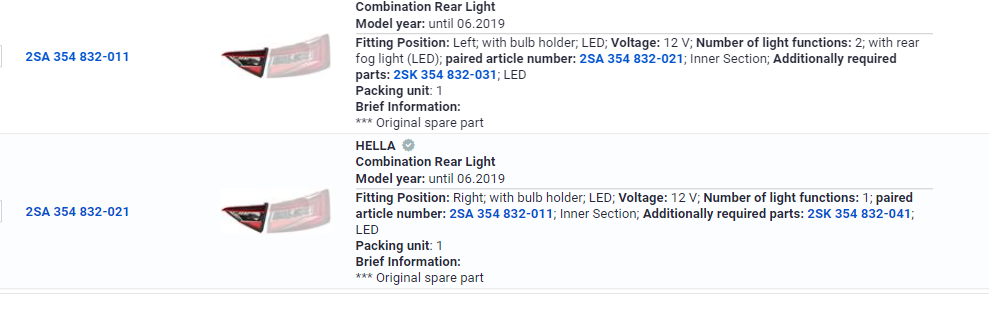
Hi Guys, I got Skoda Superb mk3 2016 hatchback diesel 2l 150bhp. I done the MOT but got some minor warning. They said the fog lights not working but the problem i got i try buy new lamp because can't change the bulb because its led lights. Then I try to find replacement part but the problembi got its only for left rear tailgate lamp with Fog function can't find any right lamp. I even contacted the HELLA who produced those lamps directly and they states that fog light is in left lamp not right. PLEASE HELP ME
Important Information
Welcome to BRISKODA. Please note the following important links Terms of Use. We have a comprehensive Privacy Policy. We have placed cookies on your device to help make this website better. You can adjust your cookie settings, otherwise we'll assume you're okay to continue.