




maklein
New here
-
Joined
-
Last visited
-
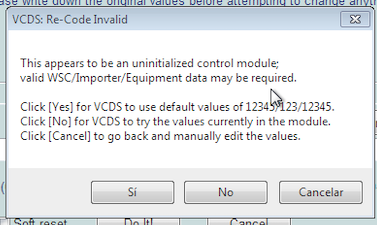
I forgot to say, VCDS says next message, so I copied from old one the numbers:
-
I've changed the module (5q0953569A). I didn't buy the original one, I buy one on a dealer much cheaper (450€ vs 150€). The one is working perfectly after erasing errors and code the new module. I don't like too much how the new module looks like: new: Address 16: Steering wheel (J524) Labels:* None Part No SW: ----------- HW: ----------- Component: Lenks.Modul --- 0175 Revision: -------- Serial number: -------------- Coding: 1400 Shop #: WSC 73430 031 00063 ASAM Dataset: EV_SMLSVALEOMQB 001010 ROD: EV_SMLSVALEOMQB.rod VCID: 6FED66BBB69D05EB22-803B old one (original): Address 16: Steering wheel (J524) Labels:| 5Q0-953-549.clb Part No SW: 5Q0 953 521 M HW: 5Q0 953 569 A Component: Lenks.Modul 075 0195 Revision: FF033033 Serial number: 20160206401464 Coding: 1400 Shop #: WSC 73430 031 00063 ASAM Dataset: EV_SMLSVALEOMQB 001015 ROD: EV_SMLSVALEOMQB.rod VCID: 3C7781F7B76BAE73D7-8069 But it's working, horn, all buttons in steering wheel and after clear error codes airbag light is gone!
-
I've just ordered a piece in a scrapyard from a volkswagen (before read your message). A mechanic friend says that the piece gonna match, same number, same hw, same first numbers of sw, two months of difference of fabrication... I'll update with the results. In case it doesnts works, I'll buy the original one. Thanks for the reply
-
Hi! Did you resolve your problem? I have the same problem, Skoda Octavia 3, clock spring 5Q0953569A broken (I've uninstalled it and the band is broken no way to fix), so I need to buy a replace. 450€ brand dealer, 150€ same part number, but I'm afraid that I have the same problem that you with the software. Did you resolve your problem? Must be the SW version in the label the same that the original part? Thanks in advance!