




Chetnik73
Members
-
Joined
-
Last visited
-
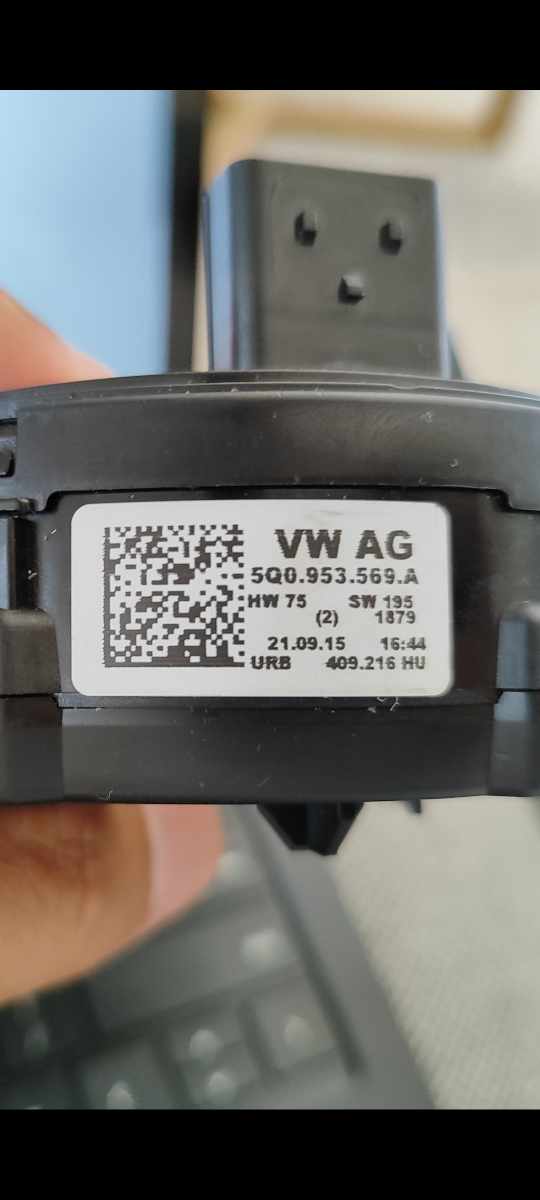
Just pay for the original part. I bought three with the exact part number but were for other vw models it turns out. Managed to track down a skoda model online for much cheaper than the dealer and it works perfectly. Needed to code back the original code so make sure you take a scan before you remove itI only replaced the steering wheel and added the LIN adapter in behind the airbag. It's only small so fits away nicely and enables all gestures on right side of steering wheel. I have the steering wheel with paddles but unsure of the model numberIt seems this may be a software issue. In my original scan the middle had software 3Q0953521BD This corresponds to the skoda stalk I have in my superb. it seems the 5Q0953569A i have been sold contains different software 3Q0953521CS despite being the same part number. I think this software corresponds to a passat stalk. This part number is across multiple models in VAG group, golf, passat, octavia and superb. does anybody know if it is possible to update the software to the correct model I have or do I need to buy a 5Q0953569A for the superb only ? Software versions are not listed anywhere and am trying to avoid the dealer cost of $1000 for the unitI sent you a PMnot sure if this helps https://tinypic.host/image/Screenshot-2023-10-06-15-36-40-583-com.voltasit.obdeleven.9X7Y9Thanks. Unfortunately i only have OBDELEVEN. I didn't think it would be this hardNo offence mate but have you read the post? My clockspring failed so i replaced with exact same part number. Unfortunately the new part although identical, needs updated coding to work. Hence the problem. It won't let me change to the code which i originally had 6410. So i don't have ACC and I'm getting warnings as a result. The steering wheel is not communicating properly with other modules including engine etc It only allows 0410 and says 31 function not supported when i try to update via obdeleven to 6410. If the part number matches the original and also the one quoted by skoda according to my VIN, then i can't work out what else it could beMy OBDEleven scan shows 0410. The original code is Long coding: 6410 when i add the clockspring it returns the coding to 0010. I am able to update to 0410 which adds rear wiper but not anything to do with the ACC which i previously had (that is the 6 in the 6410)I've done this. I have a spare LIN adaptor as per the picture above I'm happy to sell if you need one. They plug into steering wheel and air bag cable and enable all functions on right side of steering wheelSorry to resurrect this thread, but I cannot seem to resolve this. I have bought three separate clocksprings (squib) thinking they are the problem. They are all Valeo branded and OEM 5Q0953569A . This is the part number as quoted for my VIN. It's just the coding. I try to return the code to the original code of 6410 and get 31 function not available. My question is there any other modules or adaptions I have to change to re-enable ACC? Thanks
.jpg.a61f3093e3c0f8c1c3ecb0908778b22d.jpg) Sorry to revive the thread, but has anybody got instructions on how to do this?So i bought another 5q0953569a, thinking that the replacement had dated software. No dice. I still have the exact problem. Error 31 - function not available. I'm using OBDeleven. I'm wondering if another control unit or similar needs long coding changes to support unit 16. If somebody has a recent scan can they please let me know if their superb has both the same part and software number. as always, any help is appreciatedOk makes sense. Still no idea why i can't code the steering column back to 6410. It allowed me to code it to 0410 (rear wiper) but not the 6 (ccs). So frustratingYes. I also saw that ross tech wiki. The thing i can't get my head around is that the failed part was 5q0953569a. According to the Ross tech wiki that doesn't support ccs/acc however the cruise control worked absolutely fine with this part number. Also when i rang Skoda, they also quoted the above part number based on my VIN Im stumped See attached
Sorry to revive the thread, but has anybody got instructions on how to do this?So i bought another 5q0953569a, thinking that the replacement had dated software. No dice. I still have the exact problem. Error 31 - function not available. I'm using OBDeleven. I'm wondering if another control unit or similar needs long coding changes to support unit 16. If somebody has a recent scan can they please let me know if their superb has both the same part and software number. as always, any help is appreciatedOk makes sense. Still no idea why i can't code the steering column back to 6410. It allowed me to code it to 0410 (rear wiper) but not the 6 (ccs). So frustratingYes. I also saw that ross tech wiki. The thing i can't get my head around is that the failed part was 5q0953569a. According to the Ross tech wiki that doesn't support ccs/acc however the cruise control worked absolutely fine with this part number. Also when i rang Skoda, they also quoted the above part number based on my VIN Im stumped See attached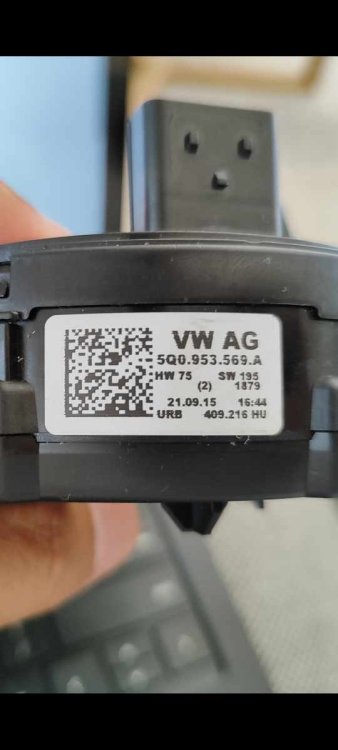

Important Information
Welcome to BRISKODA. Please note the following important links Terms of Use. We have a comprehensive Privacy Policy. We have placed cookies on your device to help make this website better. You can adjust your cookie settings, otherwise we'll assume you're okay to continue.