Eikka
Finding my way
-
Joined
-
Last visited
-
My Octavia 3/G-Tec/DSC/year 2020 has modes Eco Comfort Normal Sport Those can be selected under Driver Assistance menu. So I should have DCC? But I don't have Individual setting. Nor do I see any information about selected mode in infotainment or dash display. Is there something I have missed? However, I do notice the change in steering assistance between Sport and other modes.
-
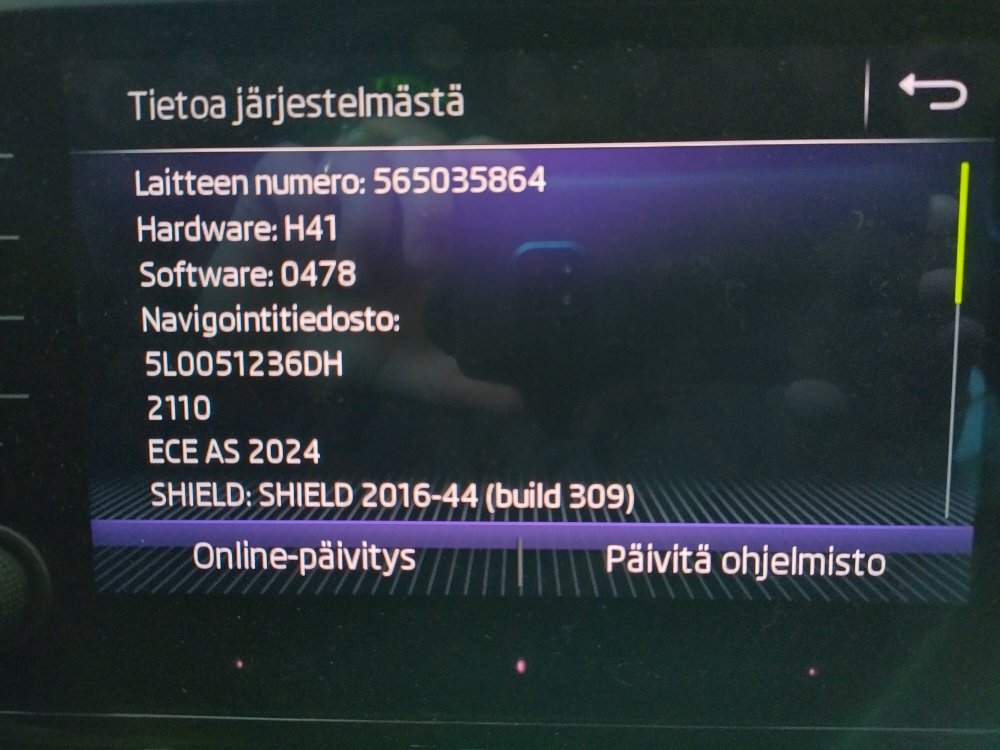
Thanks. I'd guess this is Amundsen.
-
Hi, I have no idea about the model of my infotainment and if there is an update.
-
Yes it seems to work just like you described. When Music folder is selected, I can't find any audio book tracks in suffle mode. Time will tell, but it looks you saved my day. Thanks!
-
Thanks a lot! That sounds logical! I'll try that one.
-
Thanks, that's a possibility I haven't considered. At the moment I have a dedicated folder for each album. Something like 50 to 70 folders already, 1000+ pieces of music altogether. For clarity I'd like to keep the directory structure like that. Another chance is to select a genre for shuffle, but there's only one genre per session I can chose from. Then I loose the versatility of the playlist.
-
The problem: I have loads of music saved on SD card which I usually play on shuffle mode. I'd like to have audio books on the same SD card but they should be excluded from shuffle. I tried to figure out if I can make two partitions on the SD card, one for music and the other for audio books. I managed to make the partitions in FAT32 format and save the music and books respectively, but the infotainment system didn't accept the SD card at all. Yes I know I can save audio books on a separate SD or on an USB stick, but is it possible to use a partitioned SD? Anyone managed to do that? Or is there a way to exclude the audio book files from shuffle mode if they all are on the same partition? Haven't figured out how.
-
Hi from Finland. 90 cm of snow, -20 centigrades outside, +20 centigrades inside. Not bad at all. Octavia III Combi G-Tec ready for a drive.