matism
Finding my way
-
Joined
-
Last visited
Everything posted by matism
-
I‘d also be interested in how to check SoH via VCDS on my Superb IV. Any ideas?
-
So far I didn't notice any additional features.
-
Interesting! When was 332 released and can you provide it?
-
Hi, yeah, the update went through successfully. I did not change the crash signal to "via CAN" before the update because my VCDS was too old. And interestingly enough I wasn't able to install version 88, so I tried 143 and this one worked. Afterwards I received my new Hex V2 interface and was able to also change the crash signal from "all " to "via CAN".
-
That would be super helpful. Thanks a lot!
-
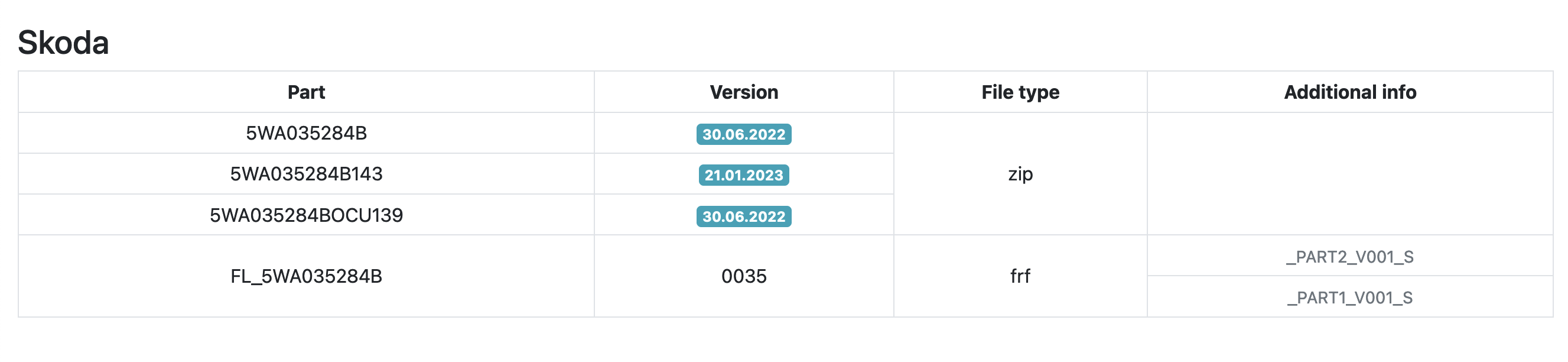
Additionally I only see version 139 and 143 on https://vag-flashinfo.de/: And I also can't find these files, not even from Service42. Does someone know where to find them? Thanks a lot
-
I searched a lot but still can't find any information on how to obtain the version 88 and install it. Can someone please help me?
-
Sure: Check what mib version you have by pressing the menu button for 5 seconds and opening the engineering menu Enter the current version at https://mib-helper.com/ (in my case MOI3_EU_SKMQB_P27000P) to see which version is the newest Download necessary updates from https://mibsolution.one/#/1/9/MOI3/Preh (in my case MOI3_EU_SKMQB_P30800P_0308 and MOI3_EU_SKMQB_P32400P_0324 Format a usb stick to fat32 and extract the update the usb stick (Preferably on windows) Insert the usb stick into a usb-c port (with an usb-c to usb-a adapter) Reenter the engineering menu und select Update Select the usb drive and start the update It's advisable to connect the car to a battery charger when doing the update. In my case I just plugged the iV charging cable into a power outlet and the car and left the driverside door open (don't know if that's necessary). Afterwards you need to get rid of the 1555 error in 5F via VCDS. There are plenty of explanations on how to do that.
-
Hi again, I successfully updated from 270 to 308 to 324. Navigation is working and system feels faster and more stable. The OCU is still on version 35. Do I need to update it and can the update be done via usb? Thanks, Mathias
-
Hi there, I just received my used Superb Combi iV and was wondering if I can update the infotainment. Currently I do have the MOI3_EU_SKMQB_P27000P version. I already know, that I need to update to the 308 first and then to the 324. But in one Kamiq thread I read that I need to update the OCU first. So I scanned my car with VCDS and found out, that mine is also running on a really old version: 0035. Do I need to update the OCU or can I just update the Infotainment? I can't find the TPIs for my Superb so I'm not sure if it is necessary. Thanks a lot for your help, Mathias