pedroballena
New here
-
Joined
-
Last visited
Everything posted by pedroballena
-
-
-
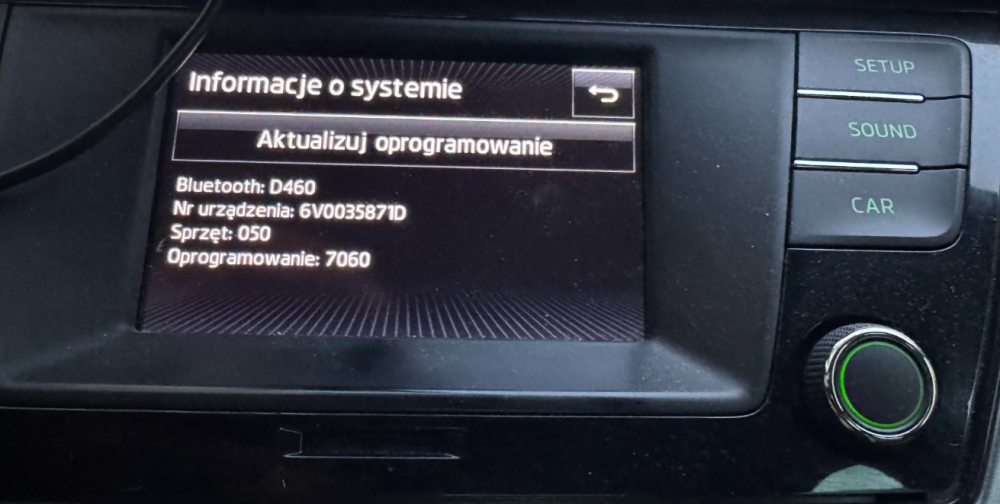
Hi all, I have my Fabia currently fitted with the base Swing head unit. I'd like to upgrade to Bolero or Amundsen, and it's important to me to stay strictly with original skoda/VAG parts - no aftermarket Android units or third-party adapters. My main goals: Apple CarPlay (via SmartLink+) - Swing doesn't support this at all Rear-view camera integration - not currently fitted What I have found so far: I would probably need Bolero unit 6V0 919 604 (and variants) to fit my Skoda. It is said that Bolero units are simpler and more reliable, especially when transitioning from Swing. I have found one auction with unlocked CarPlay + screen + unit + microphone + USB that manages SmartLink + connection cable. These Bolero models are two part: screen + unit. In my Skoda there is no designed place for control unit. I would need to fit my unit somewhere. There is no unit currently in my glovebox so I would to need to figure out some good place to store it - maybe you have figured it out already? There is some coding for car VIN needed for the units. - it is something that I can manage myself using VCDS? Here is my current unit information: Questions to the group: What model is best fit for that kind of transition. Would you reccomend Bolero or Amundsen? Is the unit I found (6V0 919 604 B) good fit? How to mount control unit? Will it fit in space behind screen unit? How to assign VIN to the unit so it works with my car? Is rear-camera setup straightforward for Fabia 3 Combi or it needs some additional changes in my car? Anything that I should pay attention to when I want to buy aftermarket units? Any guidence would be much appreciated!