oxonpunter
Finding my way
-
Joined
-
Last visited
Everything posted by oxonpunter
-
Had to do this last summer. On the mk4 when you turn ignition off the main info screen gives you the option to turn off “interior monitoring” — that’s what needs to be turned off so that the vehicle doesn’t set off the alarm if the sea is a bit choppy. No need to turn anything else off. So it’s all in the main screen when you turn off the ignition.
-
As @Stonekeeper says, it’s a very easy switch over. Much easier than tape!
-
My March 2025 Superb mk4 has a dealer-fitted towbar (well, they got a third-party in to fit it on their premises, before I collected the car from new). It’s a TowTrust detachable, and doesn’t seem as vulnerable to rusting as the previous factory-fitted towbar on my mk3. The main issue presented by the software issue (the only one I notice) is when reversing. In order to do so you have to keep your foot on the foot brake with a tiny pressure in order to stop the safety systems putting the brakes on (hard!). It is possible to reverse like this when you also depress the accelerator at the same time. It’s a pain, but manageable. And you make slow progress. I use my motor mover on the caravan as much as possible anyway. I was not warned about the problem when I ordered the car, which was already in the dealer group stock. I got a good deal on the car because it was already in their stock, and I can tow my caravan, so I get by.
-
Sandgroper - what did you do and what has worked best?
-
I thought so… thought the dealer did it on collection .
-
Thanks.
-
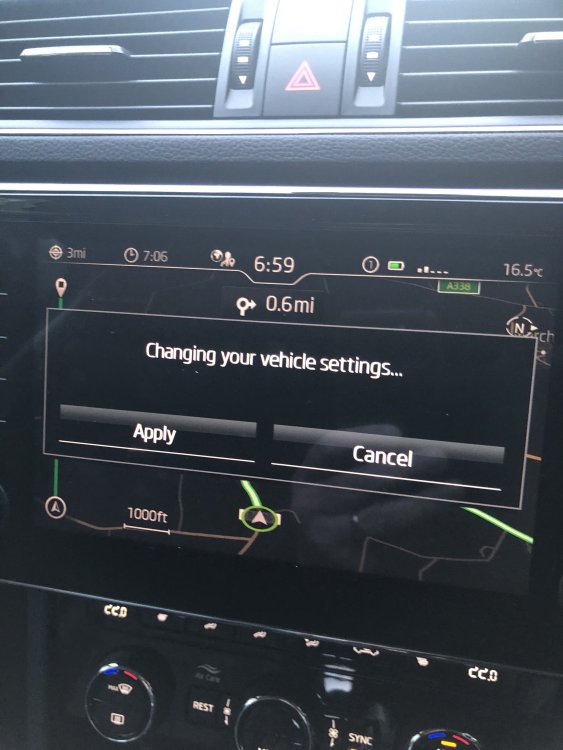
Here’s the message
-
Hi all. I have a brand new Superb Estate SE L. Each time I start a journey, after a few minutes I get a message in the infotainment screen asking me to to confirm changes in my vehicle settings. What’s going on?