Tideee
Finding my way
-
Joined
-
Last visited
-
Hi Everyone Apologies for resurrecting this most excellent and informative guide for fitting a tow bar to our beloved Yeti's....❤️ Has anyone had experience or know if the "Carista" App and scanner (either OBD or EVO) have the ability to re-code in successfully the various features to allow the addition of a 13 pin towing loom to function as expected (so rear PDL's switched off, rear fog switched off, etc) If you could please feedback, that would be awesome - Thanks all ☺️
-
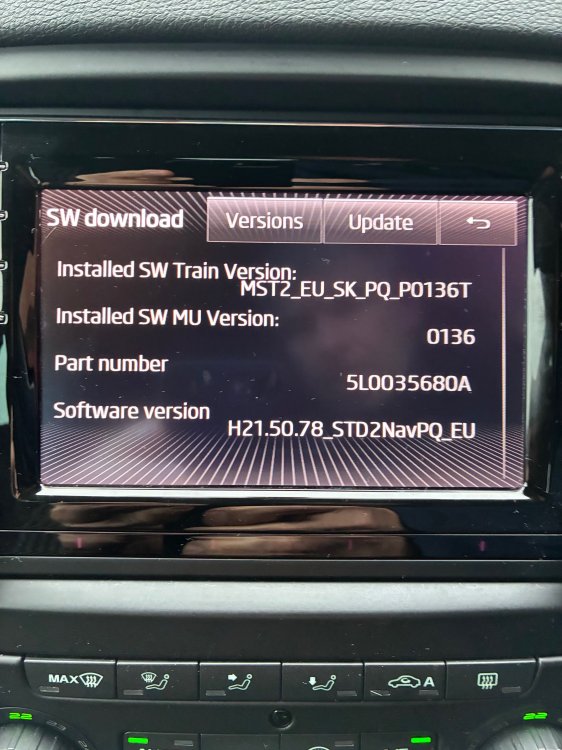
Hi Everyone - recently acquired a 2015 Yeti Monte Carlo CR170 and after reading all the useful data, posted by everyone on this interesting thread, I think that my car may well be on it's original software and is probably due an update...I've put image below so maybe @pab567 could you possibly please advise what unit I actually have and also if it can be updated to latest level software, ideally so I can maybe use Apple Carplay if that might be possible with the kit i've got ☺️ Thanks in advance everyone and a fab forum full of fantastic info for a new Skoda owner ❤️
-
Thanks @Lee01 😊
-
Thanks @Prezafab for quick reply 👍
-
Morning everyone.....I've been a Briskodian since 2005 but left the fold when my 2005 Fabia VRS was rudely written off by some clown in a Land Rover a fair few years ago 😥......nevertheless now back with a 2015 Yeti Monte Carlo and loving it ❤️
-
Morning Everyone Does anyone know the correct part number for front mudflaps to fit a Monte Carlo edition ??..........after a little research I find that part no KEA630001 fits all Yeti's EXCEPT a Monte Carlo 🙄 and think this is due to the different profile of the side skirts Has anyone any experience or further knowledge of this or has tried the KEA630001 front flaps and can feedback please ? Thanks 🫡
-
was this the final fix @IDC as I'm now experiencing the same issue and would be great to hear if a new thermostat resolved the issue....Thanks in advance :-)