



Skip to content

new fabia vrs owner from s.wales
Featured Replies

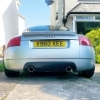
hey all my name is joe im a new member and new to skodas, im from sunny south wales in a little town called pontypool, im 22 years of age and a mechanical engineer. so thats a little bit about me so now for my skod! i have just purchased a bog standard fabia vrs in yellow yes yellow...its a real mans colour ok haha. shes on a 55 plate on 60k cambelt and pump has been changed and a fresh mot is currently being put on it for me all part of the deal. so looking forward to having some banter with you fellow skoda owners but hopefully not in the technical help sections, i enjoy a good meet and meeting others with a passion for 4 wheels so hopefully i will see you around!

a couple of pics at the dealers

media-1.jpg

media-2.jpg

cant wait to give it a good clay bar, polish and wax shame the weather isnt allowing it around here at the moment.

Welcome to Briskoda, nice looking car, Enjoy :)emoticon-0148-yes.gif

Welcome along, what a corking looking motor :thumbup:

Welcome mate, best colour if you ask me....... ;)

Welcome. Nice motor - as a former MKI vRS owner myself I can assure you you'll enjoy :thumbup: .

Had a great time in South Wales the other week - pub in Kidwelly (pre racing), racing at Ffos Las, then a few :beer: in Llanelli aftewards. Hospitality was superb - enjoyed the Double Dragon :thumbup: .

Hi and welcome aboard.

  • Author

Hey all, cheers for the warm welcomes i feel at home already.

Hi & welcome very nice looking vRS :p you love it :yes: nice colour too all the best :thumbup: :thumbup:

  • Author

the fabia is finally on my drive after having the mot and everything done, no advisory either. im so happy with my purchase, after a one hour drive home it just kept getting better and better especialy seeing my avg mpg always hovering between 51 and 52 on the A and B roads on the way back.

Create an account or sign in to comment

Recently Browsing 0

  • No registered users viewing this page.

Important Information

Welcome to BRISKODA. Please note the following important links Terms of Use. We have a comprehensive Privacy Policy. We have placed cookies on your device to help make this website better. You can adjust your cookie settings, otherwise we'll assume you're okay to continue.

Account

Navigation

Configure browser push notifications

Chrome (Android)
  1. Tap the lock icon next to the address bar.
  2. Tap Permissions → Notifications.
  3. Adjust your preference.
Chrome (Desktop)
  1. Click the padlock icon in the address bar.
  2. Select Site settings.
  3. Find Notifications and adjust your preference.
