



Skip to content

J15 VRS

Featured Replies

Some of you guys may remember my old Mk1 Black Magic vRS on CH2s and coilies, which I've regretted selling since I did :(

4941020806_a5328f566d_b.jpg

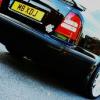
HOWEVER, I have decided I need another vRS in my life so have been on the hunt and found one being sold by a dealer take in px.

J15 VRS. Pretty sure I recall it from here but can't find it anywhere! Anyone shed any light on it's history?

Here's the autotrader ad:

http://www.autotrader.co.uk/classified/advert/201203442860367/sort/priceasc/usedcars/price-to/4000/price-from/2000/model/octavia/make/skoda/page/2/keywords/vrs/postcode/wf134nr/radius/100?logcode=p

Any info greatly appreciated

Edited by craig180

Hi, if you look at the map you will find there are not many members from Southport where the car is being sold.

I found:

Hipposouth / Members

I hope this helps?

John

It is a nice car!! Just bought a similar age / mileage myself in silver

Black is much nicer though :o

Nice VRS and good price too :thumbup:

  • Author

Hi, if you look at the map you will find there are not many members from Southport where the car is being sold.

I found:

Hipposouth / Members

I hope this helps?

John

Not quite sure I know what you mean mate! Is there a list of members???

It is a nice car!! Just bought a similar age / mileage myself in silver

Black is much nicer though :o

Cheers mate. Plans are to get to a similar standard to my old vRS. Wheels, coilies, detail, few minor classy touches etc...

Nice VRS and good price too :thumbup:

Yeah I thought so too. Would rather pay a little more for one that's been well looked after

Any other info on this or it's history then peeps??

Create an account or sign in to comment

Recently Browsing 0

  • No registered users viewing this page.

Important Information

Welcome to BRISKODA. Please note the following important links Terms of Use. We have a comprehensive Privacy Policy. We have placed cookies on your device to help make this website better. You can adjust your cookie settings, otherwise we'll assume you're okay to continue.

Account

Navigation

Configure browser push notifications

Chrome (Android)
  1. Tap the lock icon next to the address bar.
  2. Tap Permissions → Notifications.
  3. Adjust your preference.
Chrome (Desktop)
  1. Click the padlock icon in the address bar.
  2. Select Site settings.
  3. Find Notifications and adjust your preference.
