



Skip to content

New colour

Featured Replies

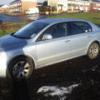
New Fabia colour, just seen it on bookface there the now, called "sky blue" and it can be ordered from June onward's

581786_447811145311352_1598991493_n.png

Horrible (IMO).

BTW, at this time Skoda are undecided as-to whether to offer Sky Blue in the UK apparently. That's presumably why it doesn't appear here: https://tools.skoda.co.uk/brochure_fabia.pdf

We could do with some proper pics of the other new colour: Meteor Grey (Monte and vRS).

Love it - anything better than the endless ranks of grey (and silver - which looks grey!)

All IMHO of course :think:

An glimpse of Roomster I'd say

Love it! Exactly the colour I would have chosen.

Love it! Exactly the colour I would have chosen.

Like an old fashioned " baby blue ".Had two cars in a similar colour back in the day.

Not my choice now,but still a welcome change from the silvers and greys.

I spotted 2 different new cars at the weekend in that colour,

and they were not a Fiat 500 or DS3.

Whatever they were really did not suit the car, and i am kicking myself that i can not remember what the were.

They were really horrible.

I am thinking one was maybe a VW, maybe a Polo.

My mums Powder Blue Austin 1100 was nice back when she had it in the 70's and mk2 Cortinas in a different shade looked OK.

george

This one looks good as a Colour tester, choose the panel in the colour you like.

(& in the second picture there is also a car.)

Wouldnt be a colour i would order, but its good to see new colours being offered from time to time, rather than the usual fair.

I would have potentiallly bought my vRS in Grey if it had been offered 2 years ago as a colour for the vRS

Create an account or sign in to comment

Recently Browsing 0

  • No registered users viewing this page.

Important Information

Welcome to BRISKODA. Please note the following important links Terms of Use. We have a comprehensive Privacy Policy. We have placed cookies on your device to help make this website better. You can adjust your cookie settings, otherwise we'll assume you're okay to continue.

Account

Navigation

Configure browser push notifications

Chrome (Android)
  1. Tap the lock icon next to the address bar.
  2. Tap Permissions → Notifications.
  3. Adjust your preference.
Chrome (Desktop)
  1. Click the padlock icon in the address bar.
  2. Select Site settings.
  3. Find Notifications and adjust your preference.
