



Skip to content

ARB bush Size again (sorry) vRS
Featured Replies

Evening all, went to change the ARB bushes this morning but got stumbled by a rounded bolt... 8h later i realised i have Erwin extractors..... idiot :)


There is a lot of discussion on the site about bush size vRS 17mm/19mm Sleeve/No Sleeve got me worried... have i bought the correct bushes??


I have the 17mm SuperPro bushes With new clamps and Bolts (also longer bolts to help).

When I was under the car this morning I coulden't see any sleeves... but the bar looks bigger than 17mm..


Whats the crack with this then? the 17mm will fit but with a Squeeze?


Sorry to ask an already asked quesion (going back on it tuesday and hate not having everything prepared.. :D

Knock the sleeve off the bar and fit 17mm ones, job done.

  • Author

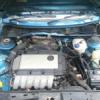
I can't see a sleeve..... Pic attached.. I think the sleeve has already been removed cos there where jubilee clips either side of the Bush. Have removed the outer ones and the knocking has reduced by 90%


I'm guessing the bushes will be a very tight fit then??


Still need to get that bolt sorted

FB_IMG_1488876354544_01.jpg

Edited by vRSsunroof

Be aware of the shape of the new bushes you have too, they may have a protruding groove in the middle, so youll need newer style clamps.

  • Author

The clamps have the same shape with space for the protruding part of the Bush. Boy do they sit snug in the clamps. Wondering how they will fit to the car.

Have you actually measured the bar to see what diameter you actually have?. It is quite a common upgrade to fit the R32 front bar, but this is usually accompanied by a rear anti roll bar as well

Create an account or sign in to comment

Recently Browsing 0

  • No registered users viewing this page.

Important Information

Welcome to BRISKODA. Please note the following important links Terms of Use. We have a comprehensive Privacy Policy. We have placed cookies on your device to help make this website better. You can adjust your cookie settings, otherwise we'll assume you're okay to continue.

Account

Navigation

Configure browser push notifications

Chrome (Android)
  1. Tap the lock icon next to the address bar.
  2. Tap Permissions → Notifications.
  3. Adjust your preference.
Chrome (Desktop)
  1. Click the padlock icon in the address bar.
  2. Select Site settings.
  3. Find Notifications and adjust your preference.
