Leaderboard
-
Lady Elanore
FREEDOM21Points25,084Posts -
gadgetman
Honorary12Points26,889Posts -
Lee01
FREEDOM12Points36,950Posts -
.jpg.1006585dfe4e2977315b67c3d642e37b.jpg)
Guest_
FREEDOM10Points83,824Posts


.thumb.jpg.9dd3f612ba7f13d10be5c518d3c8d255.jpg)

Popular Content
Showing content with the highest reputation on 23/03/20 in Posts
-
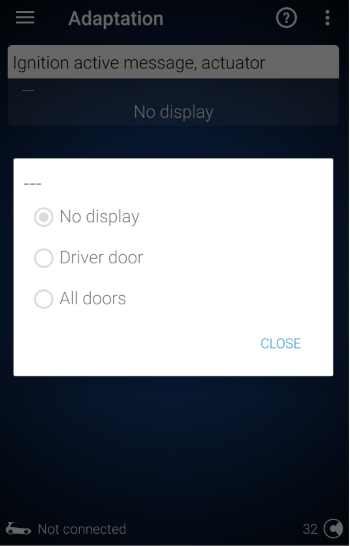
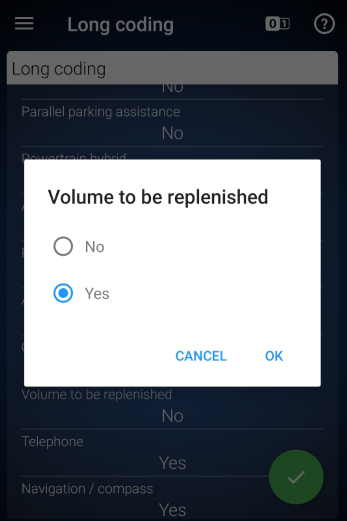
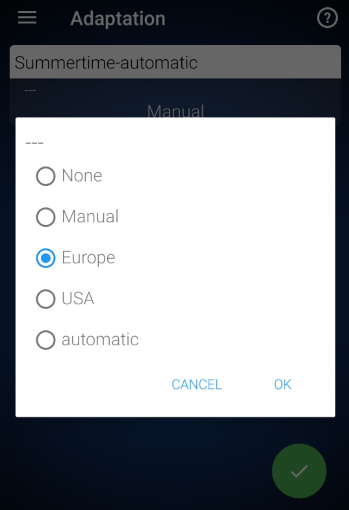
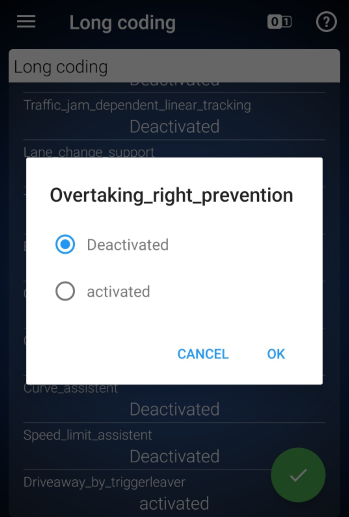
1 pointHi all, just recently purchased an OBDeleven Pro and made a few tweaks to my Karoq so thought I'd share the working tweaks done via coding (as opposed the the built-in "apps"). There's a lot of information on various forums but it's often not quite right for the Karoq or needs some translation. Disable ‘Ignition On’ Alarm This disables the ignition on alarm which is activated when the drivers door is opened. Control unit 17 (Dashboard) Adaptation Search "Ignition" Select “Ignition Active Message, Actuator” Set to "No Display" Show Refuel Quantity in Dashboard (Volume to be Replenished) Show the number of litres / gallons needed to fill the tank in the MFD / maxidot Control unit 17 (Dashboard) Security access > enter code 25327 Long coding Scroll down to "Volume to be replenished" Set to "Yes" Note: the units are controlled in the car settings (separate from consumption units) Enable Summertime Automatic Option in Time / Date Menu Enables the option to update daylight savings time automatically in the car menu Control unit 5F (Information Control Unit 1) Adaptation Search "Summertime-automatic" Set to "Europe" Disable the ACC Function to Avoid Undertaking Stops ACC slowing the car down if a vehicle in the right hand lane (UK) is moving more slowly. Obviously I'm just testing this one as nobody undertakes! Translated from clubskodakaroq.es and bear in mind the language is written for right-hand drive cars. "The adaptive cruise control (ACC) has a function to prevent overtaking on the right (RUV). If to the left of the vehicle there is another vehicle that runs at a slower speed, it is represented on the multifunction screen. To avoid "overtaking on the right," the system brakes the vehicle itself gently. The RUV function is active from a speed of 80km / h and the driver can interrupt his intervention at any time." Control unit 13 (Adaptive Cruise Control) Security access > enter code 20103 Go to Long coding Search for "Overtaking_right_prevention " By default it is set to enabled . Change to disabled . Restart the infotainment (hold power for 20 sec) - not entirely sure this is necessary More to follow. Working on a guide to enable lane assist and high beam assist for cars with the A5 camera.
 1 point