Everything posted by BOD20
-
Severe vibration problems on Superb S3
Could it be possible that one of the alloy wheel rims has been damaged and is not perfectly round ? If the car had hit a bad pothole in the road then this may have damaged both the tyre and the wheel, but it is much more difficult to detect damage to the wheel. One wheel that is not perfectly round would cause severe vibration but might well look ok on visual inspection.
-
ECE 2020/2021 (Valid since CW 25 2020)
The Windows built-in "unzip" cannot handle zip files that have been password protected (which is not the case here). It also cannot handle other compressed file formats such as "RAR" which you occasionally encounter (again, not the case here). But I've always found it pretty solid and reliable with normal zip files and have certainly never had any problems unzipping Skoda/VW map updates using it. As to the "adware" warning - many people locate software to download by using a Google search. It's not uncommon for those searches to take you to sites that are less reputable than Cnet and some of those sites are setup with multiple, deliberately confusing, "download here" links that will download software other than what you're actually looking for. I've had to remove "Mindspark", "MyWebSearch" and "DriverUpdate" so many times from people's PCs that I feel it's always worth warning people to be careful about what they download for free from the internet.
-
ECE 2020/2021 (Valid since CW 25 2020)
If you are using a Windows 10 computer then you don't need "7.zip" or any other external apps to extract files from a zipped file. Windows 10 has basic zipfile extraction built-in and has done for years. Simply RIGHT-click the zipped file, select "Extract All..." then choose the location where the extracted files will be placed. For Windows 10 users this is the safest option, since some of the free downloads of "7.zip" or "WinRAR" can contain adware or other unwanted apps that can be installed on your computer.
-
Leave USB cable plugged in?
The USB socket in front of the gear lever on my 2019 SE-L definitely turns off after a while when the car is locked. If I leave my iPod connected then it gradually discharges over the course of a few days so the USB socket cannot be charging it up.
-
Map updates - Again!!!!
That's great that you have it sorted at last. Well done. Looking at the files it seems that the Columbus unit searches the root (top) folder of the USB stick or SD card for the file called "metainfo2.txt". If it doesn't find that file in the top level folder then it stops at that point and says that it can't find any data. The Columbus doesn't seem to look inside any folders on the USB stick/SD card - it expects to find the file in the root/top level. The file "metainfo2.txt" contains information identifying the location of the "Mib1" and "Mib2" folders (basically it says that these folders are also in the root folder). The Columbus then uses that information to locate and read those folders. So, as long as you ensure that "metainfo2.txt", "Mib1" and "Mib2" are in the root/top level folder of your USB stick or SD card then it should work ok. If you extract the downloaded zip file directly to the USB stick/SD card then check if the extraction process creates a new folder and copies the files inside that folder. That would mean the required files would NOT be in the root/top level but would be inside a folder and therefore would not be found by the Columbus. This is why I recommend extracting the zip file to the hard drive of the computer first, then copying the resulting files manually to the USB stick/SD card as this gives you more control over where the files are copied to. This is how the USB stick/SD card should look at the root level
-
Map updates - Again!!!!
The "root" is the top level on the USB stick. If the USB stick is completely empty and you copy a file directly to it , then it will end up in the "root". You should NOT end up with a folder called "HIGH12_P187-EU_202022" on the USB stick - only the 3 items mentioned previously. It's not necessary to copy the 3 items individually but it won't do any harm either - just as long as they all end up on the USB stick. Note that it can take a LONG TIME to copy the "Mib" folders to the USB stick - it can take 2 hours or more.
-
Map updates - Again!!!!
Not sure what you mean here, but the file "metainfo2.txt" and the two folders "Mib1" and "Mib2" (and all their contents) should be copied to the root of the USB stick. So when you open the USB stick using File Explorer in Windows you see the following - What you don't want to do is create a new folder on the USB stick and have these items inside that folder.
-
Map updates - Again!!!!
Yes, and that means the downloaded file at step 3 is now "HIGH12_P187-EU_202022.zip" which will unzip to a folder called "HIGH12_P187-EU_202022". Everything else should be the same.
-
Map updates - Again!!!!
This is the procedure for the Satnav update for a Columbus 9.2 inch using a Windows 10 PC to download and prepare the update. No extra software required for a Windows 10 pc (i.e. you don't need to use 7zip or anything else). The procedure for Amundsen is different. 1. Went on to the Skoda update portal, put in my VIN and the ECE2020 maps update was available. 2. Downloaded the map file to my PC. It was 26 GBytes and took about 2 hours on my average 32Mbps broadband connection 3. This gave me a zipfile called "HIGH12_P184-EU_2020.zip" 4. I unzipped this to the hard drive of my PC (Right-click on the file and select "Extract All") 5. This took a while but I ended up with a new folder with the same name as the original zip file ( "HIGH12_P184-EU_2020") 6. Inside this folder were two subfolders - Mib1 and Mib2 - and a file called metainfo2.txt. These 3 items are all that you need. 7. Took a 32 GByte USB stick, connected it to the PC, and formatted it to FAT32 (go to "This PC" in File Explorer, right-click on the USB stick icon, select "Format" and select "FAT32" as the "File system"). 8. I selected the three items from step 6 above (i.e. the folders Mib1, Mib2 and the file metainfo2.txt ) and copied these to the USB stick 9. This process took about another 2 hours 10. Connected the USB stick to the USB socket in the car. 11. Switched on ignition, opened Satnav, tapped the settings icon, then "Version information", then "Update (SD/USB") 12. It took a few minutes but then it started to upload the data with a percentage display showing progress 13. It took about 40 minutes to complete the upload - ignition has to be on so best to do this whilst driving somewhere. That is it - but note the time it takes to download, copy to USB, and install in the car. Note there should only be 1 file "metainfo2.txt" and 2 folders "Mib1" and "Mib2" at the top (root) level of the USB stick. If there are any other files showing in addition to those then delete them from the USB stick before step 10 above.
-
Map updates - Again!!!!
I'll give it a go for you, if you wish. If you're happy to post me the USB stick and VIN then I'll try to download your map update and setup the USB stick for you and post it back. Send me a PM if you want to try that.
-
Help needed with microphone please!
I can't help with specific models of mic but I would say the best kind of mic for recording voice whilst moving around is a "headset" mic rather than a lapel mic. The headset mic is either worn like headphones or has a loop that goes around one ear. The mic is on a thin wire "boom" that is held along one side of your face (often with some tape) and stops just at your mouth. This keeps the microphone element closest to the source of the audio - your mouth. That means you can turn down the recording levels, which in turn means less pickup from the surroundings - especially if you can talk fairly loud while recording. Because it's attached to your head, you can move your head around and the mic stays in the same location relative to your mouth, so the levels don't vary if you turn your head. The mic element is also firmly supported so it doesn't rattle around and, if worn correctly, there won't be any "handling noise". I don't know what options there are for headset mics compatible with an iPhone. As a test, you could making some sort of "headset" for your lapel mic and positioning it at the side of your mouth - or maybe just taping it to your cheek to see if that helps at all !
-
Superb Spare Wheel Well
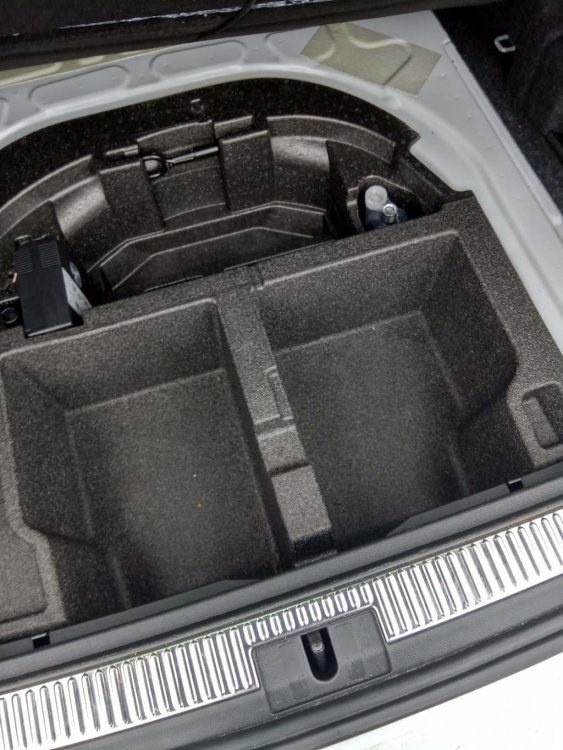
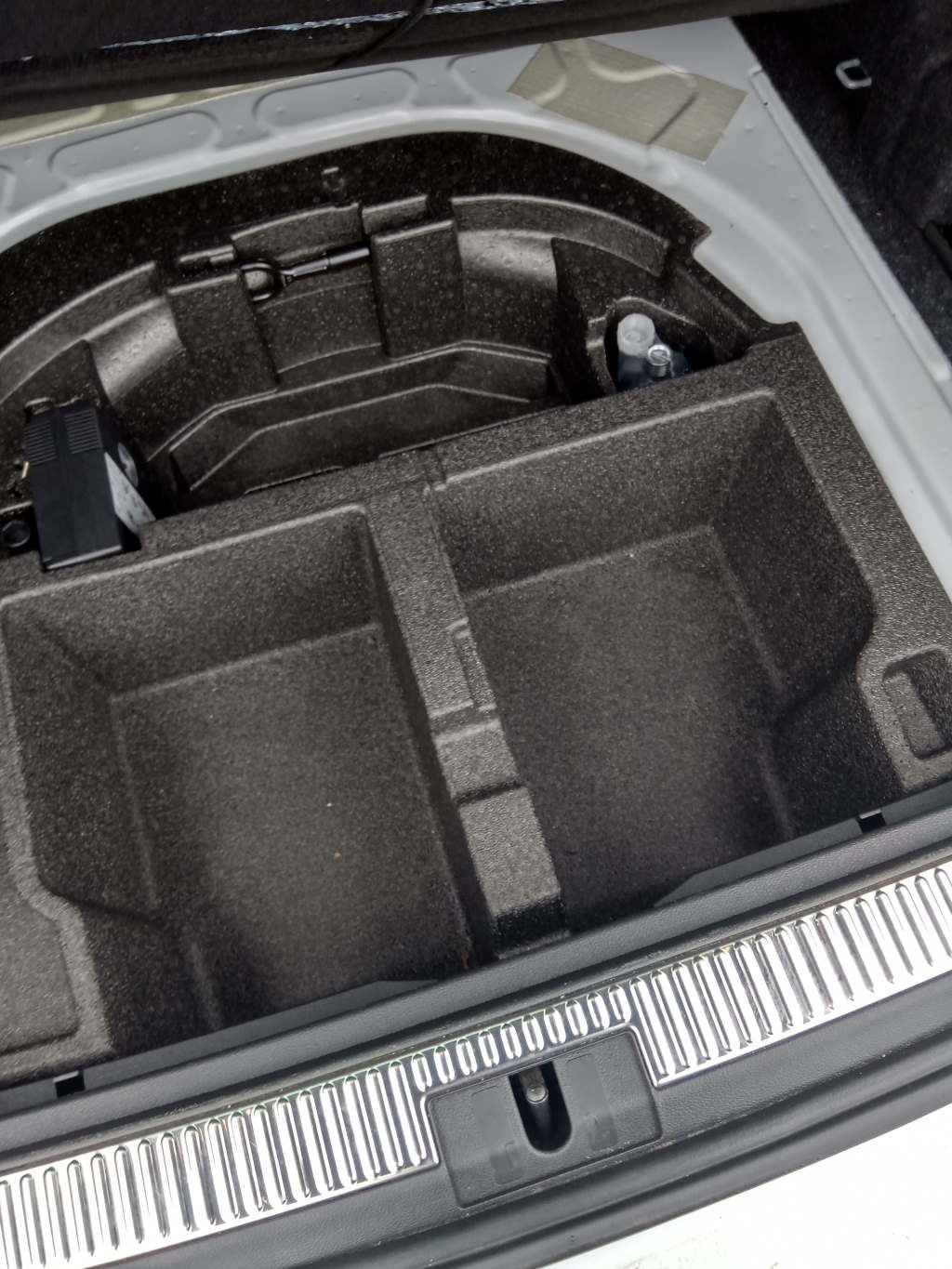
I've just taken delivery of a 2019 Superb Estate and plan to replace the wheel repair kit with a spacesaver wheel. Does anyone have any advice for changing or modifying the plastic molding under the boot floor so that the spacesaver will fit ? Anyone had previous experience of this ? Any advice greatly appreciated.