Ingper
Finding my way
-
Joined
-
Last visited
Everything posted by Ingper
-
MIxed. I can see older RCS and SMS, but since a week ago no identity at all is showed on the incoming regardless of RCS or SMS. Received two with SMS format only a few hours ago, and a marking that "new message received" showed up. But still the same - two new rows but with text "Unknown" and not possible to open.
-
Hi, Since a week ago (2nd of March ?) all new SMS I receive are showed as "Unknown" instead of the number or name (if in the contact list) on the car display. And if I try to open them in the car MMI I only get an error message "Format not supported". For every new SMS I receive, a new "Unknown" line appears. It's only the incoming map that doesn't show the SMS correct, other maps as Sent, Trash etc looks and behaves ok. Also the list of contacts, call and receive phonecalls and dialling with voice control works ok. And all SMS looks normal on the phone. Telephone is a Samsung A33, Android version 14. No system updates or re-configurations at the time when this issue started. Another attached phone (Samsung A50) works ok. Tried to restart the phone - no difference. Removed it from the car Bluetooth list and re-installed it - no difference. (Cannot test the phone in an other similar car right now my wifes A3 is too old and doesn't support manageing SMS on Bluetooth) Any ideas ?
-
Yes ! Go to "Basic Settings" instead and then select "Disengage heater". Not anything else. Not obvious....🙄 That will unlock the heater (work with all cars with MQB platform ?) and the DTC's will be possible to erase - if not already gone.
-
Yes, I have found a lot of such EGR issues (Google). But almost everything seems to be a little bit "older" cars, mine is a MY 2019 (2.0TDI, Bluemotion, dual cat). Is the weak EGR design still an issue on MY 2019 and on ?
-
Thanks. You're right - that is typical "Adblue crystal"..... 😉. But then the coolant leak will be even more mysterious. Maybe I need to wait and see if I need to top up again soon, I think.....
-
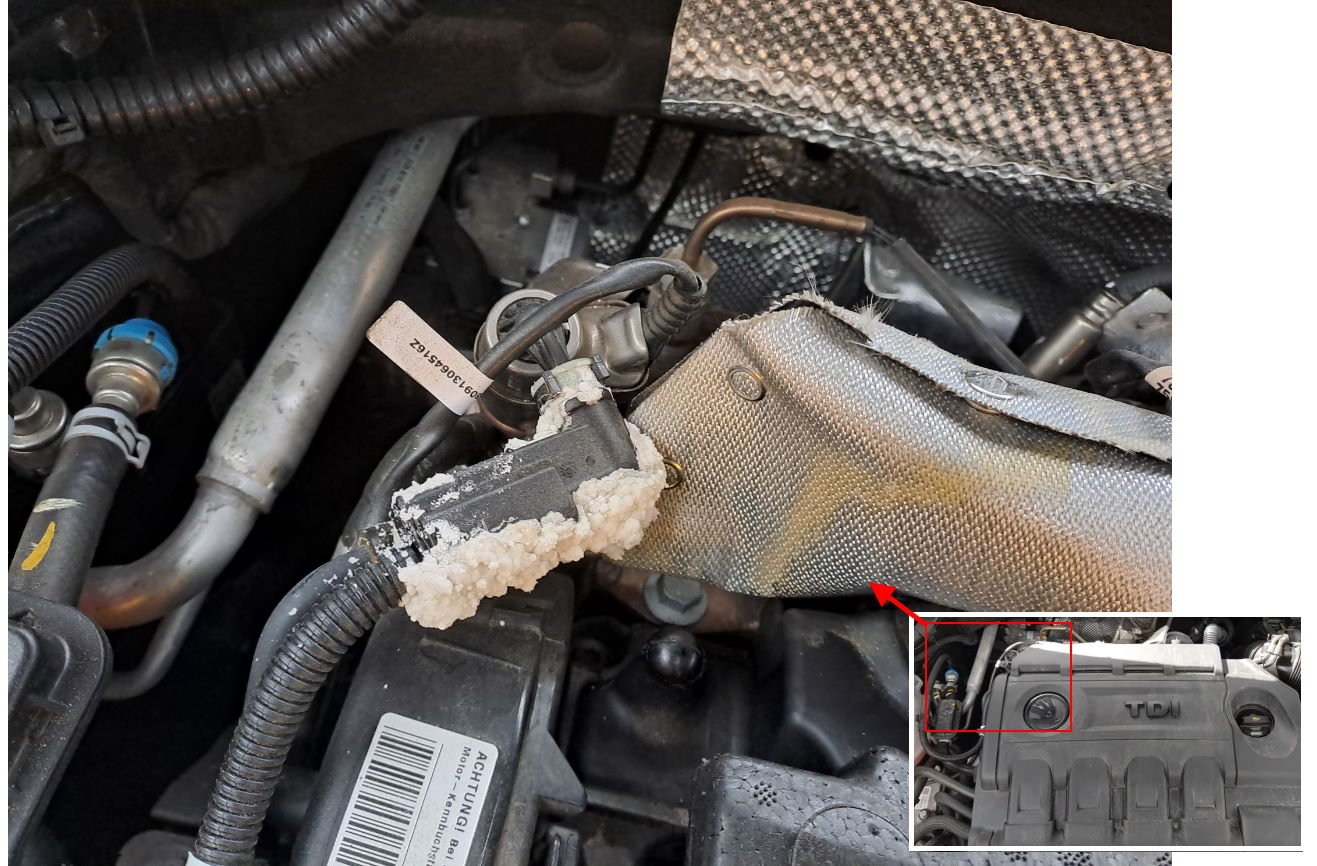
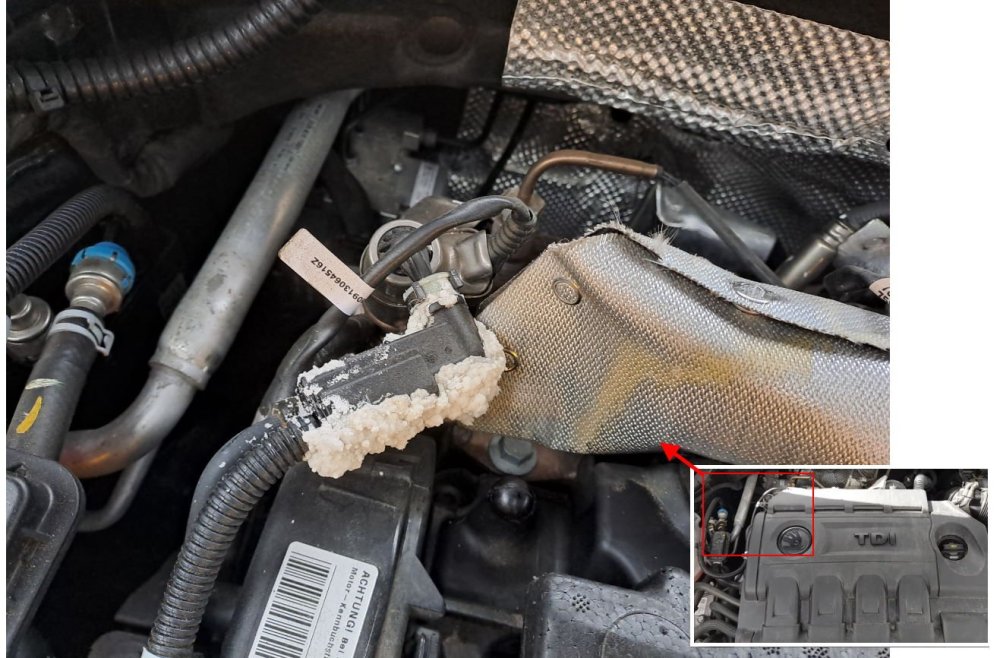
I got coolant level warning this morning, and needed to top up with 200-300ml. Didn't see any obvious leaks but found this (see photo), that looks like traces of a very long term leak. I ran the engine for some time but it felt dry around this part/connection. But what is the use of this connection ? Is it coolant water inside at all ? Anybody that have had the same issue ?
-
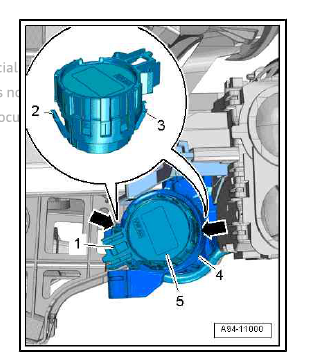
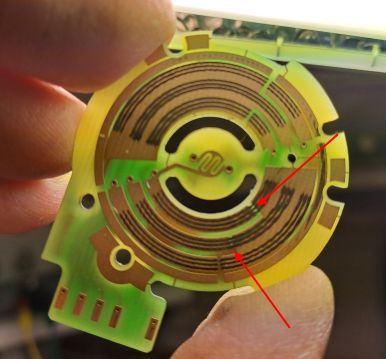
Problem solved ! If anybody else will have the same issue and find this thread, I post a follow up. Some people with exactly the same problem has got the transponder antenna ring at the key hole replaced. I also tried that, but it wasn't the problem. The issue was the ignition switch electronic - copper powder from the worn PCB seems to have been stucked in the space between to sections with a short circuit as result: The name/text of the DTC (module 09) seems to be used for many ignition/KL15 related failure, and is somewhat misleading in this case ("KL15 short to plus") It was not KL15 that is short to plus that was the root cause (it was the result), it was the key position "ignition" signal (not power) from ignition lock switch that seems to be present ("to plus") in a forbidden combination with other key lock signals, and then triggers the DTC Steering wheel module, that is the module that receives the signals from key lock switch, will not recognize any problem, because it has not the whole picture I think. By comparing the ignition key lock related "measured values" (VCDS) of Steering Wheel module to another (functional) similar car, I realized that it was something wrong already at the signal output from the key lock switch (although that module didn't recognized it was anything wrong) The electronic switch unit is possible and easy to replace as a separate part of the key lock (some homemade tools needed at the arrows to release the locking tabs): Disassembled the switch unit and as can be seen there is a lot of "dirt" at some isolating spaces between the sections, "dirt" that was found to be somewhat conductive:
-
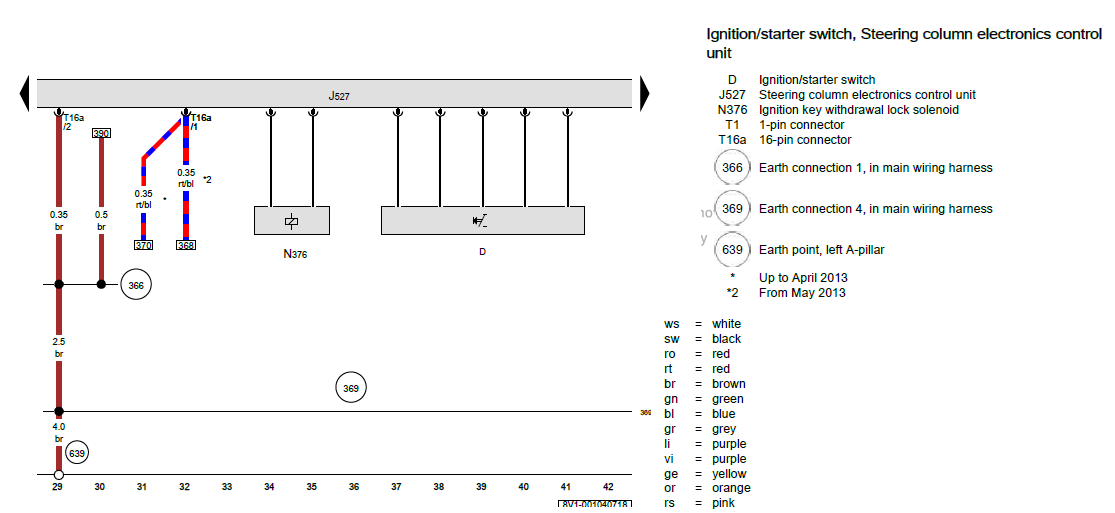
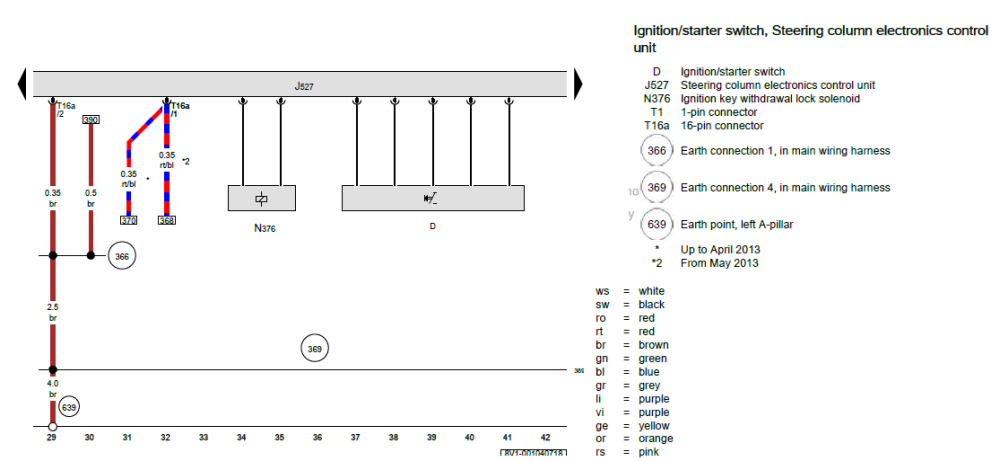
But it is really unswitched (or at plus level when it shouldn't), because the ignition/KL15 relay J329 is still enabled (controlled by module J519). And I'm afraid the ignition key switch information is sent by CAN, from Steering wheel module (J527, that has no fault codes). Not easy to measure:
-
Only when the key is fully pulled out, the ignition is switched off an engine stops. In the display there's a message with a yellow key symbol (and a yellow triangle at the bottom) saying something like "Engine Start System Fault, contact workshop". The car is drivable and seems to work, but the ignition remains "on" (and engine running, if started) until key is pulled out. The issue is only when trying to switch "off", when switching "on" all works normal (besides of the error message). The issue is permanent and came suddenly. Battery is quite new and charged. I have: Checked with VCDS, and module 09 says fault "B12E6 Terminal 15, short to positive". No error codes in steering wheel electronics (that includes the ignition key lock, I think). And no other fault codes at all. Checked ignition relay J329 that switches the KL15, and it is working. Both on the test bench and in the car - but seems to still have coil power (from J519 ?) even when key has been turned to "off". If I, when switching on, not turn the key all the way to the mechanically steady "on" position but only as far as ignition has switched on and hold the key in that position, it will go off as normal as soon as I release the key and let it return to "off". But as soon as I have turned it far enough to reach the (mechanically steady) "on" position, ignition will stay on regardless of what I'm doing. Until I remove the key from the ignition lock. Performed a power reset, i.e. disconnected and reconnected the battery. No difference Checked signals associated with KL15/ignition on module 09, and I can see that one of the four followed the key position and always changed from "active" to "not active" when key is turned to "off". Looks like it still could understand the key correct position.... Also checked signals associated with ignition key lock at Steering Wheel electronics. Both followed the (faulty) ignition status and said "enabled" until I fully removed the key. But I don't know if this test is relevant at all, not 100% sure about the monitored signal impact on the function. I really don't know how to proceed. Any ideas ?
-
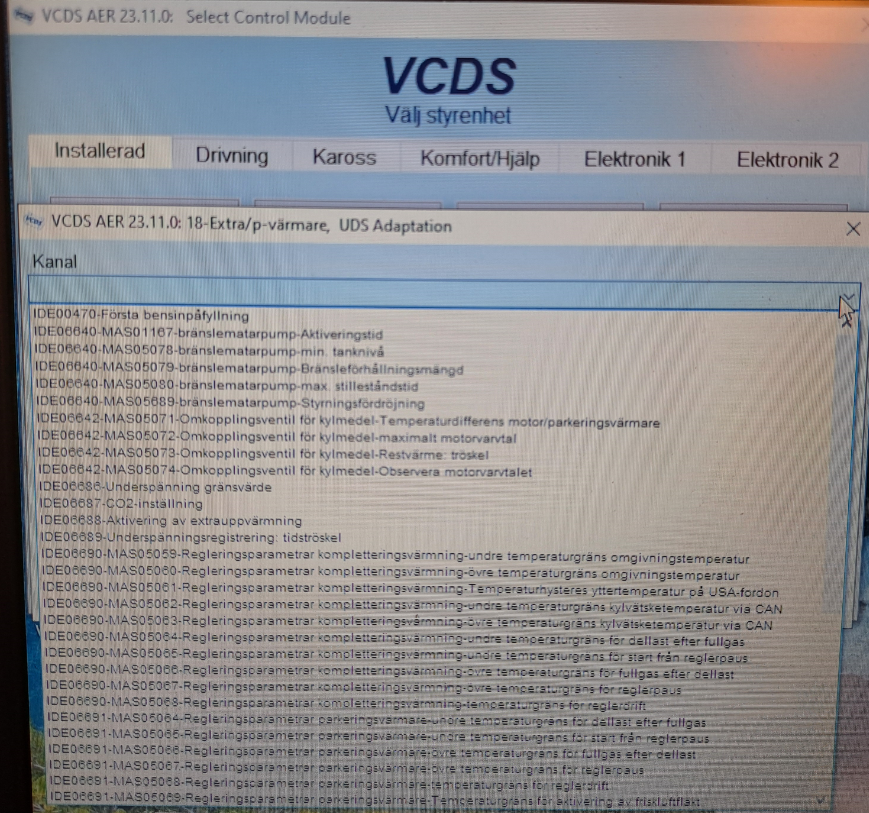
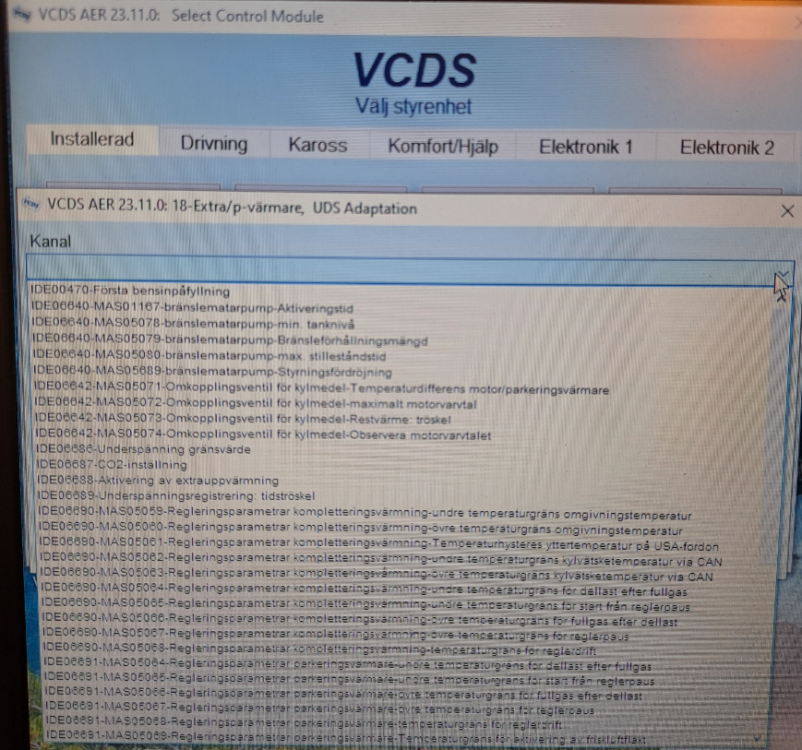
My daughters Octavia 2016 had some fault codes in Aux heater (#18) - a short circuit in Webasto water pump (correct, it was totally burned up inside - now replaced) that also was the reason for the second DTC - overheating. This puts the heater in "locked" mode. I understand that I now need to unlock the heater and then erase the fault codes (reverse order doesn't work) before it can be used again. But I don't understand how to unlock the heater: Many people suggest "Adaption" and then channel 42. But this car/unit seems to use UDS and the alternatives are in a pull-down meny. Not channel number. A lot of different stuff and functions but no alternative as "Unlock heater". Other suggest to instead use "Basic Settings", and there really are an alternative "Unlock heater" ("Lås upp värmepaketet" in Swedish). But, if I select that (and hit "Go") I only get an error message saying something like "Error: Wrong order or circumstances" (free translation from Swedish...😉) I've also tried (and succeeded) to login, the box/knob down to the right, before trying "Adaptation" or "Basic Settings". But no more alternatives at "Adaptation" and still get the same error message when trying "Unlock Heater" at "Basic settings". What am I doing wrong.....? (Picture showing how it looks in "Adaptation" and the pull-down alternatives instead of channel numbers):
-
On my daughters Octavia III 2016 there's an intermittent fault on the G62 sensor (coolant temp sensor, 1.6TDI, CXXB engine, 4x4). Most of the time it works ok, but suddenly i reads +140°C (i.e. sensor wire short to ground, R=0Ohm, I think) and a DTC is saved in the memory. The sensor has been replaced without any difference. It happens once each second day or so, and the DTC also triggers the Engine Lamp. Sometimes it can be a little bit more often, and sometimes the temperature gauge may change from the normal 90°C position when this happens, I read on an Audi forum about someone with the same problem that found an insulation issue on one wire in a harness where routed through the firewall/metal. When this wire was short to the metal the G62 error (140°C) appeared.... Anyone that have had this intermittent G62 failure on an Octavia III, and may have a hint of a common location for such insulation problem - if it's relevant ?
-
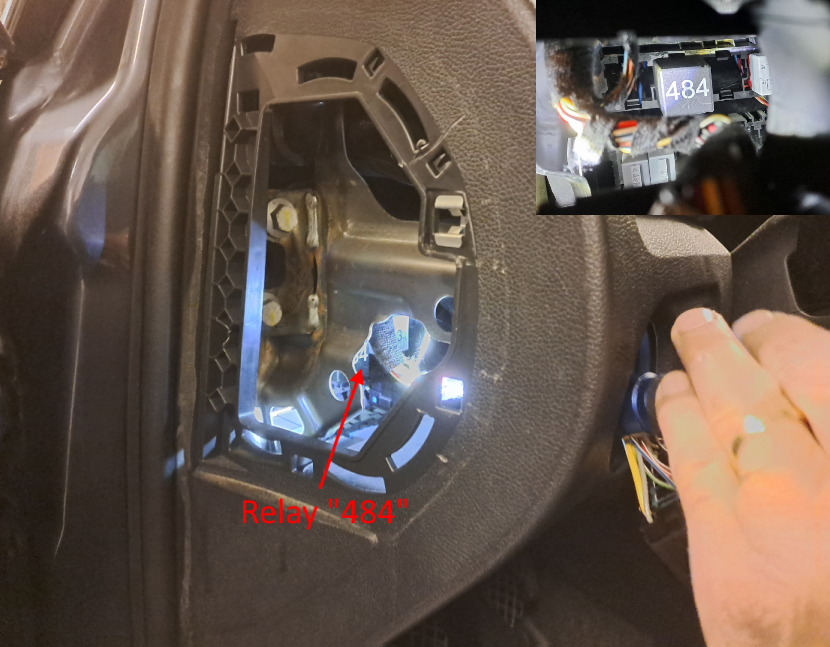
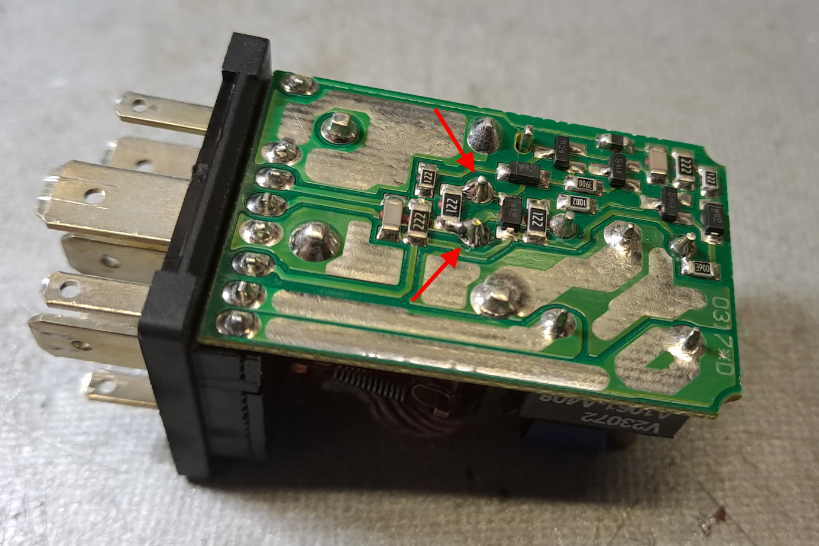
Problem solved ! I hate when there's no follow up on threads. And especially because there are other threads on the forum with exactly the same problem as mine - but without any follow up how it was soved - I will below write a detailed "how to fix it". On these MkII models there is a relay numbered "484" that does the complete DRL function. It's the same type of relay as I linked to above. Sadly the relays are located inside the dash panel, but if you have small/thin hands/arms it's possible to reach the relays from below without disassemble a lot (ask a child...). Remove the foam above the pedals. It has no screws, but be careful not to break it. Remove the cover on side of the dashboard on drivers side (mostly to get a better view, not possible to reach the relay from here) Remove the light switch: In "0", push in the knob some mm and turn it slightly to the right, This will release the locks and the switch unit can then be pulled out. Remove the connector from switch (push the locking tabs on its sides) and route the connector to the dashboard side opening to free up the hole Now you can see the relay "484". With a long tool it may be possible to take it out through the light switch hole, otherwise you need to grab it from below, Remove the cover of the relay (two snap lockings, quite easy) Inspect the PCB for suspect and/or cracked soldering, In our car I think it was the signals to one relay coil that was interrupted by a crack. May be barely visible (looks like a ring in the soldering). Re-solder all suspected pads. In the picture the suspected/cracked pins are already re-soldered: Re-assemble the relay, put it in place again and connect the light switch connector to the light switch again. Test the car with light switch in position "0" - side/parking light should be activated with ignition on, and after staring the engine the dipped beam should light up. If everything works, re-assemble the rest of the panels and covers. You have now saved a lot of money 🙂
-
Hi, Didn't see your question until now. Any progress ? Because I have almost exactly the same issue as you, also with the same writing in manual (that mention the non existing switch): https://www.briskoda.net/forums/topic/517481-automatic-light-drl-not-working-anymore-early-mkii
-
Not 100% correct. The law only requires DRL in the front also in Sweden. Maybe it was different when it all begins in the 80's, but since EU/EES, i.e. many years ago, we (need to) have the same requirements as the rest of Europe. But when they began to deliver cars with front DRL only (to save fuel/energy) a lot of Swedish owners claimed about it - even though it was according to laws and regulations. At least in the beginning. Including my wife (new Audi A3 in 2013). To keep the family peace I enabled the rear LED lights @DRL by VCDS almost immediately when she received her - at that time - brand new car 😗
-
Hi, My daughters Fabia MY2009 (manufactured 08/2008) has an issue with the automatic light, i.e. the head/tail lights that is activated even then the switch is in position "0" when the motor is started. It began with a sound of a relay that was flipping and moaning somewhere inside the dashboard on drivers side (LHD here in Sweden). Then, after some weeks, the automatic light didn't come on at all and the sound stops. Now it's all silent and all lights works but needs to be switched on/off manually. Sadly she didn't told me when this was happening, now some months later I heard of the problem for the first time.... The car manual shows a switch for the DRL, close to the fuses and OBD. But it's not present - it's only an empty hole in that place. It also seems to be a different fuse layout/usage on these early MkII: In most threads and articles about MkII it says that fuse #17 is the one for DRL. But not on this MkII, #17 is for one of the parking/side lights instead. No separate fuse for DRL can be found at all. The light switch is checked/measured, and seems to be ok. Anybody with same experience ? Could it be this relay that is failing, or is it only for aftermarket installation of DRL functionality and not installed by the manufacturer at all (btw it says it fits cars before manufacturing date of 10/2008): https://www.skoda-parts.com/spare-part/5j0941589-relay-for-daytime-lights-skoda-9652.html If so, where is it located ? Because it's not behind any of the dashboard side panels that some MkII videos and homepages shows. I guess it's instead above the pedals - somewhere. -------------------------- Second, does somebody have the wiring diagram for this early MkII with DRL ? Because nothing I have found on the Internet seems to be correct and for this car (i.e. the same problem as the fuse functions and numbers)
-
Thanks. Yes, it's a good point ! The problem is that I want them in stainless steel, everything else will become rusty when driving on Swedish winter roads (sooner or later). But black finish stainless is not easy to find. May have some plans to hand paint them black in the future....
-
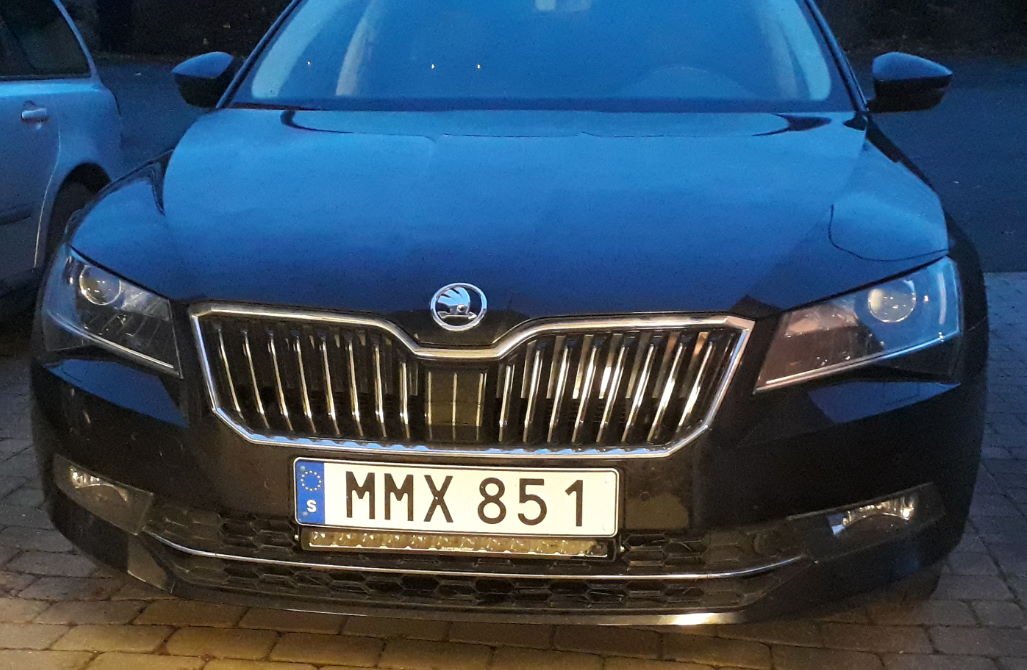
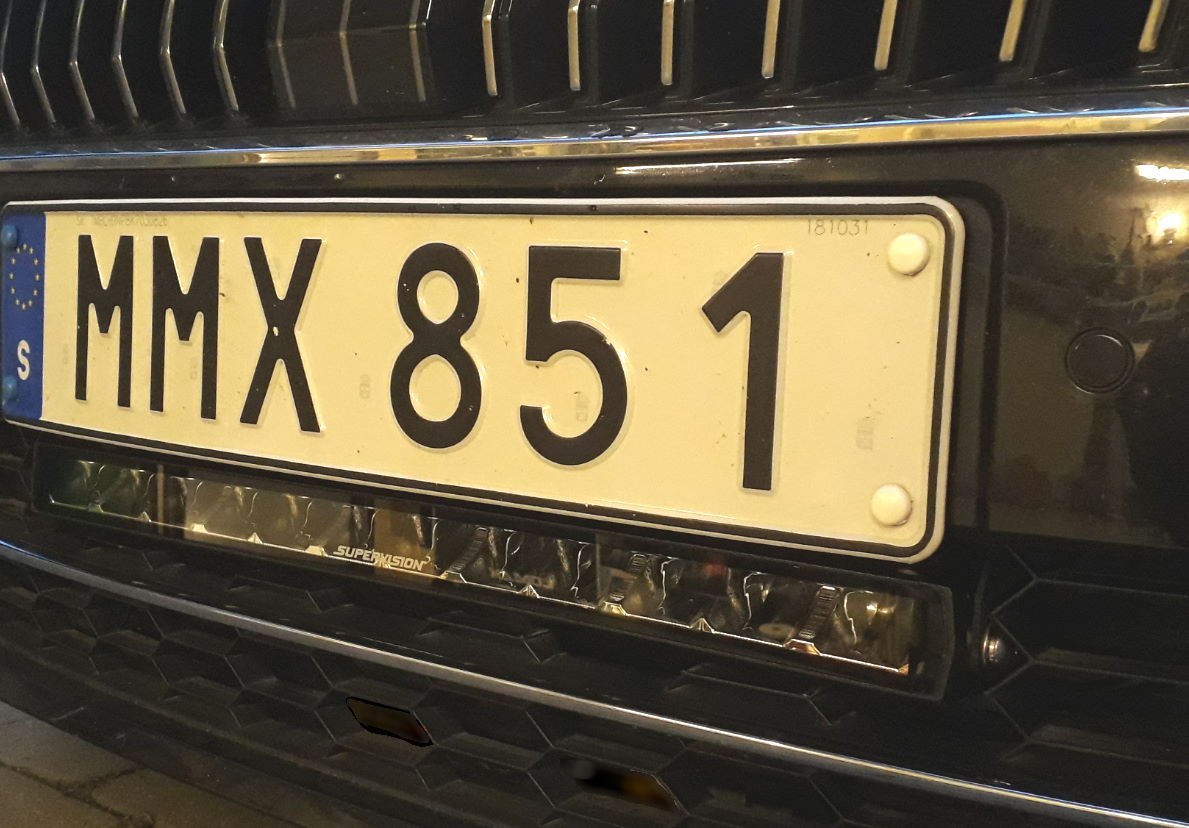
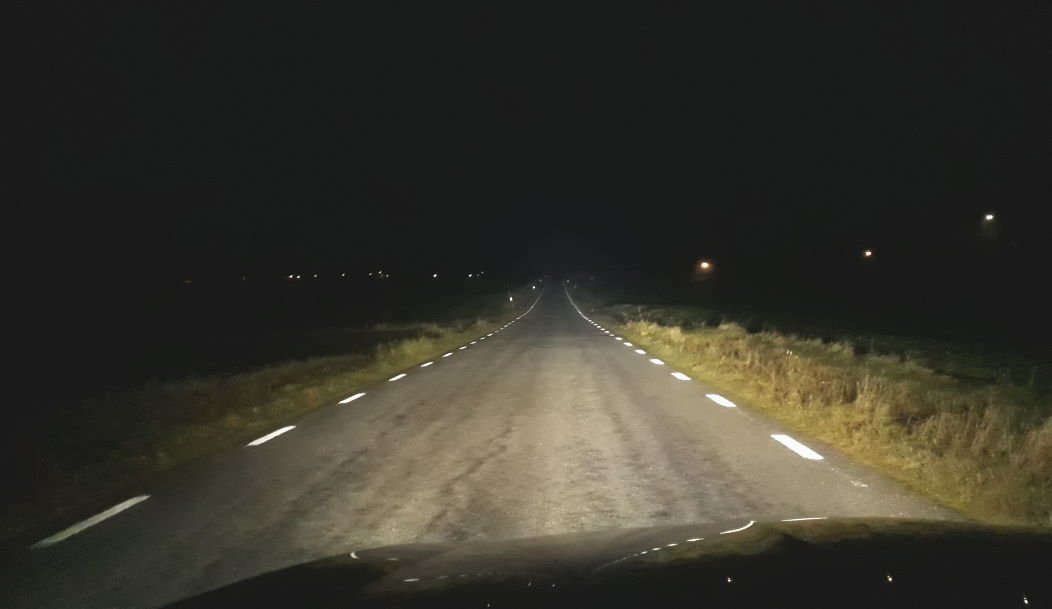
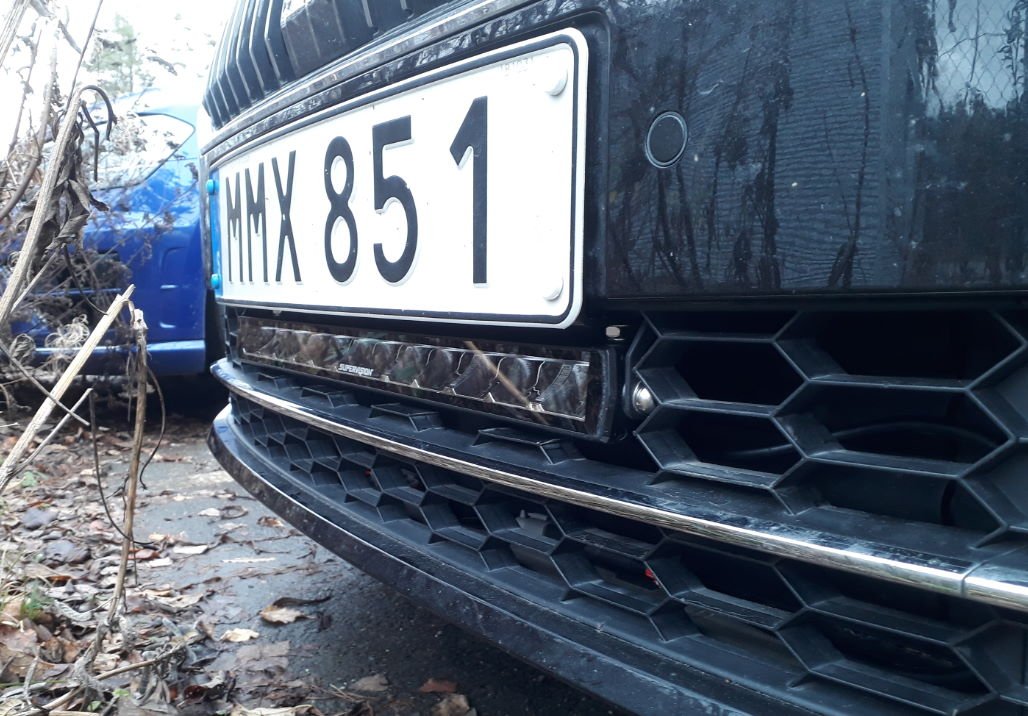
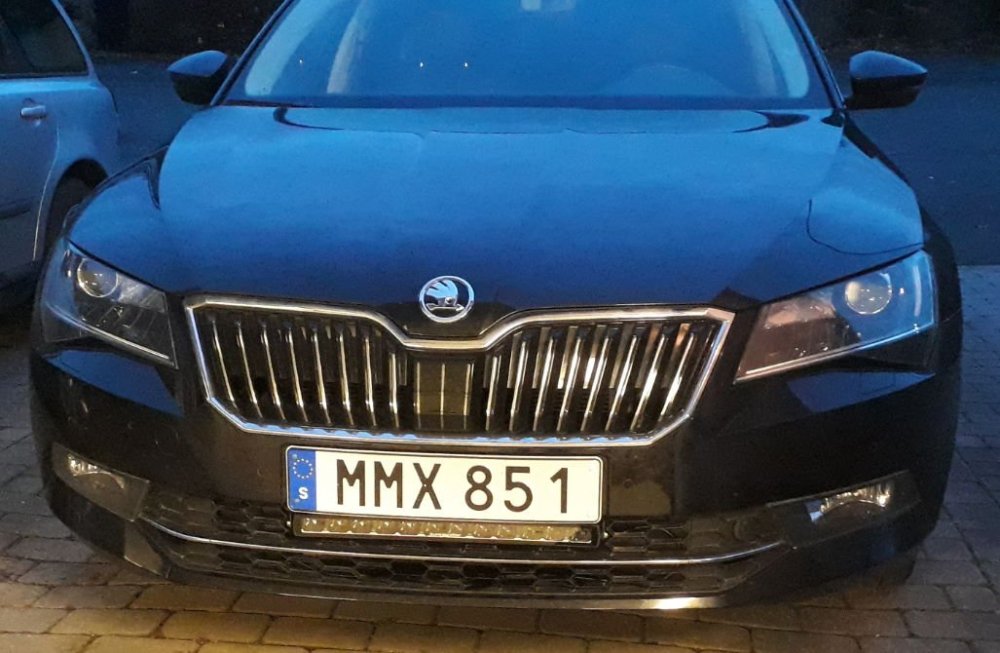
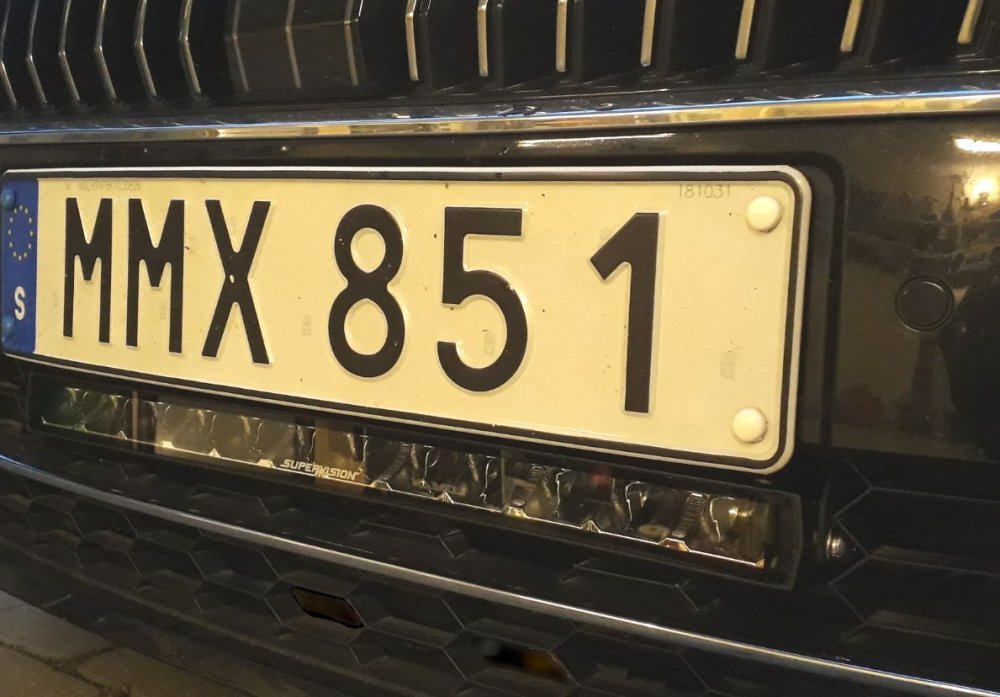
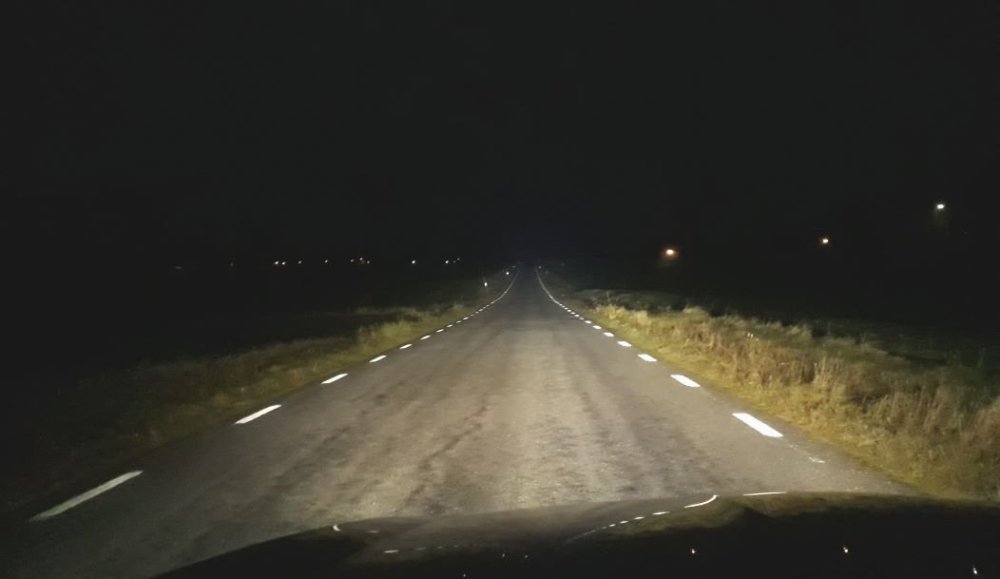
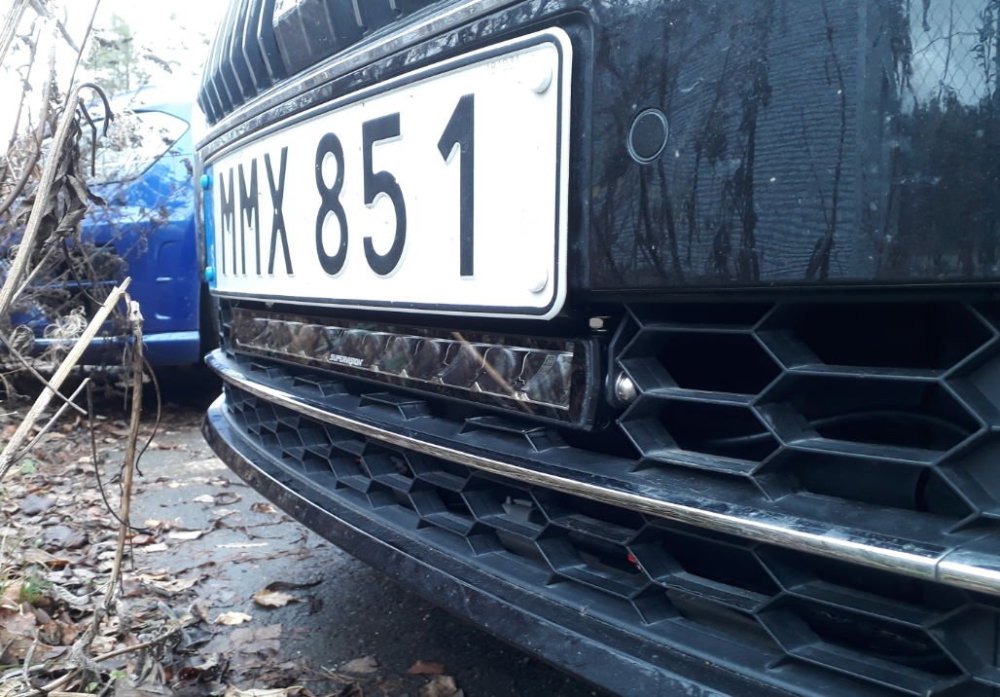
Thanks for all input. I hate threads without a final summary, so here comes a report. Although the colour on CAN wires mentioned above didn't match, the pin numbers did (thanks). I also found out that the numbers seemed to be the same on other VAG cars built on the same platform. I was aware of this, but because it was the commands to the headlight that would be used/monitored, I was convinced these messages were present on this headlight CAN bus 😉 That is not correct. It also includes information/messages to the headlight about what area to mask/dim (when "high beam assist" is in use) and if "full high beam" (i.e. not restricted at all) is the case. The information is used by the OEM controller - "if full high beam/no restrictions, activate the output". I didn't pay close to €250 for the unit, bought it second hand and reloaded with the SW for my specific vehicle. Also didn't cut the CAN wires, only unisolated them to make it possible to solder the OEM controller CAN wires in parallel. The modification was done to the harness a little bit away from the headlight connector (and on the right side, more space on my left-drive car) to make it more robust and no additional wires to take care of when headlight connector is disconnected/connected. The LED bar I used has indirect optics/reflectors that focus all light in an oval shape. That's why there's no "extremely white spot" just in front of the car, that use to be seen with some cheaper LED bars. It was possible to get everything in place without removing the front, but I had to move the outdoor temp sensor to a new location (interfered with one end of the light bar). Link (only in Swedish, use Google Translate): https://ljusgiganten.se/supervision-fusion-600-x.html The result ? Works perfect ! High beam light is now quite ok. Not 100% perfect, mostly limited by the low location. But there are almost no other alternatives because of front parking sensors, radar etc.
-
Hmmm,.... If we discuss a little bit more I'm afraid that you'll convince me to use the BCM instead....🤔 Btw I think some configuration may also be needed (remember this from another thread) ? But I have VCDS so that would be a minor issue.
-
What I understand the optional I/O pin positions on the BCM socket are not populated in the harness connector, i.e. they also need to be added. But I got your point. Thanks for your answer.. I'll double check the harness and pin numbers anyway. But now I have something to start with 😉.
-
In opposite I think it's a very good way 😉. Especially because now I have no time to modify the Body Control module connector, route wires to engine room etc. If it was few months ago - yes, then it would have been an alternative (and of course - cheaper). And it will only be used together with Highbeam, because I really need better highbeam to light up on the dark road and surrounding (to see animals etc). The original Superb III Bi-xenon highbeam is quite bad. Why would anyone use such LED bar together with fog lights ? Since a few years there are some aftermarket OEM modules that have correct implementation also when using Highbeam Assist. I.e. they switch the output off as soon as ANY part of the original light needs to be masked. For example https://modernum.se/produkter/extraljuskablage/digital-lightning/ (sorry for the swedish in the link). But to prepare the installation I need to know the CAN bus pin numbers in headlight connector. Anyone ?
-
Anyone that have the headlight connector pin functions/spec ? Need to find out what pin is CAN-H and CAN-L that will be monitored by the highbeam control module I'm going to add (installing a LED light bar to make the really bad original high beam light a little bit better). Searched on the Internet and have found Workshop manuals of almost everything but not wiring diagram of the headlights. I have Bi-xenon with Headlight assist, MY 2019. Thanks in advance