




Getting100
Members
-
Joined
-
Last visited
-
I had just booked mine in for Diagnosis for later this month 2024 and it's now £180
-
-
Yes your right Breezy Pete it is the rear hub and bearing Assembly I'm after
-
Can anyone help provide me with the correct part number for my rear wheel hub my vin number is TMBKG7NE5F0046885 Many thanks Neil
-
Mine was misting and wet at the top and the mot station listed it as an advisory
-
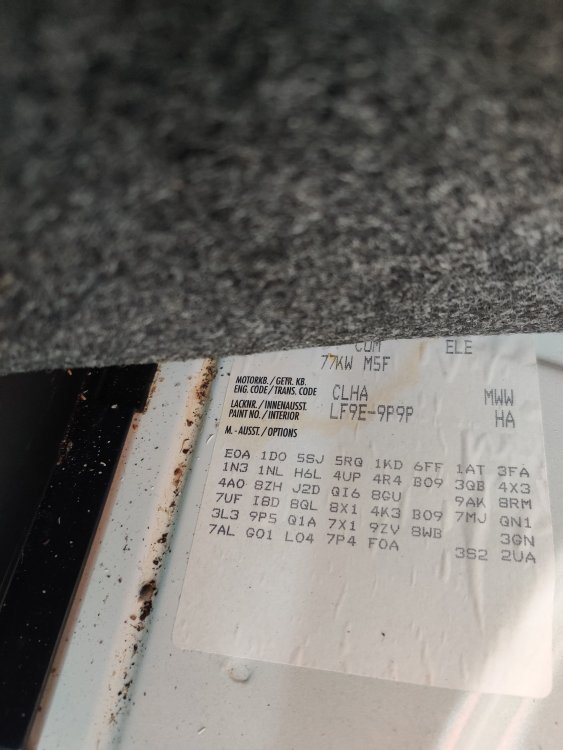
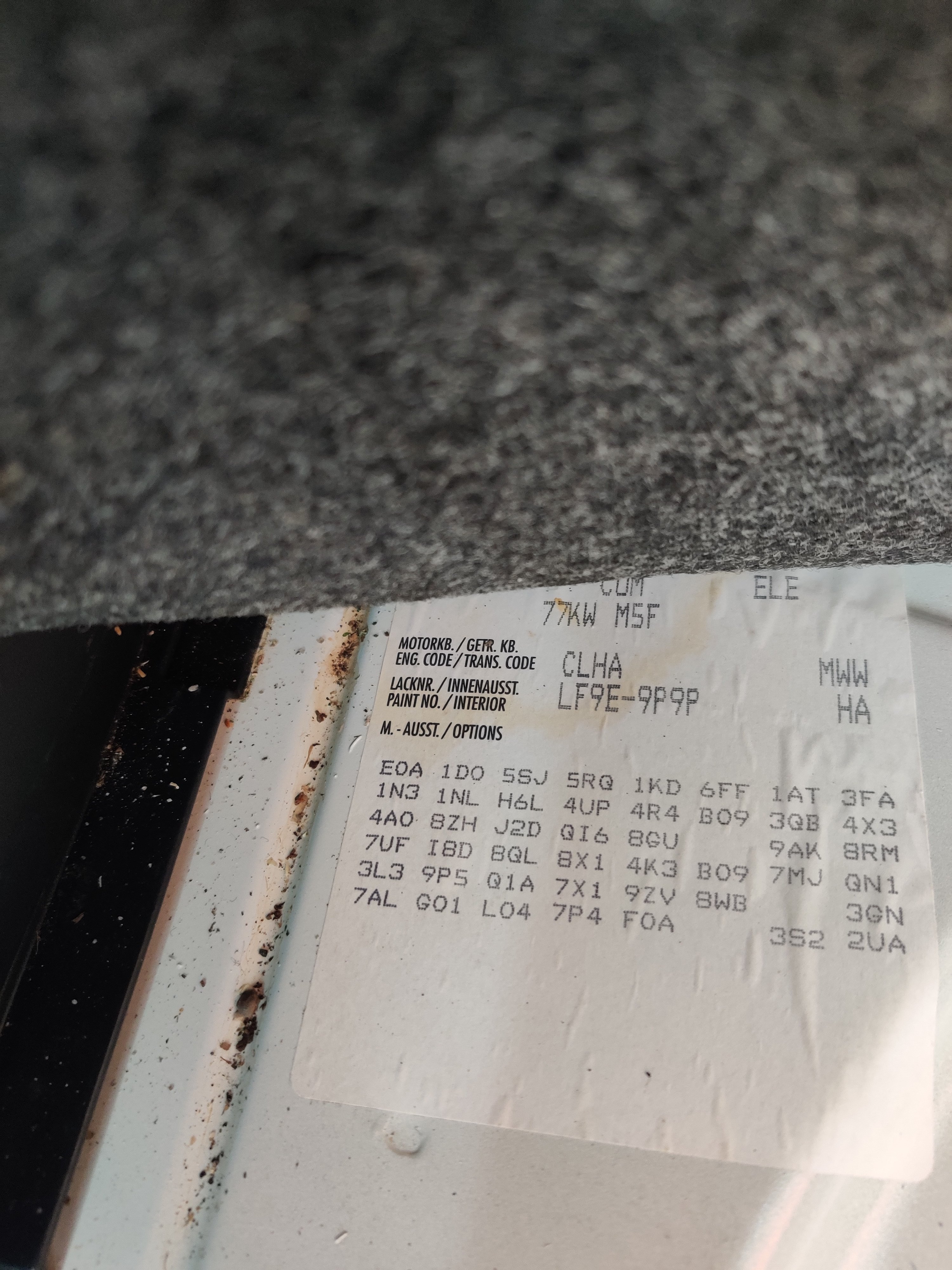
I've asked before me thinks But I would like to double check I'm after the rear and front disc sizes The rear in the boot has the code 1KD for the rear But nothing for the front My vin number is TKMBKG7NE5F0046885Thanks Breezy that's lucky I bought the 276mm ones but I wasn't sure as there seems to be 288mm that might have been correct as wellCan someone confirm what Size/ fitment Code I need for the front Discs please Vin number TMBKG7NE5F0046885Thanks PeteI thought I couldn't find see it Vin no TMBKG7NE5F0046885 After more searching I think I've found it is it 1ZE ?Which codes are the front/and rear codes for discs I can see 1KD for the rear
 Hi I had a mobile mechanic come yesterday to put a new expansion tank on and do a flush as the water had gone dark . And put in new pG13 pink antifreeze he took off the bottom driver's side radiator hose and flushed it out with fresh water connected it back up and filled with The pink G13 but only got 2 ltr in then run up the engine to temp so the thermostat opened the pink antifreeze turned dark again he said it's because the water in the block didn't drain out and the water pump will need taken out to empty the water out is there another way ?


Important Information
Welcome to BRISKODA. Please note the following important links Terms of Use. We have a comprehensive Privacy Policy. We have placed cookies on your device to help make this website better. You can adjust your cookie settings, otherwise we'll assume you're okay to continue.
Account
Navigation
Configure browser push notifications
Chrome (Android)
- Tap the lock icon next to the address bar.
- Tap Permissions → Notifications.
- Adjust your preference.
Chrome (Desktop)
- Click the padlock icon in the address bar.
- Select Site settings.
- Find Notifications and adjust your preference.
Safari (iOS 16.4+)
- Ensure the site is installed via Add to Home Screen.
- Open Settings App → Notifications.
- Find your app name and adjust your preference.
Safari (macOS)
- Go to Safari → Preferences.
- Click the Websites tab.
- Select Notifications in the sidebar.
- Find this website and adjust your preference.
Edge (Android)
- Tap the lock icon next to the address bar.
- Tap Permissions.
- Find Notifications and adjust your preference.
Edge (Desktop)
- Click the padlock icon in the address bar.
- Click Permissions for this site.
- Find Notifications and adjust your preference.
Firefox (Android)
- Go to Settings → Site permissions.
- Tap Notifications.
- Find this site in the list and adjust your preference.
Firefox (Desktop)
- Open Firefox Settings.
- Search for Notifications.
- Find this site in the list and adjust your preference.