growntree
FREEDOM
-
Joined
-
Last visited
Everything posted by growntree
-
Look on the radio in the car section under wipers. There is a tickbox for auto for the front wipers and another tickbox for the rear wiper, although the rear one doesn't have a rain sensor as far as I know, so presumably has some techno mumblejumble for working out when to wipe from the front sensor and at least in my case, generally gets it wrong.
-
My other half got rid of her 59 plate i20 auto last year which I believe was a 1.4, replacing it with a 1.0 suzuki swift auto. Both the Suzuki and my Octavia 1.0 DSG are much quicker to get up to speed and return better fuel economy than the i20 did, so as was said above, engine technology has moved on.
-
Thank you for the quick reply ords, although both threads list 13 inch rear wiper blades rather than the 14 inch ones currently fitted.
-
Hi there, You don't say if you've got a hatchback or the combi. The combi will fit at least a 205/55R16, so if you've also got the combi, it might be worth taking a wheel off and see if it'll fit. It fits outer side down so the polystyrene thing with the jack etc can fit inside it. I've heard the hatchback has less room, so needs a space saver though. Hopefully someone with the same size wheels as you will be along soon to confirm.
-
Hi there, I've been trying to find a replacement wiper for the rear of my 2019 se technology combi. I've measured the existing one and it is 14 inches, but all the online websites list a 13 inch wiper blade or 11, 12 or 16 inch in the case of halfords. I'd normally just buy a universal 14 inch one, but it has a special connector to attach it to the wiper arm. Can anyone please let me know what part number it would be for the 14 inch wiper blade? I have seen the a331h bosch listed elsewhere here, but that seems to be a 13 inch blade, Thank you for any help.
-
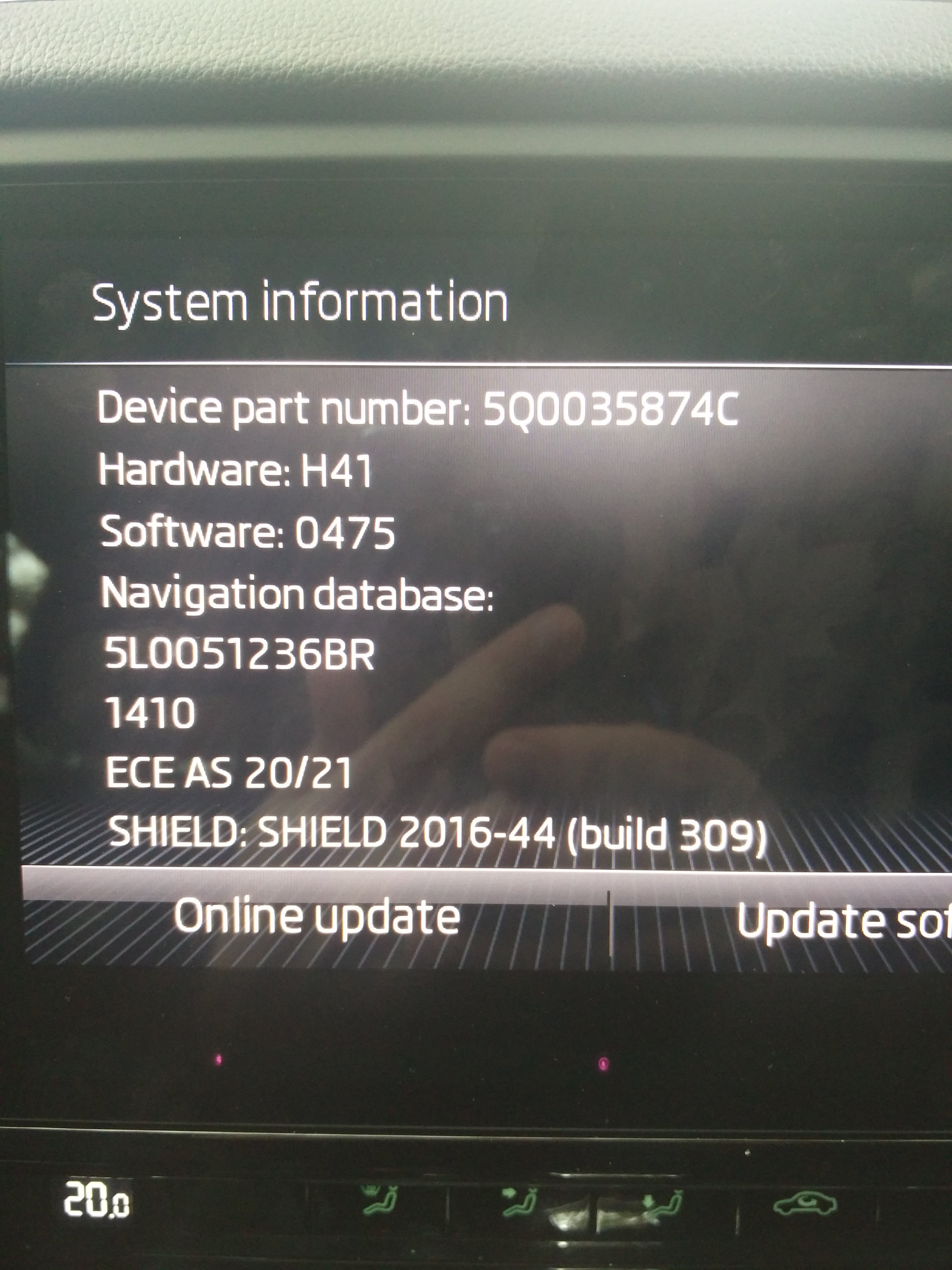
The SD card has the maps on. The SE Technology has the amundsen radio in it and will only work with an original skoda SD card. If you have no joy with the dealers, there are usually 2nd hand škoda SD Cards for sale on that will known Internet auction site in 16GB and 32GB sizes, although better to go for the 32GB size as the although the latest full map will actually fit on the 16GB card, it is only a matter of time until you'll need the 32GB card anyway. The maps can be downloaded for free from škoda's website by going to the updates section and typing in your vin number. Insert the škoda SD card onto slot 1 in the glove box after copying on the latest map.
-
Have you thought about the vcds adaptation that makes the fog lights come on with main beam? I seem to remember there being an adaptation just for main beam flash and an extra one for when main beam is turned on. Thought this might be worth considering before you go down the wiring and extra lights route.
-
The radio logos can also be transferred on using a USB stick. Go to media.info website and search for the radio station you want in the search box in the top right and choose the most appropriate one from the search results. Scroll way down the page to the other information section, then click on the link that mentions a vw car radio. Do this for each radio station you want the logo for. Copy all the logos to a USB stick or sd card and plug it into your car radio. Whilst listening to the radio, go onto the options and there will be an option for radio station logos, so you can upload the logo file from the USB stick or sd card to a particular preset. Please note, you are not updating the logo to the frequency or radio station, you are updating the logo for that particular preset (ie preset 1 or preset 2) If there is already a logo on that particular preset, you'll have to remove the old one first by clicking on the option on the radio to remove the logo before choosing the new one.
-
Thank you. The 16GB card is the Skoda one that came with the car. I just downloaded the large map to see how large it was and was surprised that it was only 14GB when uncompressed. Elsewhere on the forum it has been said that the Amundsen units require the original Skoda SD card as there is a hidden partition and my SD card happened to be 14.8GB in size, so I copied off the original files (in case I messed it all up, so I had something to go back to), then deleted them all from the card and copied on the maps directory from the updated map download. I believe from other posts on the forum, that if you can get an original Skoda 32GB card, then the latest map can just be copied to it and it will work and I seem to remember a list of part numbers being provided somewhere in a post, but can't find it at the moment. Hopefully your 16GB card will have enough space on it like mine did, but I am no expert on this by any means as this was my first attempt on my first car that has a built in satnav.
-
Thank you for the welcome StickyMicky. Ah, that's nice and local. I've just got one motorbike, although my son has two and he's not even 18 yet.
-
The update you downloaded will need extracting with 7 zip or just right click on it and choose extract from the menu if you're on a recent version of Windows. Right click on the map folder that has extracted and click properties to see how big it is. Then right click on the sd card drive and click properties to see how much space is available. The 2020/21 A1 map should be 14GB when extracted and my 16GB card has 14.8GB free on it, so the map would fit on mine, but you might have less space for some reason. If you've got less space on the sd card then the size of the extracted map, then you'll have to pick a smaller map. If the available space on the sd card is larger than the extracted map, then it might be a problem with your sd card reader or your USB cable if it is an external sd card reader. Hope that helps.
-
Hi @pab567 Is there any chance you could send me update details for the attached please?
-
Sorry to revive an old thread, but you all seem to be in the know about acc. The first octavia I test drove had acc and as part of the test drive I had it on and set to 30 through a town when all the traffic stopped at a set of traffic lights and the car allowed down and stopped behind them and turned its engine off and I had to accelerate myself and reactivate the acc when everything started moving again. I have since bought a different octavia with acc and the other day a similar situation happened, but when it stopped it immediately beeped saying brake and then lurched forward instead of turning off the engine. Which is the correct mode of operation for the acc?
-
My 2019 octavia with amundsen has the same issue. I had been considering using a powered USB hub to get round it, but after reading the advice above, I think I'll try a selection of cables first. I already have the hub, but I'll have to wire up a cable for the power socket as it has a mains adapter that provides 5v at the moment and I would need to convert that to be able to get the power from my cig lighter USB charger.
-
Just out of interest, I downloaded the full 2020/21 euro map (that says 32BG card only) which extracted to 14GB. I moved the original files off the card (incase I messed it up) and then copied the new 14GB maps directory to it. I thought it might have slowed down the satnav a bit due to it being near the limit of the card, but it seems to be working fine so far.
-
New owner of a 2019 Black estate 1.0 DSG SE Technology. No mods so far, but it did come with a full size spare wheel and I've managed to fit the Latest euro (32MB card only) map onto the 16GB card that it came with and is working fine. From the number of mods I've seen so far on this forum, it looks like I'll be busy for a while
-
Hi all, I have just bought my first škoda and picked it up last Monday. It is a 2019 octavia 1.0 dsg Se technology estate in black. I have always tinkered with cars, upgrading some of the options that are missing and am looking to fit a reversing camera as per the post in the guide section.