Iancc
New here
-
Joined
-
Last visited
Everything posted by Iancc
-
Hi, I can also report that the navigation has updated the map database to the latest version since the above action "over the air" without incident.
-
Hi Travs, I thought I would provide a quick update since the dealers intervention to update the OCU & MIB software. After several trips including the previous failure routes, the system has worked without error. The weather forecasting app also now updates during a journey, although it is probably questionable the benefit of having the forecast for the location you are driving through - just look out the window! As a test it was useful. So it appears to be worth the effort of visiting the dealer to have these "fixes" applied.
-
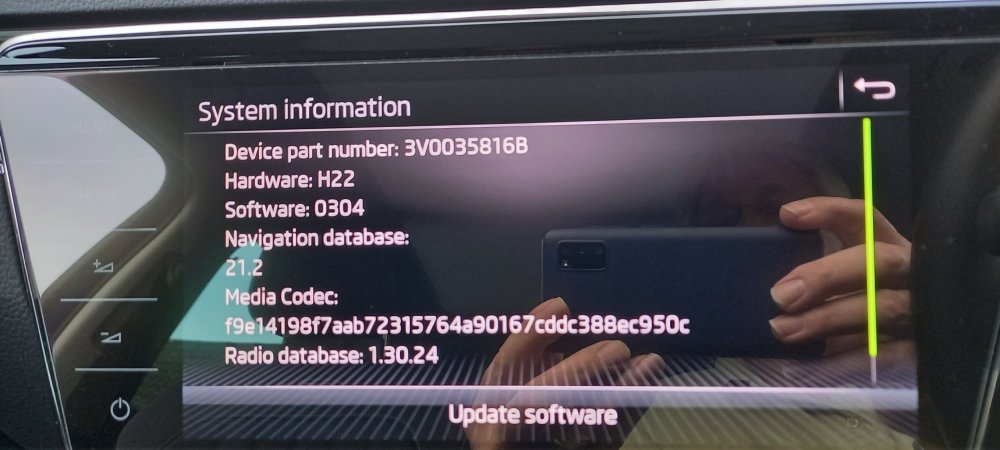
Hi, I have been suffering the SOS failure on longer journies with the attendant follow on navigation, speed signs and radio failures since late last year (in the last week or two the system has advised of a software update available however this seemed to fail to load/install. The dealer had the car back this week, having advised several SOS problems have been seen like this and that one of the updates had made this situation worse. They reloaded/updated the Ocu and Mib software. It was version 0270 and is now 0304. The navigation software and Radio databases have also been updated from 20.9 to 21.2 and 1.30.16 to 130.24 respectively. Might be worth contacting your dealer. I have an IV and am just thankful that the engine management writers have a superior quality control system than the Infotainment writers, that system works extremely well!