Skip to content

PrinceLC

Members
  • Joined

  • Last visited

Everything posted by PrinceLC

  1. No problem updating, for me the third time. When you use an Android than you see changes for Android Auto. Upgraded from 1806 to 1941 to 1969 and now 1985 and with every update the Infotainment gets better, my opinion. What improvement? Laura is working well here with German language.
  2. Yes you can update with running engine did it myself this time and no issues. Do you have warranty when yes better update by dealer.
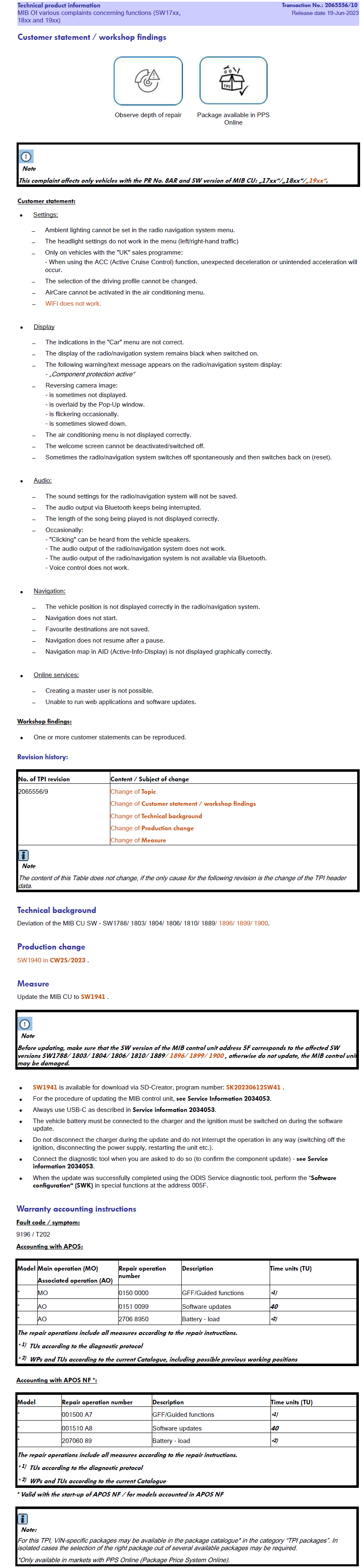
  3. Also I have the TPI for firmware 1941 and it says that you can upgrade directly to 1941 so download 1941 update and than go to the latest 1985.
  4. Android here and is better now for Android
  5. The os Is more fluid it starts faster and the update of the resolution for Android Auto is a must have
  6. So I have installed 1985 and it's a good upgrade of the Infotainment in my feelings. I like now Android Auto a bit more 😜
  7. So it's equal if I pay to you or to Antera on nl forum ?
  8. Ok I didn't know that you provided in the past for free. So the 1941 and 1969 in this forum wasn't posted by you I guess. So someone that had the files shared it here. Some guys shared the files also on YouTube with tutorial on how to install by yourself. I don't know if 20€ is a good price or not. With 1969 I don't have problems I am only curious about Android Auto now on 1985 the scale is different so you can have the icons on the bottom now.
  9. Hy yes I know 20€ for the file but thanks for the answer
  10. Hy all here I am new to this Forum. Someone of you can provide the Firmware 1985 for free on Mega or Google Drive ?? Thanks 🙏

Important Information

Welcome to BRISKODA. Please note the following important links Terms of Use. We have a comprehensive Privacy Policy. We have placed cookies on your device to help make this website better. You can adjust your cookie settings, otherwise we'll assume you're okay to continue.

Account

Navigation

Configure browser push notifications

Chrome (Android)
  1. Tap the lock icon next to the address bar.
  2. Tap Permissions → Notifications.
  3. Adjust your preference.
Chrome (Desktop)
  1. Click the padlock icon in the address bar.
  2. Select Site settings.
  3. Find Notifications and adjust your preference.