spcdust
Members
-
Joined
-
Last visited
-
Think I have settled on Goodyear EfficientGrip Performance 2 205/55 R17 V (95), the variant that has an A rating for both fuel efficiency and wet braking. I've got my local Tyre fitter, who is 2 minutes away, to do all four tyres for £500, which doesn't seem bad. Here's a link for the specific tyre: https://www.blackcircles.com/brands/goodyear/efficientgrip-performance-2/205-55-r17-v-95?tyre=48109058
-
Thanks - trying to work out if the extra £20-£25 per tyre difference for the Performance 2 is worth it, or actually whether the regular Performance tyres that you reference actually have any advantages over the Performance 2. Possibly, the Performance 2 has increased longevity, but it's a minefield, as on the websites you get tyres with the same model name and size but slightly different prices and ratings
-
Thanks @SteveTheElder . Are those the Performance 2 variant?
-
I appreciate that the question has been answered time and time again, but so many conflicting answers. Need to replace the factory-fitted tyres on my January 2021 Octavia Estate 1.5TSI SEL First Edition after a very respectable 51,000 miles. Do a combination of urban driving, but regularly do 500 mile round trips of motorway driving. Live in the South of England, so we don't really get much snow. Driving style is sensible rather than sporty. What do people recommend where the priorities, in order, are grip, fuel efficiency, longevity, and noise levels? Mid-range, known tyre brand preferable but open to suggestions. Contenders seems to be Michelin Primacy 5 (Longevity looks to be good) Goodyear Efficient Grip (Not sure which version) Thanks in advance
-
It’s really simple to factory reset, will take all of 10-15 minutes maximum and majority of your settings will re-download from the Cloud. Think you can get an S-Pin reminder through the portal and once car set up just disable the S-Pin on the Infotainment system.
-
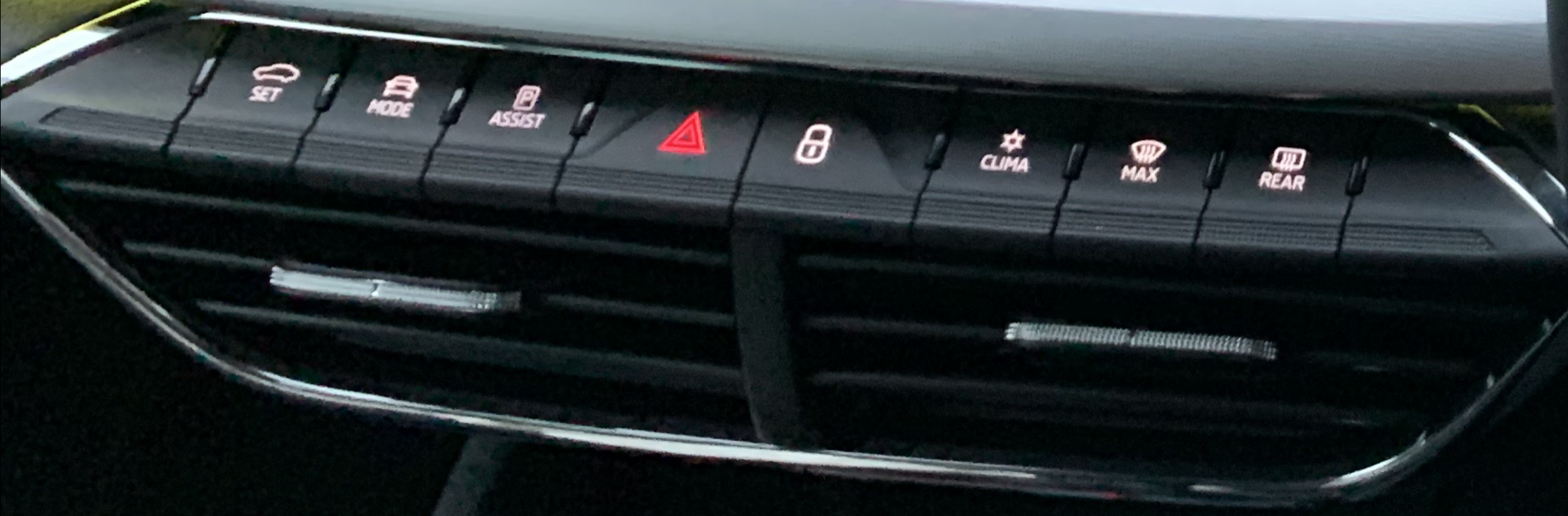
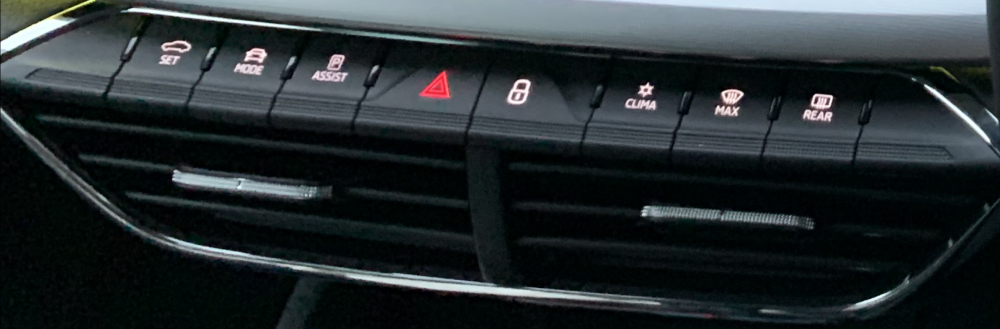
Isn’t there a physical button, centre console below screen on same row as air con physical buttons - second button from the left (UK Var)? Only reason I say this is I forgot that the button existed and searched through the virtual buttons only to realise there was in fact a physical button for driving modes. I grabbed the photo from the internet but, if memory serves me correctly, that’s roughly where the “Mode” button is on my Octavia Mk4 1.5 TSI SEL First Edition.
-
If applying updates via USB, it’s not necessary to have the engine running; however, the car must be in a state of ignition. Probably having the engine running is a belt-and-braces step in case the car battery isn’t holding a full charge and could potentially shut off power midway through the update. OTA updates, after you accept the update, follow the prompts, but basically leave the car to do its thing.
-
If you put all three at root level of your USB stick the system will know what to do when you initiate the update.
-
Really sorry to hear this - the only thing I can think of is starting the car and then holding the Infotainment power button down and see if that forces a reboot but it’s a clutching at straws suggestion. I know where you are coming from and appreciate your frustration. When I first got my First Edition in 2023 (second hand) it had multiple issues around the software but thankfully using information found in this forum, a couple of visits to the dealership to get modules firmware updated, it’s now rock solid. The problem is they’ve put a lot of tech in the Mk4’s and no one at Skoda seems to understand how all the various modules and firmware versions of these individual modules interact with one another and can cause problems. The dealerships aren’t proactive as they are completely reliant on diagnostic information and directives from Skoda HQ - really is a case of “computer says no”. It’s a real shame as they are actually great vehicles which have been blighted by shoddy software and subsequent lack of support and knowledge to resolve ongoing software issues. If Skoda could just get on top of this and roll out a program of all relevant updates, installed at the dealerships, that could be applied to vehicles based on their specific hardware configurations that would be so much better. Unfortunately they seem to only do anything on a piece meal basis based on if you have a specific issue - even then they often seem clueless. The crux of the matter is you have car manufacturers trying to be software developers and they don’t seem to be very good at it and manufacturer vehicles the dealership network workshops don’t really understand.
-
Have you done a Factory reset through the settings menu. This has resolved most issues following the OTA update (there is a separate thread regarding the 1989 update). You will have to re-add yourself as the primary user, using both keys fibs, and any other user accounts but takes no real time and once you are logged back in your settings download from the Cloud. Finally re-pair your phone.
-
Octavia Mk4 Estate 1.5TSI Manual - SEL First Edition Manufacture Date: September 2020 (approx) Infotainment Hardware: H56 Display Unit/Control Panel Hardware: H44 Display Unit/Control Panel Software: 2088 Applied the 1989 update manually via USB, then, as I have always done, Factory reset the Infotainment Unit via settings. Re-added myself as Primary User and also my wife as another user (handy as the user is linked to your key fob and adjusts the electric seat position)-no problems at all to report. Definitely think the factory reset is a worthwhile step, but also maybe updating the system in one step via USB is better than OTA?
-
As repeated multiple times by multiple contributors……. If you are experiencing issues after the update, and tbh even if you are not, do a factory reset via the settings menu. No guarantees this will sort your issues out but it’s a good starting point and seems to have done the trick for multiple people.
-
Factory reset is an option on the settings menu. Once you have done that you will have to reset up yourself as primary user using both key fobs and also any other user accounts. It’s not that bad as once you log back in the bulk of your settings are downloaded from the cloud. Finally re-pair your phone/s. Factory reset after the update
-
Factory reset is in the settings menu. It will initially unlink your car from your primary user account and then reset the system. Then make yourself the primary user again using the two key fobs, and also add any other user accounts. Most of your settings will then be downloaded from the cloud, and finally, re-pair your phone. I suspect this will resolve any outstanding issues and should only take 10-15 minutes. Over the last couple of years, I have applied three updates to my car via USB and have always done a complete factory reset after each one.
-
I installed the new update via USB, not OTA, and not experienced any issues so maybe it’s the way the OTA update applies it to the system? For those having issues have you tried a complete factory reset? I have always done this after each update I have applied, maybe it makes no difference but in my mind it’s like starting with a clean slate.