RobbanH
Finding my way
-
Joined
-
Last visited
Everything posted by RobbanH
-
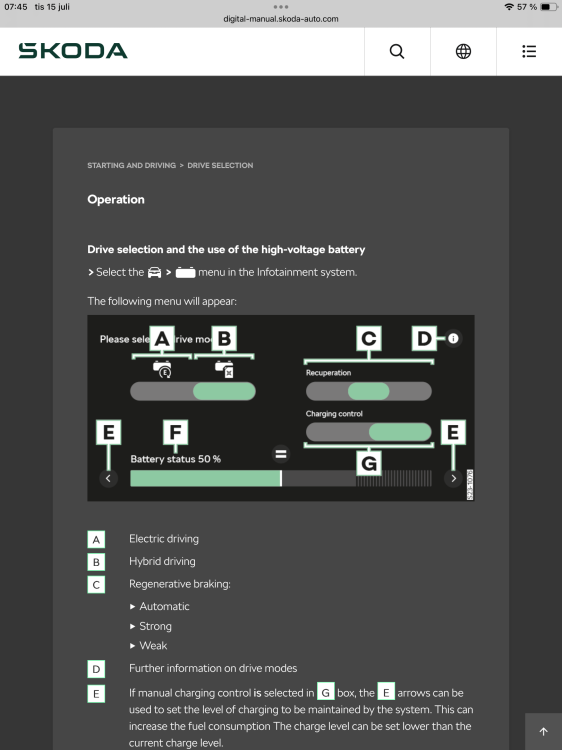
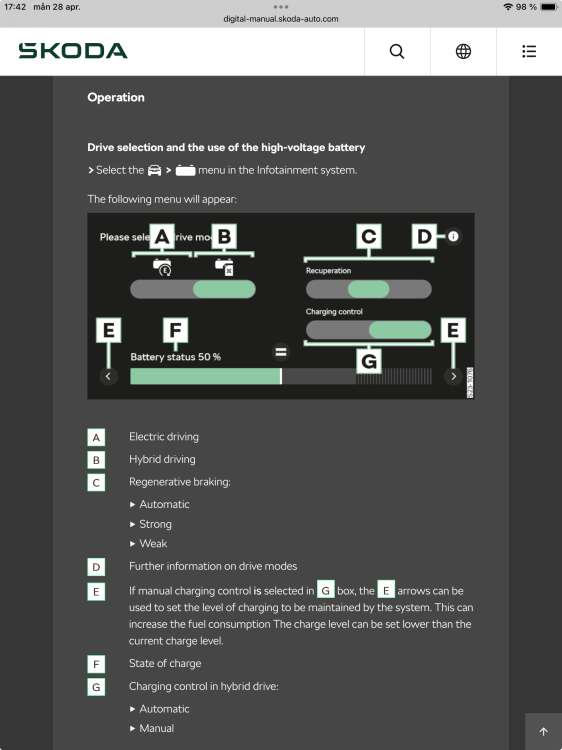
Under the battery icon you can choose to save the charging . Look at the picture . You set the B switch to hybrid, the G to manual and press the = at the level of charging you want to keep.. So if the battery level is 80 % when pressing the = it will keep the level around 80%. When you reach the city you press battery and set the B switch to battery.
-
I friend of mine got a MY25 Kodiaq IV , he got problem from the first days with the assistant systems. The workshop told him that it is a known problem and they fixed it . They replaced the third level that you control/set the cruise control and more. The also replaced the connection module for this level. Maybe a hint for those with problems with the assistant system
-
The E arrows set the level somewhere in the availble charge. The = set the charge level to the present level . So if the level is about 30% and you press = the level will be kept at 30%
-
Please look at the picture taken from owners manual Slider G is the trick I’m not sure if the picture is visible , I have to touch the white field to see it. Otherwise it is owners manual in the starting and driving/drive selection chapter
-
If Kessy is disabled the virtual pedal is disabled too. You can check if the small led in the key is flashing when you are close to the car . If it is not flashing the Kessy is disabled , nothing should open if you try.
-
The setting that you choose are not saved , so next time you start the car you have to do the same procedure .
-
You can save the battery charge level by enter the battery menu. Press the icon that looks like a battery and in the lower right corner in the display you choose manual Charging Control . Then you can slide to desired level. A small tip , when you slide/set the marker you do not really know the charge level you setting . So drive until you get to the charge level you want and press the = icon.
-
I get notification , both voice and on screens, about 2000 m before when I’m driving on a motorway. In lower speeds , in city , it is later but still in good time and pretty clear which turn to make if there are multiple turns to get lost in. I have not looked into the setting to see if you can change this as it works for me in default setting. I have seen a setting if I want the voice notification to repeat 3 times.
-
Hello, I do get 3 alternative routes when I enter a destination. You have to enable this in navigation settings. The issue why you are routed to motorway is hard to tell, I do belive that the navigator choose the fastest route. Also a setting you can check and the issue is maybe solved in you enables alternative routes.
-
-
Have to be more tender…..It is a fiddly touch button so it can keep you busy for a while. Also have all the doors shut when you toogle the switch, it can be confused otherwise.
-
Just push the button so its not yellow/amber light
-
Havde you checked the settings regarding central locking . There are some options that can make a strange situation. If the ”open just driver side” is set the luggage door wont lock up, you have to push the lock up button on the key once more Keyless is the same ,push two times on the door handle.
-
That is the switch to turn interior light on/off when you open a door. In the picture the function is set to off , the lights do not light up when you open a door.