



.jpg.7b7e11acc5e574925fd84927004bd08d.jpg)
Codrut20171
Finding my way
-
Joined
-
Last visited
Everything posted by Codrut20171
-
Got it, thanks! By the way, do you know if both headlight units should be the same generation? (015-016 or 017-018, in part numbers). Found a good deal for a 015 left unit and a 018 right unit and Im curious if they would work ok.
-
Ok, but what did you mean by "different pin arrangements"?
-
Hi JR RS, could you please give more details about this? Is the wiring/pin order in the wiring harness different for B headlights than the A ones? Or are they 100% plug n play?
-
Hi mate, could you please send me the dataset for unit 55? I have been looking for it for quite some time.
-
Any news mate?
-
Hi mate, found anything?
-
I know, all that work is not a problem. Just wanted to know if current 55 supports SLA on Xenons and where can I find a dataset for it, for matrix I would change A5 cam to 2Q0, the BCM is ok , and I would swap the 55 to a 3Q0…E 4B module as I’ve found a dataset for superb for it.
-
What about the B Xenons, with SLA? A5 currently is 3Q0 with updated fw and custom dataset , should work.
-
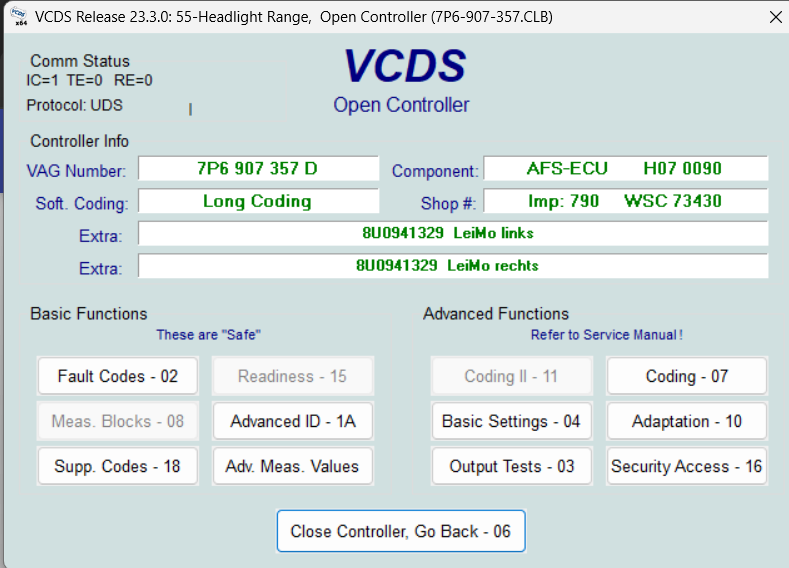
Hi guys, I would want to do this retrofit(or matrix), but im not sure my car supports it. I have swapped to EC BCM, so this is not a problem. I currently have A xenons, and as my car is MY16 I have 55-Headlights range module, not the 4B one. Can SLA with B Xenons work with 55? What about the facelift matrix headlights? Is the 55->4B swap possible? I attached photos with my current 55 module. Thanks!
-
Hi mate, could you please tell me the part number that you have? Module 36, driver's seat module. My 2016 Superb does not have "Easy entry over MMI" in coding and I am thinking of updating the module if the hardware is the same. I have part number 5Q0 959 760 A. Thank you!
-
I did the conversion 5 months ago and the screen was 240 euros. I bought it from rrr.lt and I recommend you do so, bought several parts after that and all were ok and they were very cheap. After that all you need is a FULL SIZE SD CARD. Do NOT use microSD with adapter as I tried for the first time as I f*cked up the gracenote and had to reinstall it after. Good luck! If you need more info I can help you
-
Could it be because the G13 unit was launched when VW already switched to 10/30 colors from the old 3 colors list? Also, does anything change in the dash( normal one, not aid) when you change ambient color in the infotainment?
-
Ye I’m swapping to 3QF radar and wanted to know if I can just take out that cover and not the whole bumper in order to be able to change the radar. And also, do I have to move the plastic mount when taking out and mounting the new radar? Some guys told me it isn’t necessary to calibrate it (just the dynamic calibration) when changing the radar so I’m assuming I don’t have to move the main plastic mount. Thanks in advance!
-
Are those rivets? Are they reusable once you take them out? Taking them out just with some screwdriver under them and carefully pushing them up? As a last question, is the radar fixed in that plastic mount with screws or something? Thank you!
-
As far as I know you can only do this calibration via ODIS(and maybe VCP). You can see the procedure on different forums, I read somewhere it may not really be the need of a full calibration but just resetting some adjustment values to 0 and the radar itself does some dynamic calibration while driving. I’m not 100% sure about this tho, I recommend you do some more research. There are plenty of tutorials on these problems on the web
-
-
-
-
-
I don’t think so.
-
mibsolution.one I think it was also mib.mibsolution.one but not sure. Check in the following days. Mibwiki.one is the wiki. This is already working.
-
By the way, mib2.5 and mib2 (high) harman units are exactly the same. every single sticker, everything. Just the software on it is different. Can just confirm what JR RS said, I've also done the conversion. Definitely worth it.
-
@netman82 mibsolution is up again very short time(1-3 days i think) . mibwiki is already working.
-
-
.thumb.jpg.4829fdb196b87494d6787f40449b7580.jpg)
