TenaciousLee
Finding my way
-
Joined
-
Last visited
-
Hey @Giorgi I’ve still been looking at getting the buttons working on and off the last few months. I’ve almost got mine working. it depends on what type of gateway module you have installed. my car was basic from the factory so contained all “low line” equipment. Had to upgrade my indicator stalks, squib ring, and gateway module all to highline It’s all easy to do, but the gateway module needs coding to the car which I’m up to now. also need to have a new airbag wire that supports MFSW. Can buy them off eBay for about £40. Check if you have highline gateway module first and lets know!
-
Hi all, I’m trying to find someone to remove component protection from a gateway module in/around Liverpool / North west. May need to coding doing to the module to match the old module etc. Does anybody have any recommendations for anyone in the area who may be able to help? Appreciate the info, Lee :)
-
Ok so looking like I may need a new Gateway. I guess it’s a trip for CP to be removed. Anyone able to give any assurances that this is the last piece of the puzzle? Also any recommendations on CP Removal in/around Liverpool or NW?
-
Hi all, Hoping someone can help out as AI is driving me mad. Mk3 Octavia 2013… No MFSW from factory. Bought MFSW Upgraded Clock Spring(Squib) and Indicator Stalk to a high line models Clock Spring (Squib) 5Q0953549F Indicator Stalk 5Q0953507HL I’ve also swapped out the airbag loom to 5E0971584A So I can connect to the MFSW buttons. I coded in anticipation however, I’m getting no lights on the MFSW Buttons and in turn, no functionality. Just wondering if there is anything I’ve missed at all, as from what I’ve seen (and told by local VAG guys) it should work. Any input is appreciated Thanks Lee
-
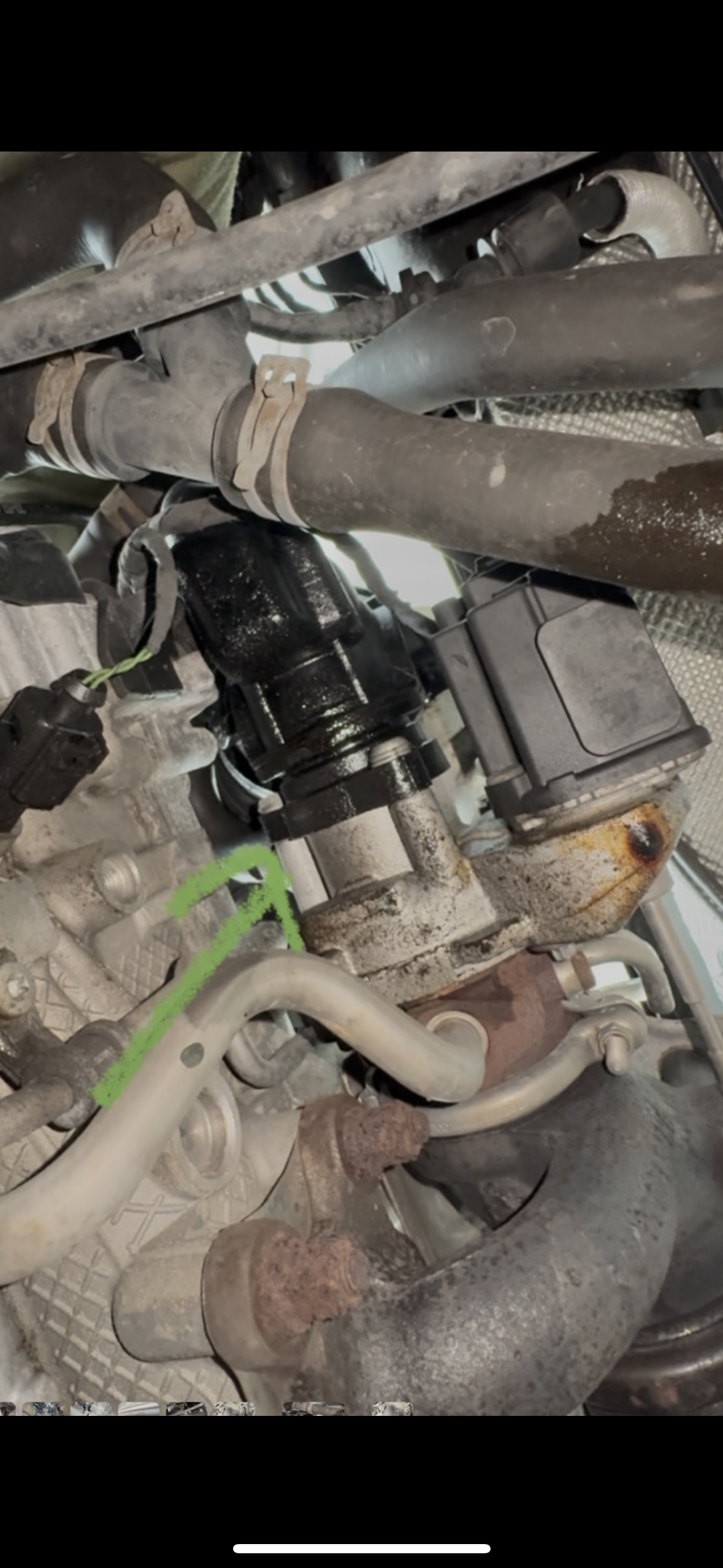
Hi all, Octavia 1.2tsi 2013. I noticed the oil was sitting half full. No unusual smoke from the back so could be within tolerance for ‘normal’ consumption. I decided to take a look and everywhere looks dry apart from the pictures below. Not sure if anyone can identify the part that seems to be leaking, seems to connect to part of the air intake, which seems weird. If that’s the case, why so much oil?
-
Thanks for the replies all, some good info… 👍🏼
-
Thanks for the replies… Will go for a 5w30 then. Always though a 0w30 would be best, esp in winter. I seem to find the 5w30 is cheaper and more widely available compared the 0 when looking for for 504/507 spec. Just wondering what your consideration are when deciding between the two? Do you have any thoughts on Mannol, seems reasonably priced…
-
Hi all, Recently purchased a 2013 1.2TSI Octavia has the E211 engine i believe. Looking to swap the oil and filter soon and wondering what oil you guys recomend? I’m up in NW England figure 0w30 would be best but don’t see a whole lot of manufactures who make 0w30 VAG504 Oil. Wondering what your guys use or recommend? Cheers!
-
@Giorgi New wheel came today, will be fitting this later. This isn’t a big deal, but is there a way to wire up the multifunction buttons so they can be used? If not I’m still happy to transfer the blanking plates over. Thanks Lee.
-
Thanks! Appreciate the info and help. The 3 spoke looks so much nicer, seems an easy decision to upgrade. Hopefully it’s as easy as it seems :) Thanks Lee!👍🏼
-
Thanks for the quick reply! I’ve just ordered the same 3 spoke wheel as you using the part number you listed. Seen a video on how to remove airbag and steering wheel and seems ok I guess. How difficult was it to remove the buttons and replace with the black plastic?
-
@Georgi I have the same situation. A 2013 Octavia with the 4 spoke steering wheel with no buttons. I will want to transfer the blank buttons from my old to the new wheel as I don’t need the buttons. But did you original airbag fit the new wheel? Thanks Lee
-
Cool. I don’t have any of them yet as only a new owner. So VCDS alone will be sufficient for this…?
-
Yes I guess that would be all that’s needed. If that’s something you can assist with the would be happy to see how much it would cost and how to do it :)
-
I’ve been looking at this more and seems a nightmare. @pab567 , did you say your able to prepare a plug and play OEM set up? May be the best option, do you have a price for this? Cheers Lee