



Skip to content

Slw007

Finding my way
  • Joined

  • Last visited

  1. Hi Pabs, Sorry not an expert at all. I went for the Columbus MIB 2 unit and this way worked for me. May be a different patch file for the Amundsen/Bolero unit
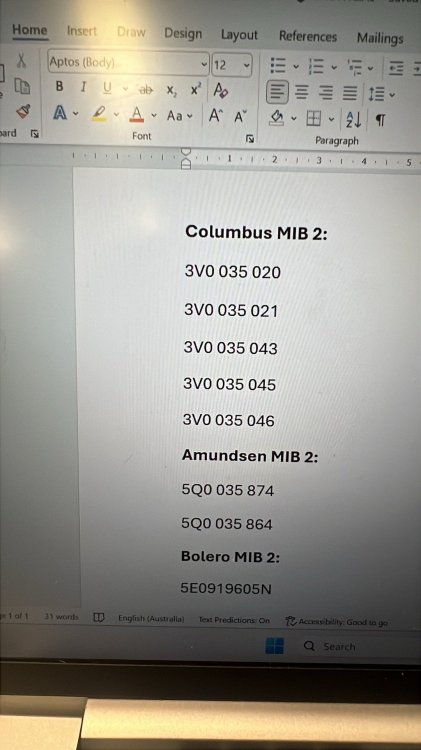
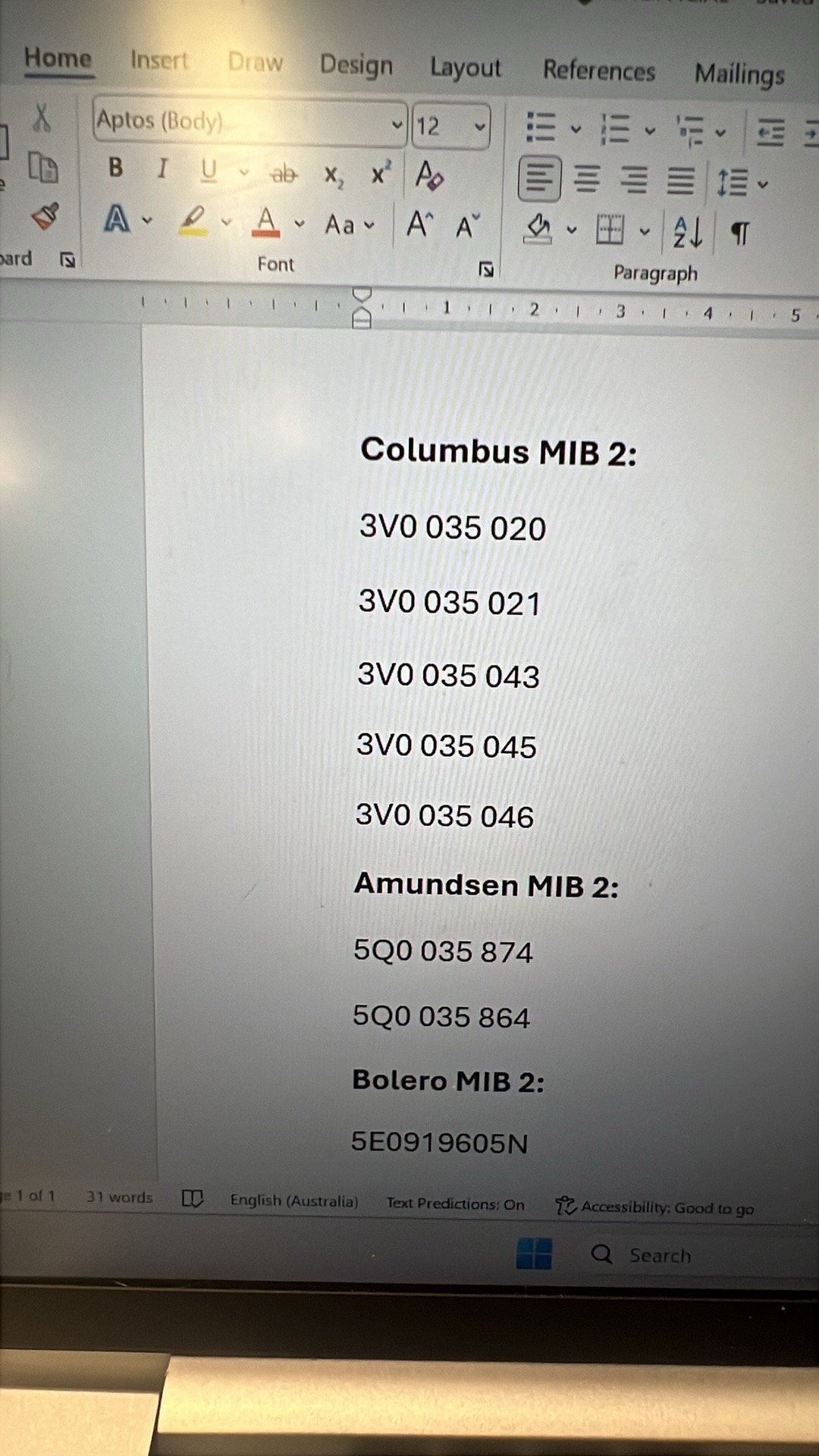
  2. After a lot of struggle I have figured out the easiest way to do this. Follow the 3 steps below: Get a used MIB 2 unit and install (this is the unit in glove box) below part numbers are compatible: Get a FAT32 SD card - normal size Go to mibsolution.one and download the following file onto your SD card: MHI2_ER_SKG13_P4256_1_AIO_MU1440_20230504 location would be in : mib>MQB_Solution>MHI2-Harman >Skoda Slot SD card with that file and do a software update This All in one patch file removes component protection and installs all relevant features. Spent a fair bit of money and effort to find out this is the easiest and most effective solution. Feel free to reach out if you have any questions.
  3. Hi mate, similar situation any updates?
  4. Hi Pab567, thanks a lot. I am new to the forum and dont have pm privlages yet. Are you able to send me a pm with cost and process for: Bolero/amundsen/columbus mib 2, with usb port Shipping to campbelltown, south australia (post code: 5074)
  5. Thanks a lot Pab567, need the cheapest Possible way to just get smart link enabled. Would you know the part numbers for the MIB2 units and the usb port? Would this need cp to be turned off by dealer? If I go through you how much $$ am I looking at?
  6. @pab567 , you are certainly the legend within this space and would love your guidance on getting apple car play for my Octavia VRS MK3. VIN: TMBBE9NE2F0011531 Thankfully it doesn’t have a canton system. My assumption is MIB 2 with USB would be easiest and fairly cheap? I am in Adelaide, south Australia
Important Information

Welcome to BRISKODA. Please note the following important links Terms of Use. We have a comprehensive Privacy Policy. We have placed cookies on your device to help make this website better. You can adjust your cookie settings, otherwise we'll assume you're okay to continue.

Account

Navigation

Configure browser push notifications

Chrome (Android)
  1. Tap the lock icon next to the address bar.
  2. Tap Permissions → Notifications.
  3. Adjust your preference.
Chrome (Desktop)
  1. Click the padlock icon in the address bar.
  2. Select Site settings.
  3. Find Notifications and adjust your preference.